We’ve compiled a list of the best time blocking apps available right now to help you get started with time blocking (and stick with it!). Here are our top picks for 2026 👇
Best Time Blocking Apps
AI-Powered & Automatic Time Blocking
- FlowSavvy for intuitive auto-scheduling for individuals
- Motion for team project management
- Reclaim for protecting time for tasks
Premium Manual Time Blocking
- Morgen for AI-assisted manual planning
- Akiflow for premium-feel manual planning
- Sunsama for guided daily planning
- ClickUp for team project management
Simple Time Blocking Apps
- Structured for simple, aesthetic time blocking
- Google Calendar for familiar, basic time blocking
What is time blocking?
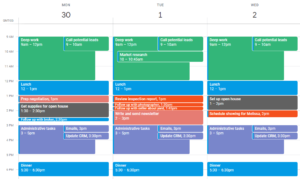
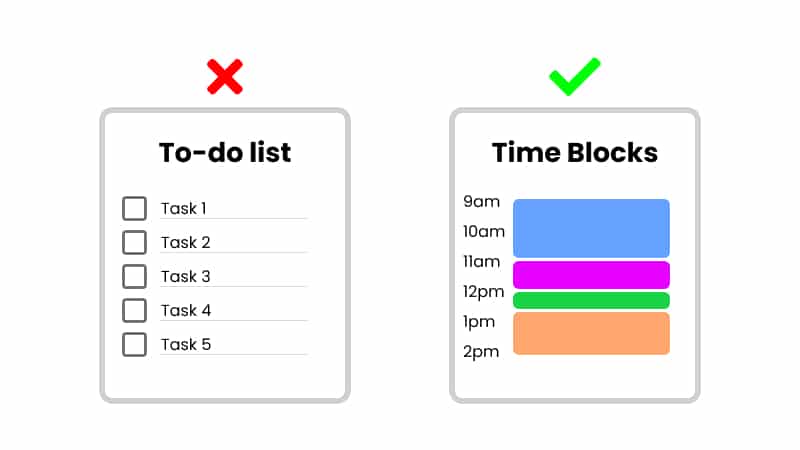
Time blocking is a time management technique where you create blocks of time in your calendar for your tasks. Instead of throwing tasks onto an endless to-do list, you commit to doing them at a specific time.
How to choose a time blocking app
To find the right time blocking app for you, you’ll first want to look for apps that have the following essential features:
- A to-do list view
- A calendar view
- Task durations
- An easy way to transfer tasks from the to-do list to the calendar (drag & drop or auto-scheduling)
- Ability to mark tasks complete
After that, you’ll want to consider whether you’re looking for a simple tool, a tool to help your team time block, or whether you want help from AI/automation.
To help you find the right app for you, we searched for time blocking apps across Google, YouTube, Reddit, the App Store, and the Play Store and compiled a list of apps that met our requirements listed above, and then we tested each of those tools using the following steps to find the top apps:
- Create an account and complete onboarding.
- Start a trial where applicable to test paid features.
- Input a full schedule into the app, simulating a real work week.
- Test extra features like focus timers, priorities, mobile apps, etc.
During our testing, we noticed the apps naturally fell into one of three categories: AI time blockers, premium manual time blockers, and simple time blockers. We’ve categorized them as such down below the table so you can quickly skip to what you’re looking for.
A quick note: One of the products below, FlowSavvy, is our product. We used the same criteria to evaluate it and recommend it where it fits and not where it doesn’t.
Here’s a quick comparison table for our picks for the best time blocking apps:
Quick Comparison
| Product | Best for | Platforms | Pricing |
|---|---|---|---|
| FlowSavvy | Intuitive automatic time blocking for individuals | web, iOS, Android | Free, $14/mo or $120/yr |
| Motion | Project management with automatic time blocking | web, Windows, macOS, iOS, Android | $49/mo or $348/yr |
| Reclaim | Protecting time via automatic time blocking | web | Free, $12/mo or $120/yr |
| Morgen | Manual time blocking with AI suggestions | web, Windows, macOS, Linux, iOS, Android | $30/mo or $180/yr |
| Akiflow | Premium aesthetic manual time blocking | web, Windows, macOS, iOS, Android | $34/mo or $228/yr |
| Sunsama | Guided daily planning | web, Windows, macOS, Linux, iOS, Android | $22/mo or $204/yr |
| ClickUp | Full project management suite with time blocking | web, Windows, macOS, Linux, iOS, Android | Free; $10/mo or $84/yr |
| Structured | Simple, aesthetic time blocking | web, macOS, iOS, Android | Free, $6.99/mo or $29.99/yr |
| Google Calendar | Basic, free time blocking | web, iOS, Android | Free |
AI-Powered & Automatic Time Blocking Apps
FlowSavvy: Best automatic time blocking app for individuals
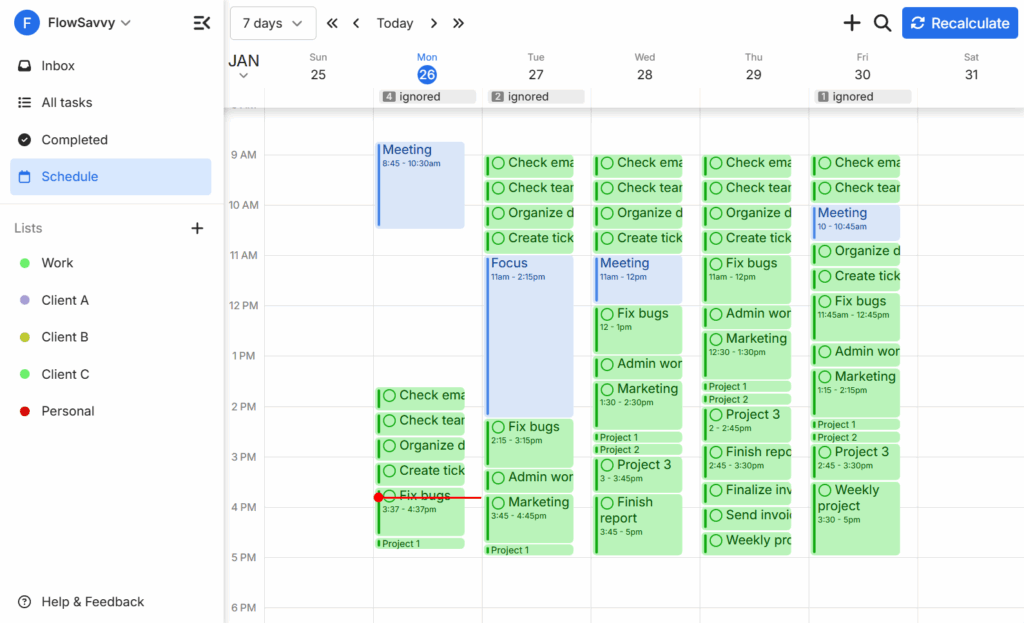
FlowSavvy is an automatic time blocker that schedules tasks from your to-do list into your schedule automatically. When you miss a task or plans change, FlowSavvy automatically reschedules your time blocks.
FlowSavvy’s focus is ease-of-use, so it’s streamlined and simple to use while simultaneously being a strong auto-scheduling app.
It’s worth noting that FlowSavvy is built for individuals, so it doesn’t have the team features you might see in other automatic time blocking apps, like task assignees, shared projects, etc.
Pros
- Creates your time block schedule automatically
- Automatically reschedules time blocks
- Auto-scheduling is easy to use
- Fully featured mobile apps
- 2-way sync with Google Calendar, Outlook, and iCloud Calendars
Cons
- No native collaboration features (task assignees, shared projects, etc.)
- Does not automatically spread out large projects. Must use repeating tasks.
Pricing
- Free tier: yes
- Paid: $14/mo or $120/yr
Motion: Best auto time blocking app for project management
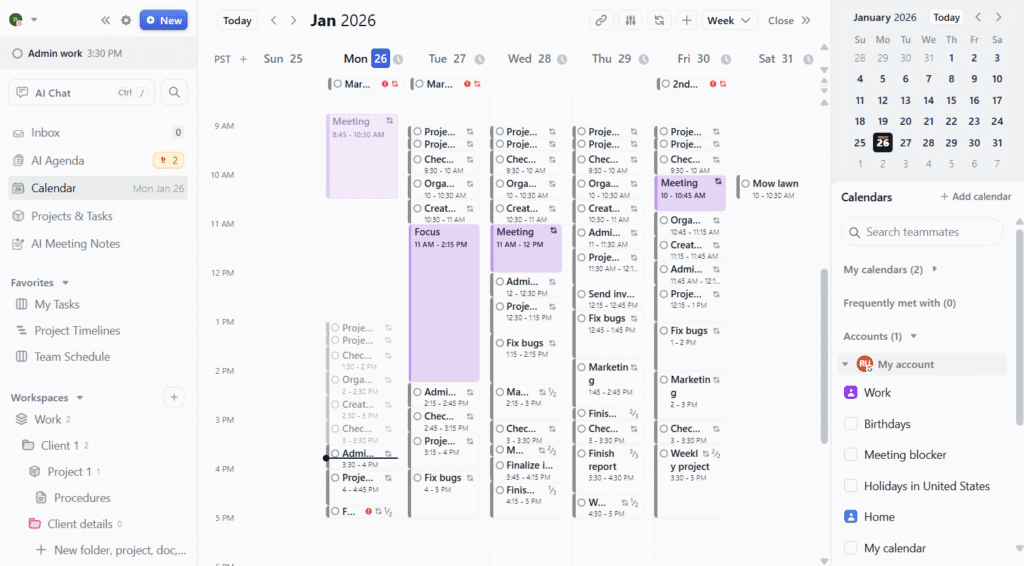
Motion is an AI productivity suite that includes a calendar in its offerings. It auto-schedules tasks from your to-do list into your calendar and re-adjusts them as needed like FlowSavvy. Motion can help create projects with AI, and then each team member can time block their assigned tasks automatically into their calendar. Motion can then display team members’ progress and forecast project completion dates.
Because of its automatic time blocking features, Motion is a strong time blocking app, though individual users looking for an easy way to time block their calendars may find it to be complex. For teams looking to coordinate complex projects and time blocking assigned tasks onto team members’ calendars, Motion is an excellent choice.
Pros
- Creates your time block schedule automatically
- Automatically reschedules time blocks
- Advanced project management views like Gantt charts and Kanban boards
- AI Project creation
- Reusable project templates
Cons
- High learning curve
- Expensive if you only want the time blocking features
- Limited mobile companion app
Pricing
- Free tier: No
- Paid: Multiple tiers starting at $49/mo or $348/yr, discounted rates for teams
Reclaim 1.0: Best for protecting time via time blocking
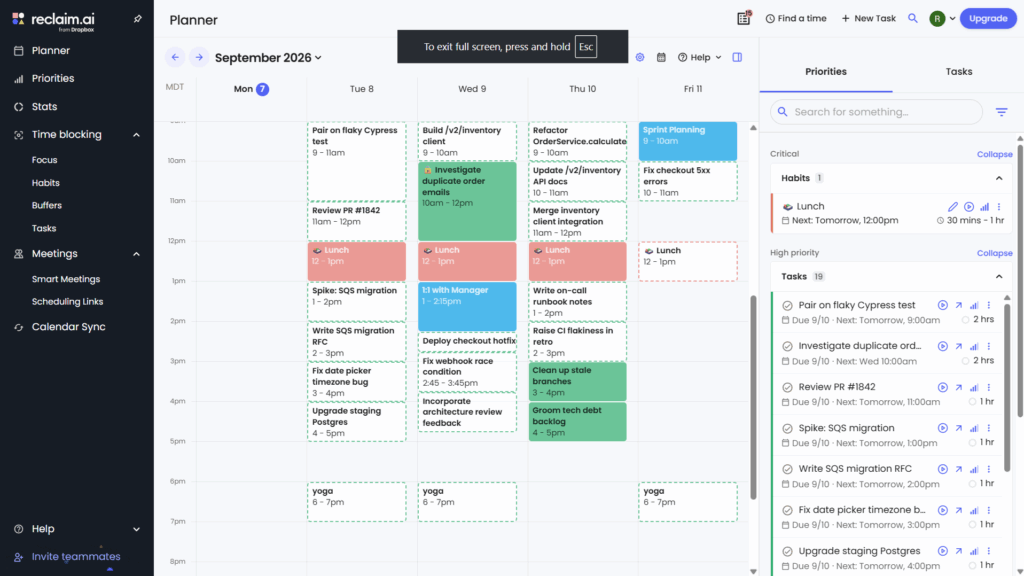
Reclaim is an AI calendar designed to automatically protect your time, fix conflicts, and help you choose what to work on next.
💡Important disclaimer: Reclaim 1.0 automatically time blocks every task into your calendar like FlowSavvy and Motion, whereas Reclaim 2.0 (in beta) no longer supports time blocking individual tasks and instead focuses on providing suggestions for which tasks you should work on next. The screenshot above and any points that reference scheduling individual tasks pertain to Reclaim 1.0, not the newer 2.0. If you want the individual task time blocking capabilities, you can switch your account to Reclaim 1.0 in “Settings -> Account -> Manage my account”.
Reclaim 1.0 automatically blocks time on your calendar for your tasks and reschedules as things come up. It automatically detects when tasks don’t have much more room to be pushed back and will mark them as busy on your Google or Outlook calendar so people don’t book over them.
You can assign different priorities for your tasks and habits like FlowSavvy and Motion, but Reclaim takes this one step further by hooking your booking page into your priorities. If you send your CEO your “High priority” booking link, they’ll get your maximum availability, but if you send a teammate your “Low priority” booking link, they won’t be able to book over your high priority tasks, so you can protect your focus time.
Reclaim also works well for protecting repeating tasks that have an ideal time, like lunch (ex: “ideally 12pm but can go earlier or later if needed”), and it can help you find times to meet with coworkers with its smart meeting feature.
Pros
- Auto-schedules time blocks for tasks
- Automatically reschedules as needed
- Intelligently marks tasks as free/busy to protect time
- Can mirror personal events onto work calendar and vice versa
- Priority-aware booking links
Cons
- Less native task management; relies on integrations
- No native mobile app (But planned on their roadmap)
- High learning curve
Pricing
- Free tier: yes
- Paid: Multiple tiers starting at $12/mo or $120/yr
Premium Manual Time Blocking Apps
Morgen: Best for AI-assisted manual planning
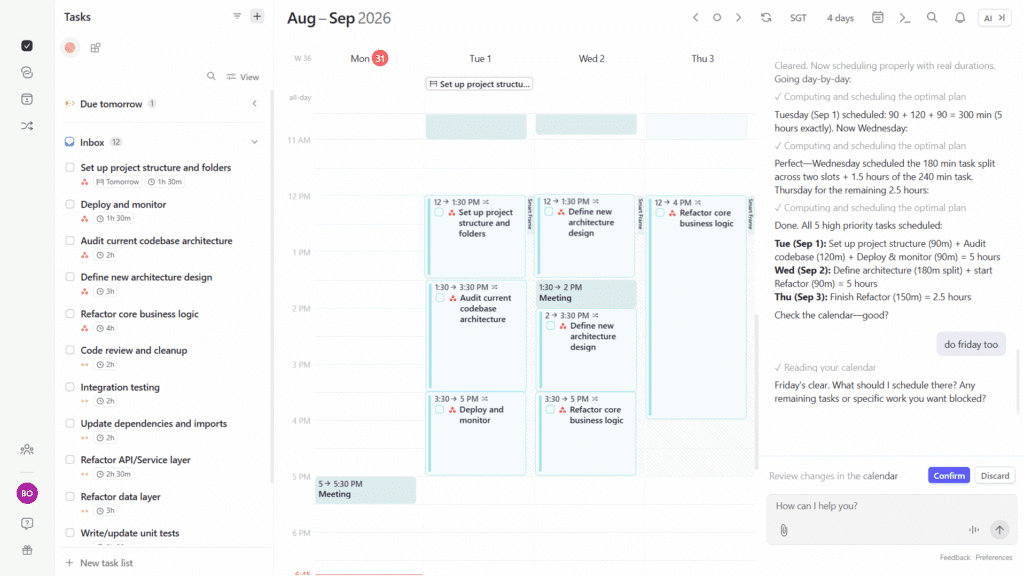
Morgen is a sleek time blocking app that allows you to consolidate your tasks from multiple sources into the sidebar and then seamlessly plan them into your calendar via drag & drop. It includes helpful automations like automatically adding travel time to events with locations, and mirroring events from one calendar onto others.
Morgen takes time blocking one step further by offering an AI planner assistant, which can help time block your tasks into your calendar as well as suggest changes when conflicts arise. While not as fully automatic as the tools listed in the AI calendar section above, it does provide helpful suggestions and then allows you to manually tweak the plan before it’s scheduled.
Among the premium manual time blocking apps like Akiflow and Sunsama, we found Morgen to have the best balance of modern, intuitive design plus tools to help you time block faster.
Pros
- Premium feel
- Easy drag & drop time blocking
- Helpful admin automations like auto buffer time
- AI chat assistant to help with time blocking
- Can create multiple time blocks per task
Cons
- Limited mobile companion app
- Expensive compared to most productivity apps
- Requires connecting an external calendar
Pricing
- Free tier: No
- Paid: $30/mo or $180/yr, discounts for teams
Akiflow: Best premium aesthetic
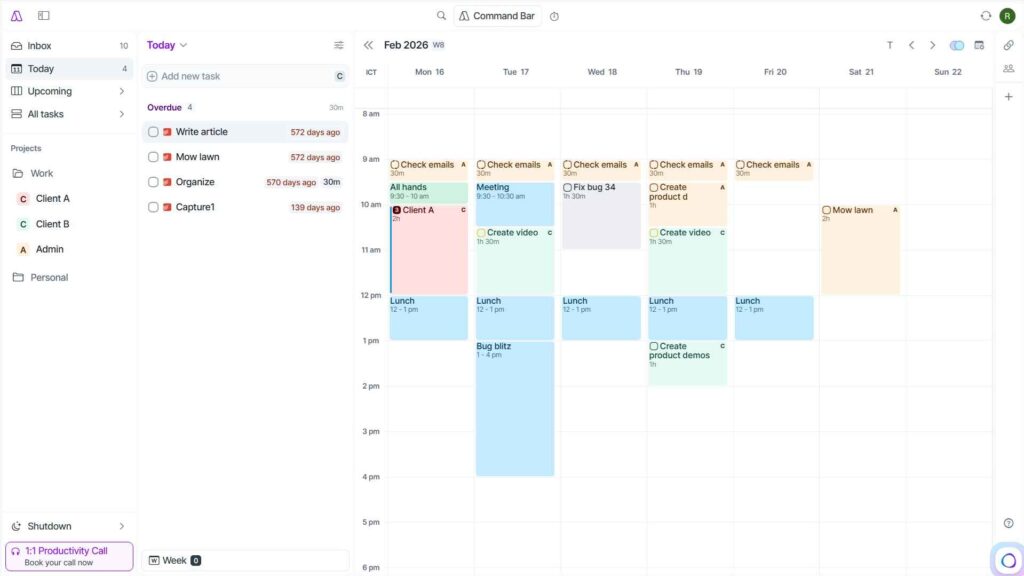
Similar to Morgen, Akiflow is a premium drag & drop time block planner. You can sync your tasks in from multiple locations and then drag them from the task list into the calendar.
In Akiflow, you can time block individual tasks, or you can create “slots” in your calendar, which are more like groups that you can then drag tasks into. This is nice when you want to devote some time to a project without planning out the time for each task individually.
Akiflow’s AI assistant, “Aki” offers a convenient way to talk with your calendar like an executive assistant. Overall, Akiflow is a great time blocking app with a high quality feel.
Pros
- Premium feel & intuitive UI
- Easy drag & drop time blocking
- Time slots for task batching
- Large integration list
- Talk with “Aki” like an assistant to manage your calendar
Cons
- Limited mobile companion app
- Expensive compared to most productivity apps
- Requires connecting an external calendar
Pricing
- Free tier: No
- Paid: $34/mo or $228/yr
Sunsama: Best for guided daily planning
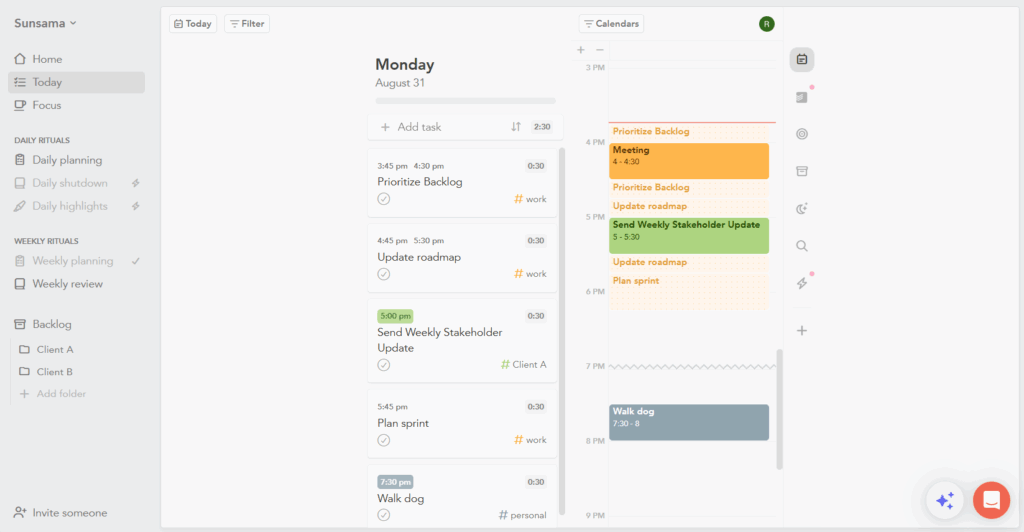
Sunsama is a time blocking planner focused on mindful, guided planning. It has several views dedicated to daily/weekly planning and reflection. Some people may find this guided approach helpful, while others may find the extra views and options overwhelming.
You can either use the calendar view and drag tasks directly into the calendar, or you can just drag tasks into a day column in the board view, and Sunsama will then auto-schedule them into open slots on your calendar on those days. It will only auto-schedule a task on the exact day you pick, so it’s not as holistic as the true auto-schedulers in the previous section, but it definitely gave a good speed boost to daily planning.
Sunsama also offers an AI chat assistant that can guide you through your planning or make changes directly in your calendar.
Pros
- Dedicated views for guided planning sessions
- Drag & drop from to-do list into the calendar
- Focus page and pomodoro timer included
- Large number of integrations
- The backlog is helpful for tasks you don’t want to schedule yet
Cons
- High learning curve due to lots of views and options
- Clicking and dragging on the calendar only creates events (not tasks)
- Limited mobile companion app
Pricing
- Free tier: no
- Paid: $22/mo or $204/yr
ClickUp: Best for project management
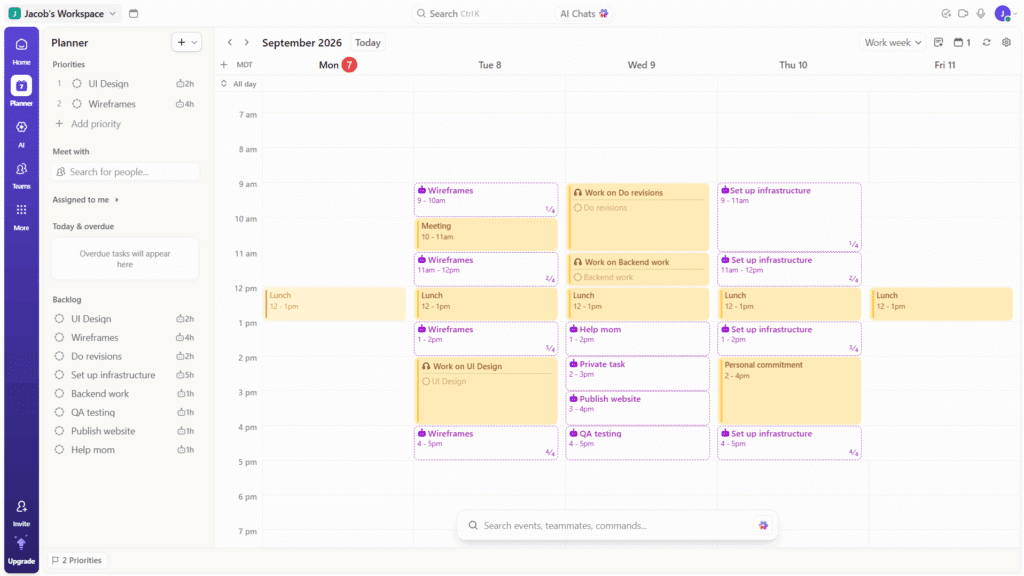
ClickUp is an incredibly powerful all-in-one work platform with some time blocking capabilities built in. In the Planner view, you can drag and drop tasks from the sidebar into the calendar, and you can even drag a task into the calendar multiple times to create multiple time blocks for the same task. ClickUp also offers light AI scheduling capabilities to help automate time blocking.
While not as automatic as FlowSavvy, Motion, and Reclaim, or as streamlined for manual time blocking as Morgen, Akiflow, and Sunsama, ClickUp’s main benefit compared to the others on this list is that it’s an all-in-one tool. That means your time blocks will be deeply connected to the rest of your work, including tasks, docs, and priorities.
So, the way to decide if you should pick ClickUp is basically this: Do you primarily need a powerful all-in-one productivity work platform to use with your team, plus some integrated time blocking features? If yes, ClickUp is the app for you. If you’re looking for the best possible pure time blocking experience and don’t need the other features the ClickUp platform offers, the other apps in the Automatic or Premium Manual sections may be a better fit for you.
Pros
- Time blocking inside a top-tier project management software means all your work is connected
- Drag and drop tasks from the sidebar into the calendar
- Can schedule multiple time blocks for the same task
- Basic auto-scheduling is helpful for light suggestions
- Enterprise-grade collaboration features
Cons
- No native recurrence or custom color coding
- Tasks are displayed in one flat list in the sidebar rather than organized by projects
- Not as intuitive for time blocking as some of the other apps on the list
- The full platform may be overwhelming for people looking for only time blocking
Pricing
- Free tier: Yes
- Paid: Multiple tiers starting at $10/mo or $84/yr
Best Simple Time Blocking Apps
Structured: Best simple aesthetic
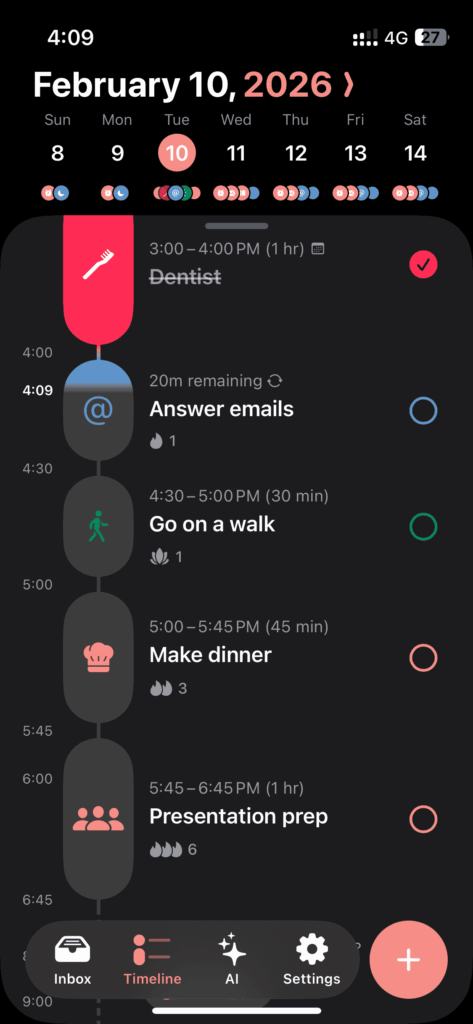
Structured is a minimalist planner focused on aesthetic, day-by-day planning rather than robust weekly time blocking. It uses a compact timeline view that is more of an agenda rather than a calendar. You can create tasks and Structured will automatically suggest the icon for the task (and it’s really good at it). Assign the task a day and time, and it will show up in the timeline.
On mobile, Structured offers a lot of auxiliary features like lock screen widgets, energy planning, blocking apps during your planned tasks (via a OneSec integration), and new natural language for adding tasks (currently in beta).
From our testing, Structured works great as an aesthetic time blocking mobile app for personal use, but it feels too simplistic for time blocking in a professional context. The timeline view, limited web app, and lack of task categorization make it hard to use for planning heavy workloads weeks at a time.
Pros
- Simple daily planner
- Strong support for the Apple ecosystem
- Color/icon customizations make the app aesthetic
- Use AI to input tasks via voice or images
- Some users may prefer the timeline view over traditional calendar apps
Cons
- The timeline view may be less intuitive/appealing for some users
- No categories/folders for task organization
- Web version is very limited at the moment
Pricing
- Free tier: yes
- Paid: $6.99/mo or $29.99/yr
Google Calendar: Best basic & free time blocking app
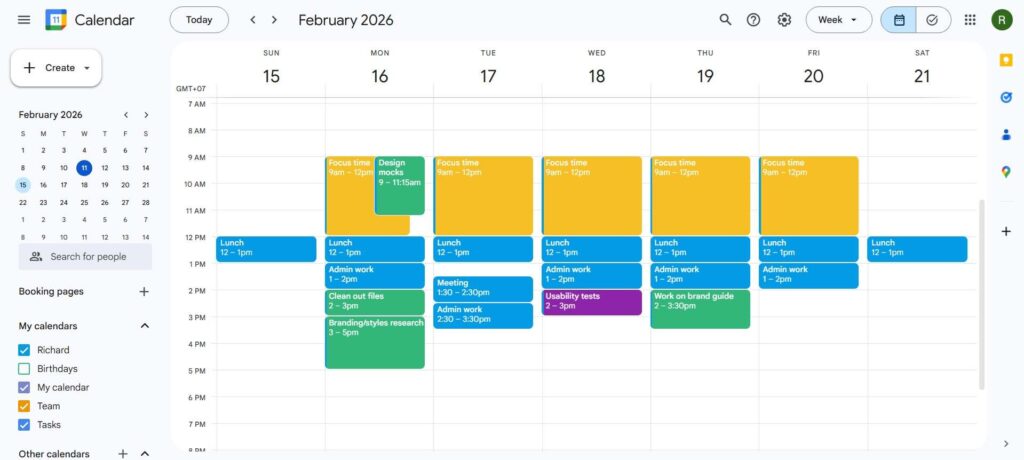
Google Calendar is a common recommendation for time blocking, and for good reason. It’s familiar to most people, and it’s super easy to use. Google has been rolling out additional features to make time blocking easier, like adding durations for tasks, so they can be used for time blocking instead of events. However, as of our testing on September 7, 2026, repeating tasks still don’t support duration, so the task feature isn’t fully ready for time blocking.
Google also recently rolled out custom color labels for events and tasks, meaning you can create named labels for your different categories and then color-code your events and tasks with those named color labels.
Even with the current duration limitations, time blocking with events in Google Calendar is super easy, and the new color labels make organization simple and easy. For help organizing your Google Calendar, check out our guide on Time Blocking Google Calendar.
Pros
- Easy to use
- High quality web and mobile apps
- You may already be using it at work
- Free time blocking
Cons
- Still have to use events rather than tasks for some situations
- No help replanning missed tasks/events
Pricing
- Free
Summary: Which time blocking app is right for you
The apps we’ve highlighted each offer unique features and advantages tailored to different needs and preferences. To recap:
If you prefer time blocking by hand and have the budget for a premium tool, check out Morgen, Akiflow, or Sunsama. Choose FlowSavvy for intuitive automatic time blocking for individuals, and Motion or Reclaim for automatic time blocking with team features. For heavy project management with time blocking mixed in, use Motion (more automatic) or ClickUp (more manual but “all-in-one” work platform). For aesthetic daily planning, use Structured, and for simple time blocking, use Google Calendar.
Thanks for reading, and we hope this list helped you learn more about the best time blocking apps for your workflow!
FAQs about Time Blocking Apps
What is the best calendar for time blocking?
The best calendar for time blocking will depend on the features you need, but in general, Morgen and Akiflow are the strongest manual time blocking calendars, FlowSavvy is the best calendar for automatic time blocking, and Google Calendar is the best calendar for basic time blocking.
Can I use a regular calendar app for time blocking?
Yes, time blocking can be done anywhere, including in regular calendar apps and physical planners. However, dedicated time blocking apps make time blocking more efficient because they allow you to easily organize your tasks as well as move them from the to-do list into the calendar and adjust them as plans change.
What are the best time blocking apps for iOS/Android?
The best time blocking apps for iOS and Android are able to be fully functional on their own instead of being a companion app to a desktop-based time blocker. Here are the best time blocking apps for iOS and Android depending on your needs:
- Google Calendar for basic, free time blocking and good Google ecosystem support
- Structured for aesthetic day-by-day planning and good Apple ecosystem support
- FlowSavvy for mobile-friendly automatic time blocking
What is the best time blocking method?
There isn’t a single best method, but there are a few main methods that you can try to find the best one that works for you: Time blocking every individual task into your calendar, scheduling blocks of time into your calendar for types of tasks, assigning themes to each day, and splitting your day into sections based on your energy levels. Try scheduling individual tasks into your calendar first, and then try using the broader methods if scheduling each individual task becomes overwhelming.
What are the downsides of time blocking?
Time blocking is infamous for creating inflexible schedules that don’t leave room for spontaneity or unexpected changes. Rearranging an already-packed schedule takes more time than it’s worth, so people naturally stop time blocking. Using an automatic time blocking app like FlowSavvy automates the rescheduling so users can get the benefits of time blocking without having to constantly reschedule time blocks.