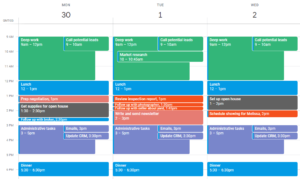
If it’s not on your calendar, it probably won’t get done, which is why scheduling tasks into your calendar, A.K.A “time blocking”, is so important.
In this article, we’ll explain what time blocking is, how to do it effectively, and common mistakes to avoid when time blocking your calendar. Here’s everything you need to know about time blocking in 2026.
⚡TL;DR
- Time blocking is the act of blocking off time in your calendar for your tasks.
- Time blocking is the #1 most effective time management method.
- You can automate your time blocking by using an auto-scheduler like FlowSavvy.
What is Time Blocking?
Time blocking is a time management technique where you create a block of time in your calendar for each of your tasks.
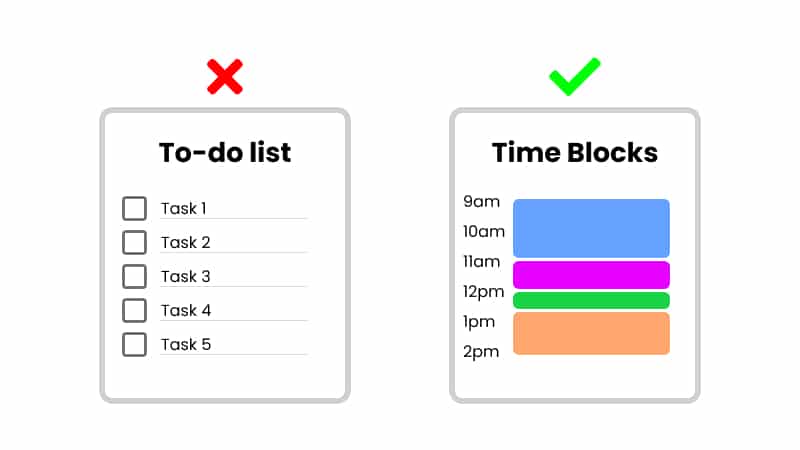
Instead of creating a to-do list and hoping for the best, you plan out exactly when you’ll do each task, and then focus on only that task during its time block.
Time Blocking vs Time Boxing
The terms “time blocking” and “time boxing” can cause some confusion, because a lot of people have different definitions for them, and some even use the terms interchangeably.
However, the most common definition is that time boxing is a type of time blocking where you stop working on that task or category at the end of the block, even if it’s not finished. A time box is just a time block that has a strict end time.
Here’s a quick comparison between time blocking and time boxing:
| Method | Definition | Example |
|---|---|---|
| Time Blocking | Creating blocks of time in your calendar dedicated to specific tasks | “I will fix this bug at 2pm. I think I’ll finish at 5pm, but it’s flexible.” |
| Time Boxing | Creating blocks of time for specific tasks but with a strict limit | “I will work on this bug from 2-5pm. If I’m not finished by 5, I’ll move on and come back later” |
The difference has nothing to do with whether the block of time is for one task vs. a type/group of tasks (ex: “Admin work”). Batching tasks can be done with both time blocking and time boxing.
For this guide, when we say “time blocking”, we’re referring to the umbrella term of putting tasks into your calendar. We’ll go through several examples of ways you can choose to do that.
Why Time Blocking Works
Time blocking is one of the most effective time management techniques because it forces you to be intentional about how you’re spending your time. When you put a task on your calendar, you’re committing to doing it at that time, so you’re much more likely to follow through.
Here are some of the reasons time blocking is so effective:
- Helps You Stay Focused: Time blocking lets you dedicate specific periods to a single task, which helps you cut out distractions. When you know you’ve set aside time for a task, you’re more likely to focus and stay in the zone, instead of jumping from one thing to another.
- Prevents Overwhelm and Stress: A never-ending to-do list can make you feel like you’re always behind. Time blocking gives structure to your day, making everything feel more manageable. Instead of stressing over how many things you have left to do, you can just focus on the task at hand, knowing everything else has its place and will get done.
- Avoid Procrastination: When you dedicate specific blocks of time to important tasks, you’re less likely to waste time or procrastinate. There’s something about having a time on the calendar that makes you more likely to follow through. The time is already blocked out for it; might as well do it!
- Encourages Better Work-Life Balance: It’s easy to let work spill into your personal time, especially if you don’t have clear boundaries. Time blocking helps you create those boundaries. By scheduling personal time—whether it’s for hobbies, exercise, or relaxing—you can ensure that you’re making time for yourself and the things you enjoy, rather than letting work take over your entire day.
- Reduces Decision Fatigue: Deciding what to work on next can drain your mental energy, especially if you’re constantly switching between tasks. With time blocking, that decision is made ahead of time. When you look at your schedule, you already know what you need to do and when. This reduces the mental load of constantly deciding what to tackle next, making your day run smoother.
Who It’s Good For
Time blocking works best for people who have many competing priorities, have flexibility in how they get work done, and like working with structure.
After working in the time blocking space for over 6 years, here are some of the most common use cases we’ve seen:
- Knowledge workers: Knowledge workers have lots of tasks and are in an environment where productivity tools are easily accessible.
- Business owners: Strong need for self management and discipline, and time blocking helps create that structure.
- Busy parents: Need to ensure nothing falls through the cracks by assigning every task a time in the calendar.
- Students: Need to avoid last minute cramming by planning out study time and social activities.
- People with ADHD: Benefit from external structure and visual cues rather than endless to-do lists.
How to Time Block (With Examples)
Ready to get started? Here’s a step-by-step guide to help you implement time blocking in your life:
1. Choose where you’ll create your time blocks
You’ll need somewhere to put your time blocks. Here are some options:
- Physical daily/weekly planner: Convenient and familiar.
- Whiteboard: Still physical but easy to erase and change time blocks.
- Basic calendar app: For an easy place to start, check out our guide on time blocking Google Calendar.
- Dedicated Time Blocking App: Designed specifically for time blocking. Check out our picks for Top Time Blocking Apps.
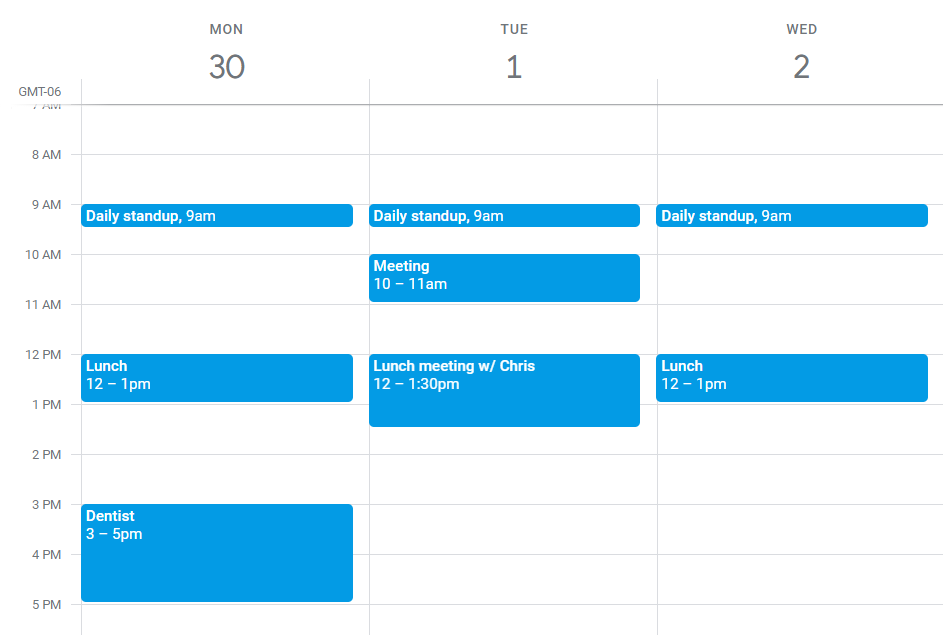
2. Fill your calendar with fixed commitments first
Putting tasks in the calendar will just be wasted effort if we have to move them around later to put events in. So, put all your fixed commitments in your calendar first. Ex: Appointments, meetings, morning/evening routines, etc.
3. List Your Tasks
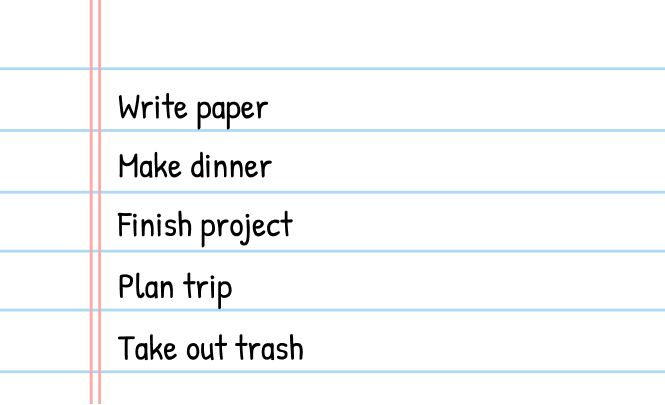
Write down everything you need to get done. Just get everything out of your head: Work-related tasks, personal errands, or even things like making time for a walk.
You can write this down anywhere (digital or physical)—We’ll put them into the calendar later. If you’re using a time blocking app, you can enter the tasks directly into the task list in the app.
4. Prioritize tasks
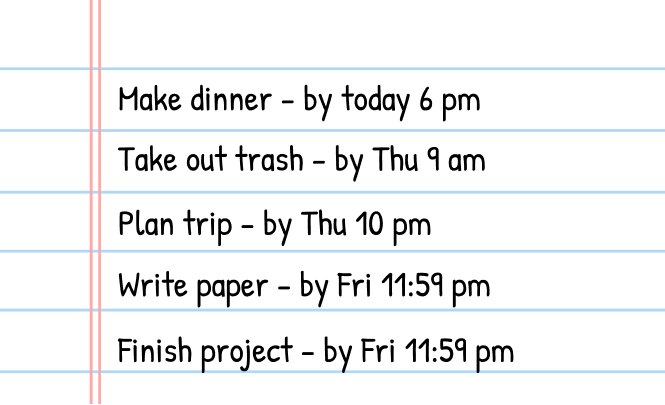
Not everything on your list needs to be done right now. Some tasks are more urgent, and others can wait. Prioritize your list by writing down the due date for each task. Then, put the tasks in order of due date.
5. Estimate durations
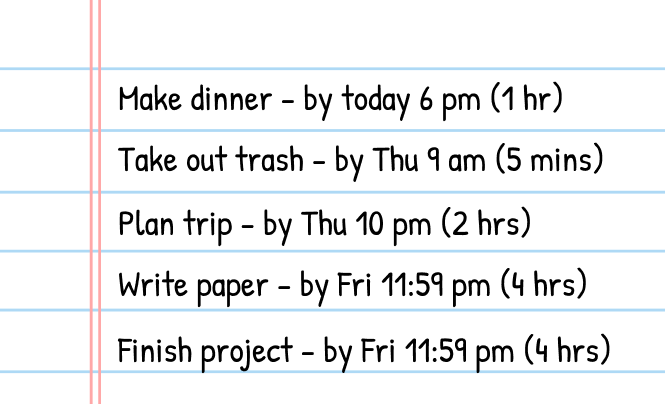
To prepare for putting these tasks in the calendar, we need to know how long the task will take. These don’t have to be perfect; just put a rough estimate of how long you think it will take.
We recommend overestimating task durations to start (1.5x is a good rule of thumb), and then you can adjust accordingly as you get better at time blocking.
6. Assign Time Blocks for Each Task
Now that you have your tasks and priorities, it’s time to assign them a specific time slot. Start with the top of your prioritized list and block off time for each task in a free spot that makes sense in the calendar.
In this example, I scheduled “Make dinner” at 5pm tonight, and then “Take out trash” at 8am tomorrow morning. After my most urgent tasks were scheduled, I fill in the gaps with other tasks that are due later in the week.
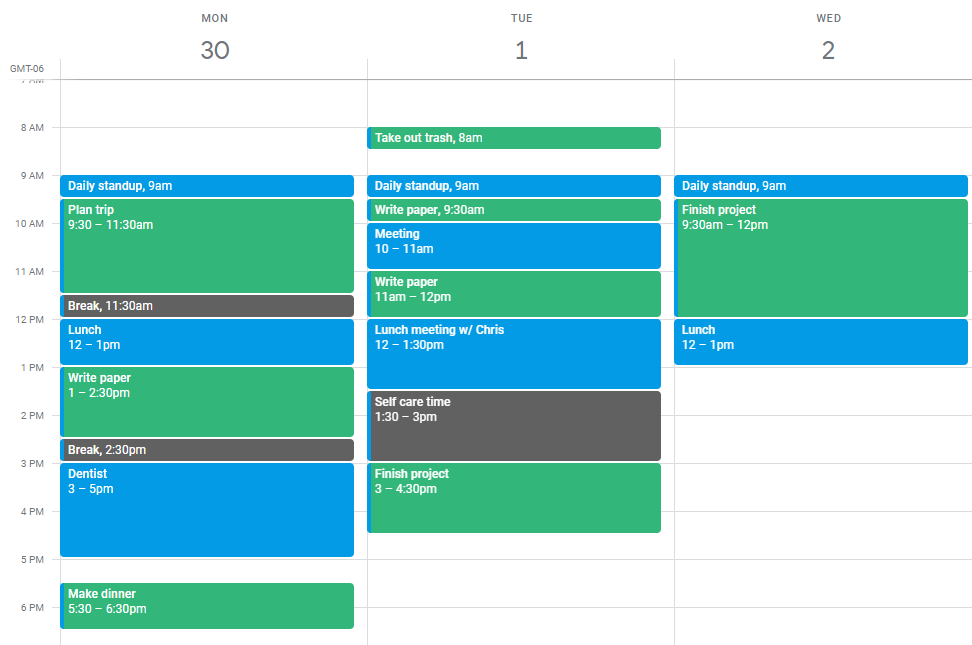
Tip: Remember to include time for breaks and relaxation!
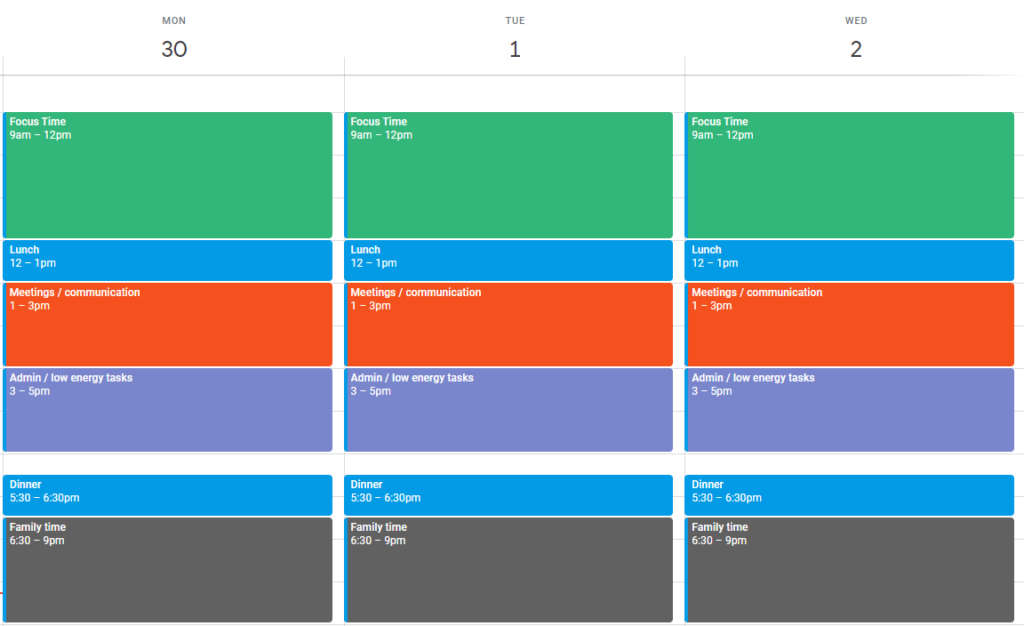
6B. (Alternative method) Batch tasks together
If blocking time for each task is overwhelming/chaotic to you, you might consider task batching.
Instead of creating a block of time for each individual task, you divide your day into sections dedicated for types of tasks.
For example:
- 9am-12pm: Focus time (core deep work)
- 1-3pm: Meetings / communication
- 3-5pm: Admin / Low energy tasks
Here’s what that would look like:
7. Follow your schedule
Sticking to your planned time blocks is often the hardest part of time blocking. While your calendar can’t complete the work for you, it can definitely help you stay on track.
Here are a few ways to make following your schedule easier:
- Keep your calendar within reach: Whatever time blocking tool you chose, make sure it’s always accessible so you can quickly check your time blocks, no matter where you are.
- Set reminders: If you’re using digital tools, enable notifications on your devices to get timely alerts when it’s time to start or prepare for a task. These reminders can keep you accountable and help you transition smoothly between activities.
- Try an accountability partner: Review your schedule with someone else and then tell them what you did at the end of the day or week. Having an accountability partner can help give an external push to stay on track.
- Try Body Doubling: Body doubling is where you work with someone else. You both work on your own work but together so you keep each other accountable. Services like Focusmate and Flow Club allow you to join focus sessions with other people online.
- Avoid distractions: Turn off notifications, and put your phone on Do Not Disturb. You can also use apps like Forest and Opal to help you stay in the zone during deep work blocks.
8. Review and Adjust Regularly
At the end of each day or week, take a few minutes to look over how things went. Did you stick to your blocks? Were there tasks that always took longer than expected? Were there times when you felt rushed? Use these insights to tweak your schedule moving forward. The more you fine-tune your time blocks, the better they’ll work for you.
Time Blocking Tips
While the basic idea of time blocking is simple, there are a million ways you can do it, so here are a few tips to help make your time blocking as efficient as possible:
1. Automate your time blocking
The biggest challenge with time blocking is that when one thing doesn’t go according to plan, your entire schedule is thrown off. You then have to drag and drop your time blocks around to recreate your schedule.
This is the #1 reason people give up on time blocking.
To solve this, use an automatic time blocking calendar like FlowSavvy. FlowSavvy automatically reschedules your time blocks when your plans get derailed, so you can get right back on track.
Automatic time blocking makes sticking with time blocking over the long term much easier. Try FlowSavvy today to automate your time blocking.
2. Overestimate task durations
People usually underestimate how long it will take to complete a task. This is a well-studied phenomenon known as the planning fallacy.
When the planning fallacy is applied to time blocking, people almost always make their time blocks smaller than they should be, so they end up packing their calendar, which inevitably leads to frustration when they get behind.
The solution to this is to add 50% to your estimates.
Overestimating and then finishing early is much better than underestimating and then feeling like you’re falling behind.
Fun fact: I’ve been time blocking consistently for 8 years, and I still add 50% to every task.
3. Don’t overload your schedule
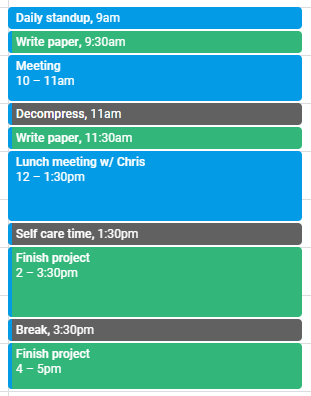
It’s easy to get excited about time blocking and start cramming every minute of your day with tasks. The problem? You end up with an unrealistic schedule that doesn’t allow for breaks or unexpected interruptions. This can lead to burnout or frustration when you can’t keep up with your own plan.
Solution: Build in buffer time. Give yourself more time than you think you’ll need for certain tasks (remember the 1.5x rule), and schedule short breaks between blocks. This extra space will help you catch up if something takes longer than expected, and it also gives your brain a chance to rest.
4. Re-prioritize when your time blocks don’t fit
There are only 24 hours in a day. That might mean that not everything can fit into your schedule, which can lead to a sense of overwhelm.
It can be tempting to throw out the entire schedule just to avoid the anxiety/overwhelm. However, good time blocking can actually reduce that feeling and make you feel relaxed, knowing that everything will get done.
Solution: Use the 80/20 rule: focus on the 20% of tasks that will deliver 80% of the results. If something isn’t urgent or important, consider whether it needs to be done at all. This will help you cut through the clutter and schedule time for the things that actually matter.
FAQs about Time Blocking
Is time blocking good for ADHD?
Yes. Time blocking is one of the most effective time management methods for people with ADHD because it offloads some of the executive function work to the calendar:
- Helps with time blindness by turning abstract time into visible blocks.
- Lower initiation friction because “work on X from 3-3:30” is mentally easier than “work on X sometime”.
- Reduces decision fatigue by pre-deciding when to work, so you can just look at the calendar and know the one task you should be working on.
However, time blocking can also feel overwhelming for people with ADHD if it’s too rigid. This is why it’s beneficial to use an auto-scheduling calendar like FlowSavvy that will reschedule for you when you get off track.
Does time blocking really work?
Yes. Time blocking is widely acclaimed to be one of the most effective time management methods because deciding exactly when you’ll do the task makes you more likely to do it.
For more information, check out our article on the psychology of time blocking.
Does Elon Musk use time blocking?
While the idea that Elon Musk uses time blocking is repeatedly circulated online, we were unable to find direct quotes from him—or people who have worked closely with him—supporting the claim that he uses the time blocking method (creating blocks of time in the calendar for tasks). In fact, Musk even directly refuted the popular 5-minute time blocking claim on Twitter.
Walter Isaacson shadowed Elon Musk for 2 years to write his biography, and Isaacson did say that Musk focuses intensely on a task for an hour, does some palate cleansing, and then focuses on the next task (source). This behavior shares commonalities with time blocking, but we weren’t able to find sources indicating Musk specifically blocks this time in his calendar.
What is a time blocking app?
A time blocking app is an app designed specifically for time blocking. While you can use basic calendar apps for time blocking, dedicated time blocking apps have the following components that make them more useful for time blocking:
- To-do List: Somewhere to keep track of tasks.
- Calendar: Somewhere to put the time blocks. This can be either a single-day timeline view or a full calendar view.
- Task durations: Tasks must be able to block different durations on the calendar, not just show up as a single line reminder.
- A way to transfer tasks from the to-do list to the calendar: Either via manual drag and drop or via auto-scheduling like FlowSavvy.
- Ability to mark tasks complete: Events in regular calendars can’t be marked complete. Tasks in time blocking apps can be marked complete.
What are the best time blocking apps?
Some of the best time blocking apps include FlowSavvy, Morgen, Akiflow, Sunsama, Reclaim, Motion, and Structured. For a more detailed comparison, check out our picks for Top Time Blocking Apps.
How long does it take to set up a time block calendar?
For your first time listing out your tasks, due dates, and durations, and then blocking them into a calendar for the next 1-2 weeks, expect around 30-60 minutes depending on the amount of tasks.
Expect 3-4 weeks to fully dial in your schedule, because you’ll be making small adjustments here and there as you start to recognize patterns in your expected vs actual execution.
Final Thoughts
Time-blocking is a game-changer when done correctly. If you often feel like you’re bouncing from task to task, constantly running out of time, or struggling to stay focused, time blocking might be worth trying.
If you want an easy way to implement and stick with time blocking, try using an auto-scheduling app like FlowSavvy. FlowSavvy automatically schedules your to-do list into your calendar and adjusts instantly as plans change, making it easier to stick with time blocking.