The best Motion app alternatives for auto-scheduling tasks in 2026 are FlowSavvy, Reclaim, Skedpal, ClickUp, Akiflow, Morgen, and Sunsama.
I’ve put together this guide to help you find exactly which auto-scheduling Motion alternative will work best for you depending on your use case.
⚡TL;DR: Best Motion Alternatives
- FlowSavvy: Best Motion alternative for individuals
- Reclaim: Best Motion alternative for teams
- Skedpal: Best for more customizability
- ClickUp: Best for all-in-one productivity suite
- Akiflow: Best for chat-based scheduling
- Morgen: Best for more intentional AI scheduling
- Sunsama: Best for daily planning
How I evaluated Motion alternatives
Based on what I’ve seen on Reddit, other social media platforms, and search data, most people looking for Motion alternatives are looking for specifically the auto scheduling feature. (For example, these Reddit threads here and here).
Because of this, this article focuses on apps with Motion-like auto-scheduling capabilities, not other categories that Motion overlaps with, like dedicated project management tools, to-do list apps, and manual calendar apps. I ranked apps by how closely they match Motion’s core features as well as Motion’s “bonus” features.
Motion features I weighted most heavily:
(Based on the features people cite when looking for alternatives)
- Automatically schedule tasks from the to-do list into the calendar
- Automatically reschedule when things don’t go according to plan
- Auto-scheduling features (priorities, dependencies, hours, etc)
Motion features I treated as bonuses:
- Task/project management views
- Mobile apps
- AI chat components
Disclaimer: One of the products below, FlowSavvy, is our product. I used the same evaluation criteria to evaluate where it is a good fit, as well as when it is not a good fit.
Quick Decision Table
| Best for | Key features | Price | |
|---|---|---|---|
| FlowSavvy | Closest Motion alternative for AI scheduling | – AI scheduling for tasks – Fully featured mobile apps – Intuitive UI (no team feature bloat) | Free; $14/mo or $120/yr |
| Reclaim | Best alternative for teams | – AI scheduling for meetings and tasks – Priority-aware booking links | Free; Multiple tiers starting at $12/mo or $120/yr |
| Skedpal | Best for more customizability | – AI scheduling for tasks – Infinite nested subtasks | Multiple tiers starting at $14.95/mo or $119.40/yr |
| ClickUp | Project management and collaboration | – Highly customizable views – Task assignees, comments, etc. | Free; Multiple tiers starting at $10/mo or $84/yr |
| Akiflow | Chat-based scheduling assistant | – Drag and drop tasks from the to-do list to plan manually – “Aki” assistant can help you plan | $34/mo or $228/yr |
| Morgen | AI scheduling suggestions you can accept or reject | – Drag and drop tasks from the to-do list to plan manually – AI planner for auto scheduling | $30/mo or $180/yr, with discounts for teams |
| Sunsama | Focused daily planning | – Intentionally choose which day to work on tasks, then drag them into the calendar – Auto-schedule tasks onto the day they’re assigned | $22/mo or $204/yr |
1. FlowSavvy: Closest Motion alternative for AI scheduling
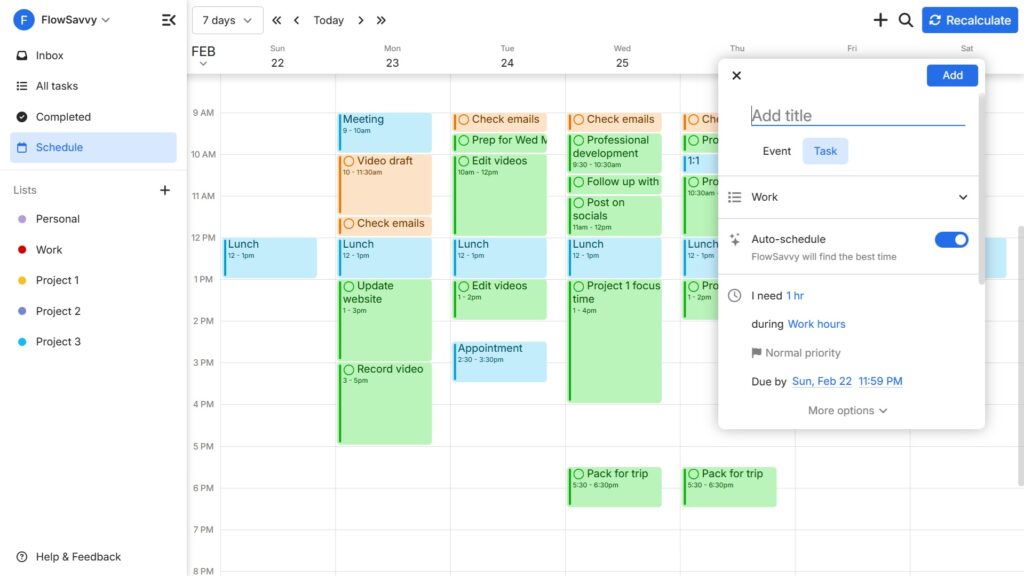
FlowSavvy is the closest Motion alternative in terms of auto-scheduling functionality. If you like Motion’s auto scheduling but want an app that is more focused on the individual experience (rather than team/enterprise features) at a more affordable price, FlowSavvy will be the best Motion alternative for you.
FlowSavvy auto schedules tasks from your to-do list into your calendar and reschedules if plans change or you miss tasks. You can expect all the features that make a great auto scheduling app, like priorities, dependencies, scheduling hours (i.e. work, personal, custom, etc.), lists for organizing projects, flexible repeating tasks, and much more.
Plus, FlowSavvy’s mobile apps have all the same features of the FlowSavvy web app, whereas Motion only offers limited companion apps, and FlowSavvy costs less than a 3rd of Motion’s price for individual users.
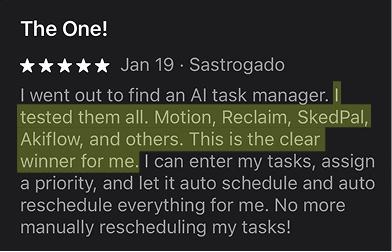
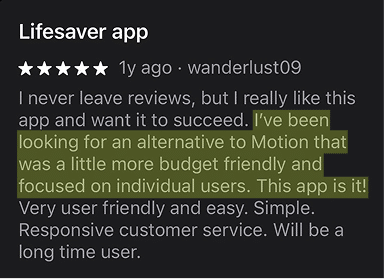
Users frequently cite FlowSavvy as the best Motion alternative:
Pros
- AI scheduling creates your calendar and reschedules as needed
- Easy to use
- More affordable than Motion
- Full mobile apps (not just companion apps)
- Flexible repeating tasks that support many more options than Motion, like “every other day” and “yearly”
Cons
- No team features. Built for the individual experience.
- No built-in chat component. Use the MCP for natural language support.
Pricing
- Free version: Yes
- Paid: $14/mo or $120/yr
💡Check out our FlowSavvy vs Motion comparison for an in-depth comparison.
2. Reclaim: Best Motion alternative for teams
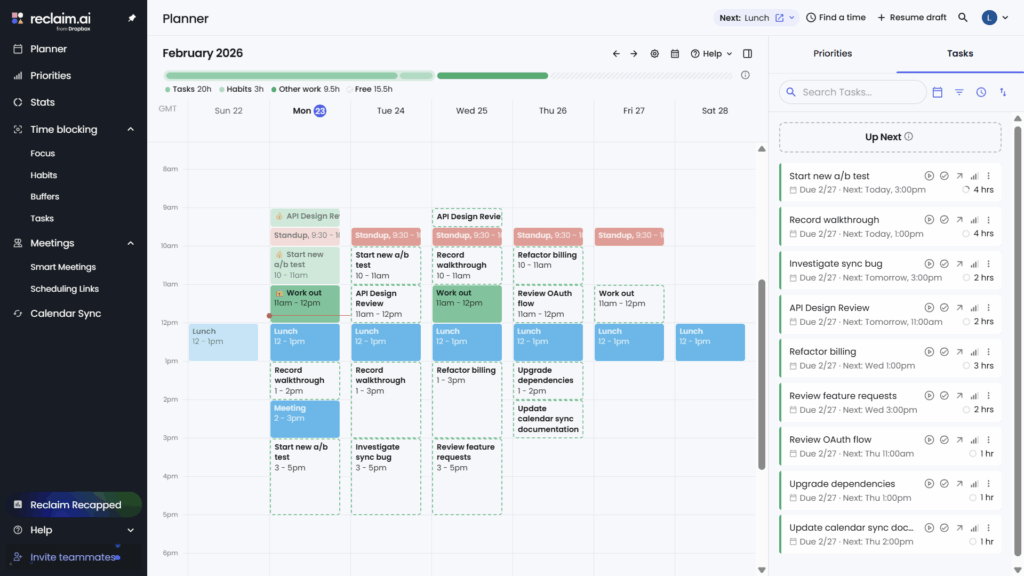
Reclaim is another strong Motion alternative for AI scheduling. It auto schedules tasks from your to-do list into your schedule and reschedules if plans change just like Motion and FlowSavvy. Here are Reclaim’s biggest advantages over Motion:
- Reclaim auto-schedules meetings in addition to tasks, making it the best option for teams.
- Reclaim integrates with more task management tools
- Reclaim offers more control over adjusting individual time blocks
When you want to adjust the schedule Reclaim gives you, you can just drag and drop time blocks in either Reclaim or your connected calendar, and Reclaim will lock those individual chunks in place. This does require additional UI inside Reclaim since individual parts of tasks need to be able to be managed, but it offers a great way to manually tweak the generated schedule.
The Motion feature you might miss in Reclaim is that Reclaim doesn’t have any built-in project management. Tasks show up in one flat list in the to-do list view and can’t be organized into projects like Motion or lists like FlowSavvy. Instead, you’ll need to connect your existing project management software to organize your tasks in another app. The good thing about this though is that Reclaim does integrate with more task management apps than Motion, so it’s just a tradeoff.
Pros
- Auto-schedules both tasks and meetings
- Priority-aware scheduling links
- More task management integrations
- Offers more control over individual blocks
- Can mirror events between personal and work calendars
Cons
- No native mobile app. Only available on mobile as a PWA
- No native project management / task organization
- No task dependencies
Pricing
- Free version: Yes
- Paid: Multiple tiers starting at $12/mo or $120/yr
3. Skedpal: Best for more customizability
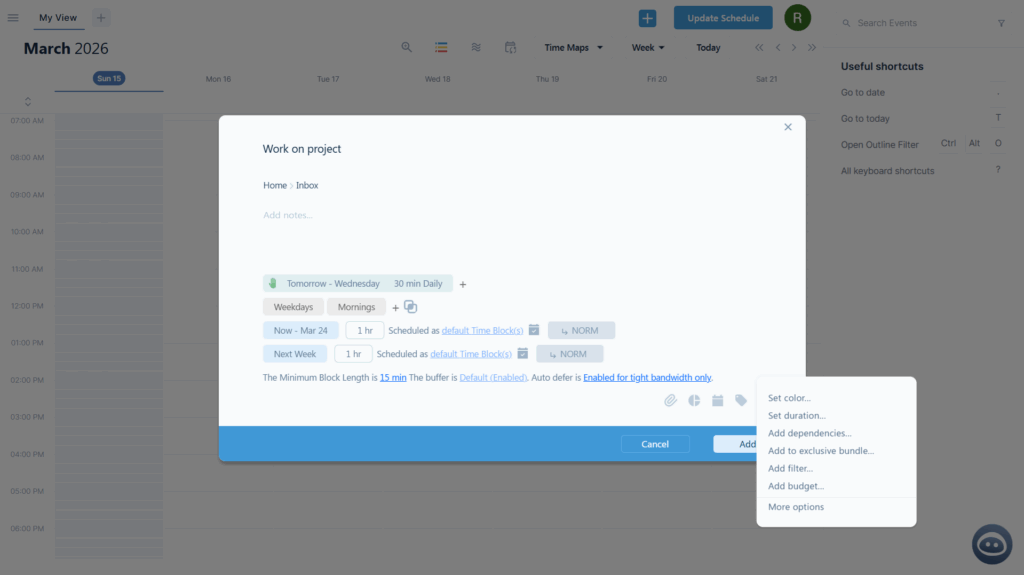
If you feel limited by Motion’s options, Skedpal might be the best alternative for you. Skedpal is another AI calendar app, and it offers a lot more customizability than Motion. For example, in the screenshot above, I configured a task to have 1 hour sometime this week and another hour next week, with both of them only able to be scheduled in the intersection of my “Weekdays” and “Mornings” hours, with a max of 30 minutes every day. And you can see in the dropdown menu that there are even more customizations available.
While Skedpal is very customizable, this does also mean that it has a high learning curve, so it will take a while to fully grasp all the capabilities.
The other important drawback to note is that Skedpal does not have an option to automatically trigger a schedule update when you make changes, and instead, you must click the “Update schedule” button to make it adjust to changes. If you’re ok with that though, Skedpal is still one of the best AI schedulers in the market right now.
Pros
- Auto-schedules tasks into your calendar
- High auto-scheduling customizability and control
- Infinite nested subtasks
Cons
- Dense UI and options mean a higher learning curve
- Must click “Update schedule” to trigger the auto-scheduling
- No native collaboration features. Designed for individuals.
- Limited companion mobile app
Pricing
- Free version: No
- Paid: Multiple tiers starting at $14.95/mo or $119.40/yr
4. ClickUp: Best for project management and collaboration
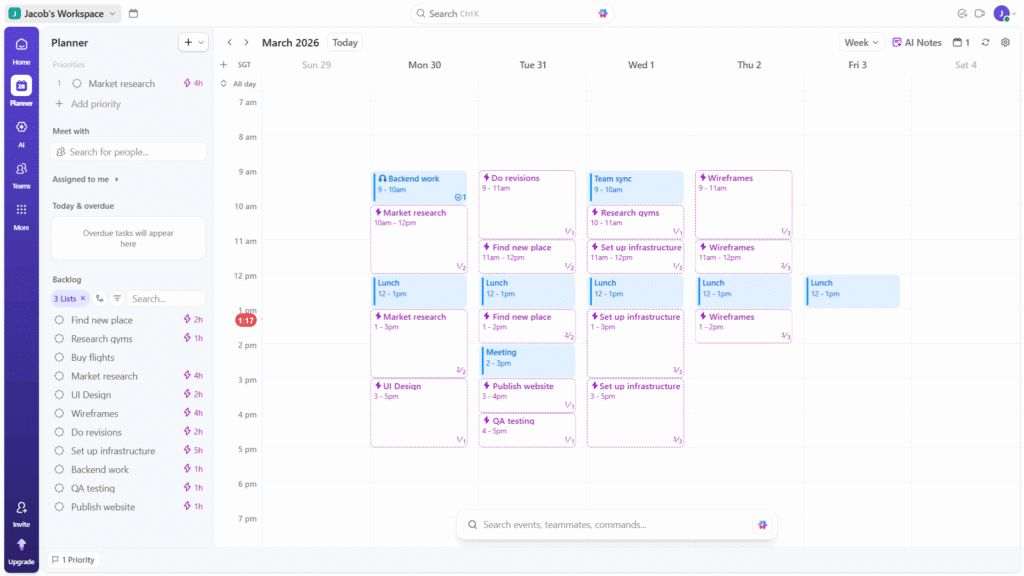
ClickUp is a unique alternative to Motion because it’s an all-in-one productivity suite that is starting to add auto-scheduling features, whereas Motion started with just the auto scheduling and is now more of an all-in-one productivity suite. With these two platforms becoming more and more alike, I put ClickUp to the test to see how well it can replace Motion.
At a high level, I was really impressed with ClickUp’s absolutely gargantuan feature set. It truly is an all-in-one workplace. Every view you could want, collaboration features, Slack-like chat, and more.
However, its auto-scheduling capabilities are very new and limited. When you’re on the planner view, you can click the auto-schedule button on the task, and the task will be slotted into your calendar at the next available time. This works great for basic auto-scheduling, but you’ll miss some features from dedicated auto-schedulers like Motion and FlowSavvy like the following:
- Start date and dependencies affecting the auto-scheduling – They’re ignored in ClickUp’s auto-scheduling.
- Multiple sets of hours like work and personal hours – ClickUp only has work hours.
- Auto-scheduled tasks syncing to Google/Outlook – Auto-scheduled ClickUp tasks don’t show up in your Google or Outlook until you click “Confirm work session” on an individual time block, but then they won’t be auto-scheduled anymore.
- Customizing splitting behavior – No way to prevent ClickUp from splitting tasks into small chunks.
Tasks also can’t be configured to be auto-scheduled at creation time and can only be auto-scheduled from the planner view, which makes the auto scheduling feel like an add-on rather than a core part of the platform.
To sum it up, ClickUp is easily the strongest Motion alternative as project management software (with very basic auto scheduling), but if the auto-scheduling feature is most important to you, the other options on this list will likely be a better fit.
Pros
- Powerful all-in-one project management tool
- Strong collaboration features (comments, assignees, etc.)
- Highly customizable
- Large number of integrations
Cons
- Dense UI creates a high learning curve
- AI scheduling is very basic at the moment (see limitations above)
Pricing
- Free version: Yes
- Paid: Multiple tiers starting at $10/mo or $84/yr
5. Akiflow: Best chat-based scheduling assistant alternative
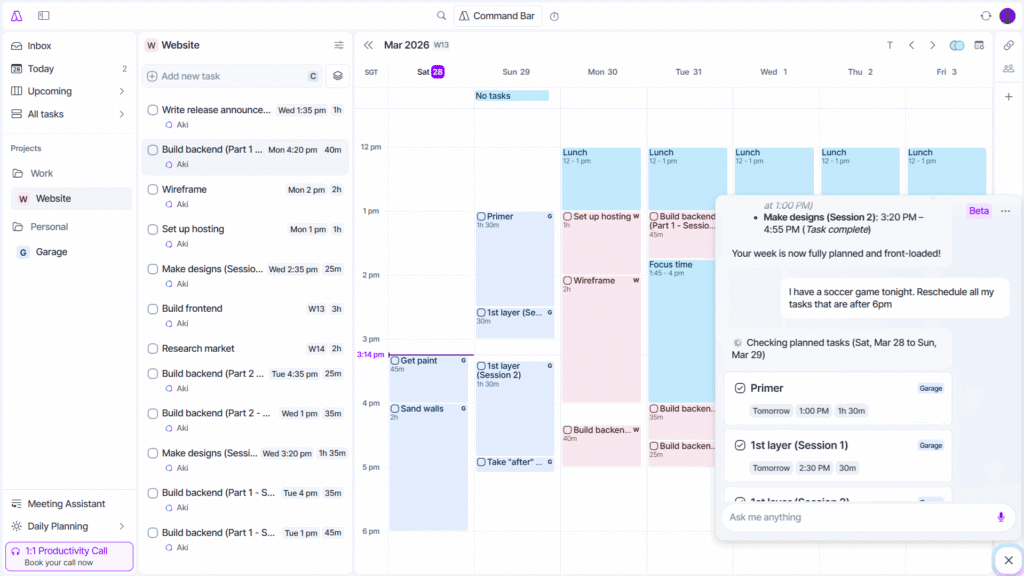
Akiflow is another time blocking app similar to Morgen, but its AI scheduler comes in the form of a chat-based, LLM-powered assistant called Aki. In terms of chat-based scheduling assistants, Aki is one of the best I’ve seen in practice. The chat UI is clean and intuitive, and it allows you to set up scheduled workflows that run a prompt at a specific time every day.
The best way I was able to mimic Motion’s auto-scheduling was to set up a prompt to run every morning that looked something like this:
“Schedule any unscheduled tasks and resolve any conflicts. Tasks in my work folder should be scheduled in my work hours (9-5 on weekdays) and personal tasks should be scheduled in my personal hours (weekends and 6-9pm on weekdays).”
However, this can only run once a day, so if a meeting came up later or I added a new task later, I’d have to tell Aki to update my schedule, and that’s when I started noticing it forgetting constraints. As I’ve talked about before in our AI Calendar Apps guide, LLMs struggle with large numbers of constraints, so the scheduler started missing/forgetting constraints. For example, it put work tasks outside the work hours I had told it or on days where an event marked as “busy” should have prevented tasks from being scheduled.
For other simpler scheduling tasks, I did find it nice to have an assistant I could just talk to.
So, as a great time blocking app with a chat assistant, Akiflow can be used to replace Motion for very simple auto-scheduling needs like “reschedule my tasks from today to next week”. For true Motion-like auto scheduling that can handle complex schedules though, apps like FlowSavvy and Reclaim will be better drop-in replacements for Motion.
Pros
- Chat-based scheduling assistant understands natural language
- Sleek design
- Great as a time blocking calendar app in general
- Large number of integrations
Cons
- Not a true auto-scheduler. Must engage the assistant whenever you want it to make changes
- Because the assistant is LLM-powered, it occasionally hallucinates and misses constraints
- Limited companion mobile app
- Expensive
Pricing
- Free version: No
- Paid: $34/mo or $228/yr
6. Morgen: Best for AI scheduling with full control
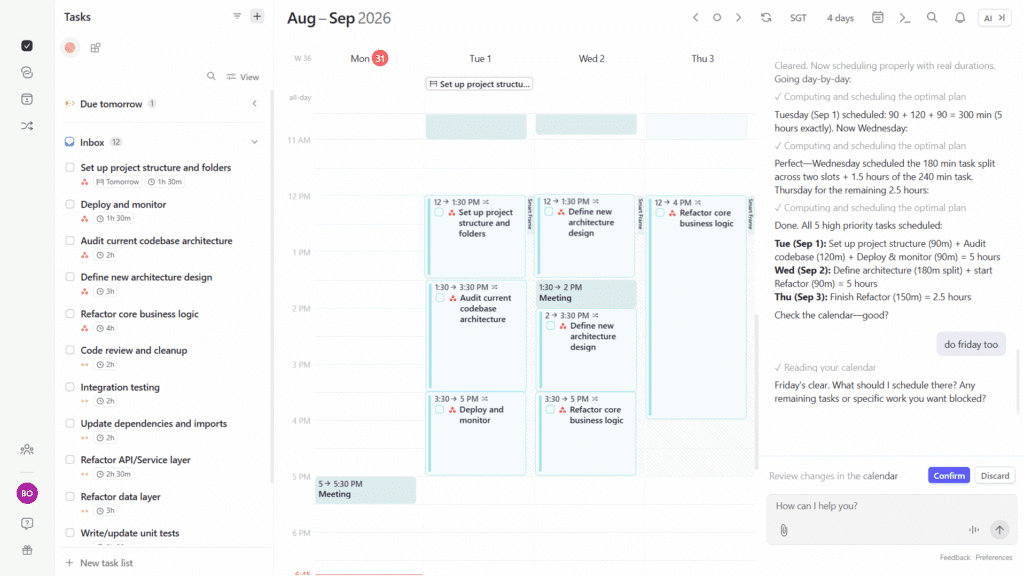
Morgen is a premium time blocking app that aggregates all your tasks from different sources and then allows you to drag them into the calendar or use the AI planner feature to plan them for you. When you choose to use the AI planner, it will give suggestions for the time block placements, and you can choose to accept them or not, meaning tasks will never move without your explicit consent.
People looking for a replacement for Motion’s auto-scheduling will find Morgen to be a very different kind of workflow. It’s intentionally not a fully automatic scheduling assistant and is designed to only auto-schedule when you use the AI planner feature. The AI planner interface was recently changed to be a chat-based, LLM-powered scheduler, which we found to be more ideal for small every-day interactions, but not as fast and accurate as a dedicated auto-scheduler like Motion.
In addition to the AI planner, when a conflict comes up, you’ll be given the option to have Morgen find a new time for the tasks. Tasks only get rescheduled when you want them to, so you stay in control.
For some people, a great time blocking app with an AI planning feature you have to intentionally engage may be what you’re looking for, which is why Morgen is still a great Motion alternative. For people looking for Motion-like auto scheduling and automatic rescheduling though, the other apps listed above will be a closer fit.
Pros
- Sleek UI
- Large number of integrations
- Chat-based AI planner allows you to make changes in natural language
- You’re in full control of when tasks move.
Cons
- Not fully automatic like Motion
- Limited companion mobile app
- Not a full project management app like Motion or ClickUp
Pricing
- Free version: No
- Paid: $30/mo or $180/yr, with discounts for teams
7. Sunsama: Best for intentional daily planning
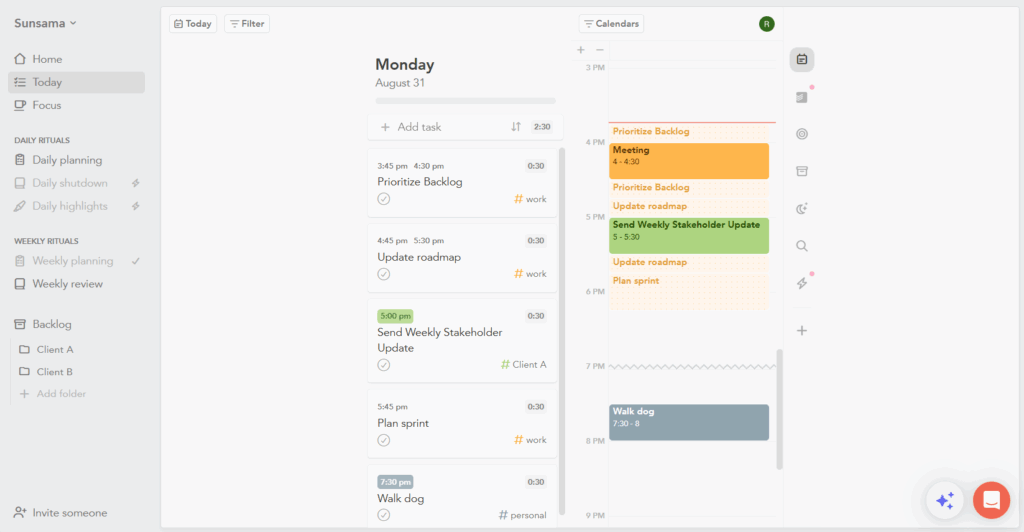
Sunsama is another time blocking app similar to Morgen and Akiflow, but it is designed specifically around intentional daily planning. You can add tasks to your backlog, then decide which day you want to do them, and then you can drag tasks from those days in your board into your calendar.
Sunsama offers “task projections”, which places tentative time blocks on your calendar for your tasks so you can get a feel for how your tasks fit into your week. If you add other events or tasks, the projections will be rescheduled. However, these auto-scheduled projections only get scheduled on the day you chose for each task. They do not spill over into the next day if there isn’t enough time like in full auto-schedulers like Motion.
Sunsama is a great Motion alternative if you want to be more intentional about what you work on each day with lightweight day-scoped auto-scheduling.
Pros
- Sunsama’s focus on daily planning helps you be intentional about what gets done on each day
- Lightweight auto-scheduling for help in daily planning
- Large number of integrations
- Chat assistant can help manage your tasks and time blocks
Cons
- The auto-scheduling is not as comprehensive as fully auto-schedulers like Motion, Reclaim, and FlowSavvy
- The focus on daily planning makes it less ideal for users who prefer time blocking directly into the week view of the calendar
Pricing
- Free version: No
- Paid: $22/mo or $204/yr
Final thoughts: What is the best Motion AI calendar alternative?
The best Motion AI calendar alternative will depend mostly on which feature you were interested in in Motion.
If you’re looking for the closest drop-in replacement for auto-scheduling, FlowSavvy will be the best fit for you. If you want auto-scheduling for both tasks and meetings, use Reclaim. If you want more fine-grained control and customizability over the auto-scheduling, use Skedpal. If the productivity suite aspect is what you liked about Motion, ClickUp will be the best alternative for you. If you want a chat-based calendar assistant, use Akiflow. If you want an AI scheduler but want to review changes before they’re solidified, use Morgen, and if you want an app more focused on daily planning with some lightweight auto-scheduling, choose Sunsama.
FAQs
Is there a free alternative to Motion?
Yes, FlowSavvy and Reclaim both have free plans and are the two closest Motion alternatives. FlowSavvy is the best free Motion alternative for individuals due to its similarity in auto-scheduling features and behavior.
Is the Motion app good for ADHD?
Motion is good for ADHD because it reduces planning friction and decision fatigue. However, Motion has high startup friction due to its more complicated UI. For another AI scheduling app that automatically plans for you but offers a more streamlined, ADHD-friendly UI, try FlowSavvy.
Is there a cheaper alternative to Motion?
Yes. FlowSavvy, Reclaim, and Skedpal all offer similar auto-scheduling functionality at a much lower price.