I tested 25 apps hands-on to find the best apps for daily planning. After spending dozens of hours testing these apps, I’ve narrowed it down to 9 apps that work best for different use cases. Let’s dive right in:
Best daily planner apps in 2026
- FlowSavvy: Best for automatic daily planning for individuals, building your schedule from your to-do list and rescheduling when plans change.
- Motion: Best for automatic daily planning for teams, combining auto-scheduling with full project management.
- Morgen: Best for AI-assisted suggestions while staying in control of your calendar.
- Ellie: Best for intentional daily planning, with a backlog, day board, and calendar you can drag between in one view.
- TickTick: Best task manager with daily planning built in.
- Google Calendar: Best ultra-simple, free daily planning app.
- Structured: Best simple, aesthetic daily planner for mobile.
- ClickUp: Best project management platform with daily planning included.
- PlanWiz: Best digital daily planner for people who want a digital version of a paper planner.
How I evaluated daily planning apps
First, I gathered a list of 25 apps that could be used for daily planning from sources like app stores, Reddit, other “Top 10” type articles, and YouTube. Then, I evaluated each one using the following testing steps:
- Created an account
- Went through any guided onboarding
- Added a sample day to test how smooth the daily planning felt
- Experimented with extra features like AI assistants, focus views, etc.
- Downloaded and experimented with each app’s mobile app, if it offered one
Features I looked for:
- Calendar or timeline. This is a “daily planners” list rather than a “to-do list apps” list, so apps had to have a calendar or timeline view where a day could actually be planned out.
- Task duration. Apps that displayed tasks on the calendar with an unchangeable duration (for example, Apple Reminders) were excluded since that makes creating a realistic daily plan difficult.
- Intuitive for daily planning. If I couldn’t figure out how to start adding tasks and making my daily plan within 5 minutes, I ditched the app. For example, Notion is a super powerful tool, but I felt like I needed to watch YouTube tutorials to understand how to build a daily planner, while there are many other apps built specifically for daily planning. (Do check out Notion if you want to build your own system though.)
Where multiple apps fit the same niche, I chose the app whose feature set was best suited specifically for daily planning.
Disclaimer: One of the apps below, FlowSavvy, is our app. I’ve subjected it to the same requirements and testing as the others and listed the use cases it’s a good fit for and the ones it’s not good for.
Daily planner apps comparison
| App | Best for | Key features | Pricing |
|---|---|---|---|
| FlowSavvy | Automatic daily planning for individuals | Auto-scheduling, auto-rescheduling, flexible repeating tasks, full mobile apps | Free plan available. Paid plans: $14/mo or $120/yr |
| Motion | Automatic daily planning for teams | Auto-scheduling, auto-rescheduling, project management, AI meeting notetaker | From $49/mo or $348/yr |
| Morgen | AI-assisted planning while staying in control | AI planner, sync tasks from multiple sources into one sidebar, slick drag & drop time blocking | $30/mo or $180/yr |
| Ellie | Intentional, guided planning | Backlog, board, and calendar in one view; daily rituals, polished iOS app | Free plan available. Paid plans: $9.99/mo or $99.99/yr |
| TickTick | Task management plus daily planning | Calendar view, natural language task entry, Eisenhower matrix, habit tracker, pomodoro timer | Free plan available. Paid plans: $4.99/mo or $49.99/yr (calendar requires Premium) |
| Google Calendar | Simple, free daily planning | Google Tasks sidebar, drag tasks into calendar, meeting tools | Free |
| Structured | Simple, aesthetic planning on mobile | Timeline view, energy levels, Apple-native design | Free plan available. Paid plans: $6.99/mo or $29.99/yr |
| ClickUp | Daily planning inside a team work platform | Backlog-to-calendar drag and drop, auto-schedule suggestions, ClickUp Brain, all work in one place | Free plan available. Paid plans from $12/mo or $108/yr |
| PlanWiz | Template-based digital paper planner | 2000+ planner templates, export reminders to calendar, “Carry Forward” | Free plan available. Paid plans: $3.99/week, $39.99/yr, or $99.99 lifetime |
1. FlowSavvy: Best AI daily planner for individuals
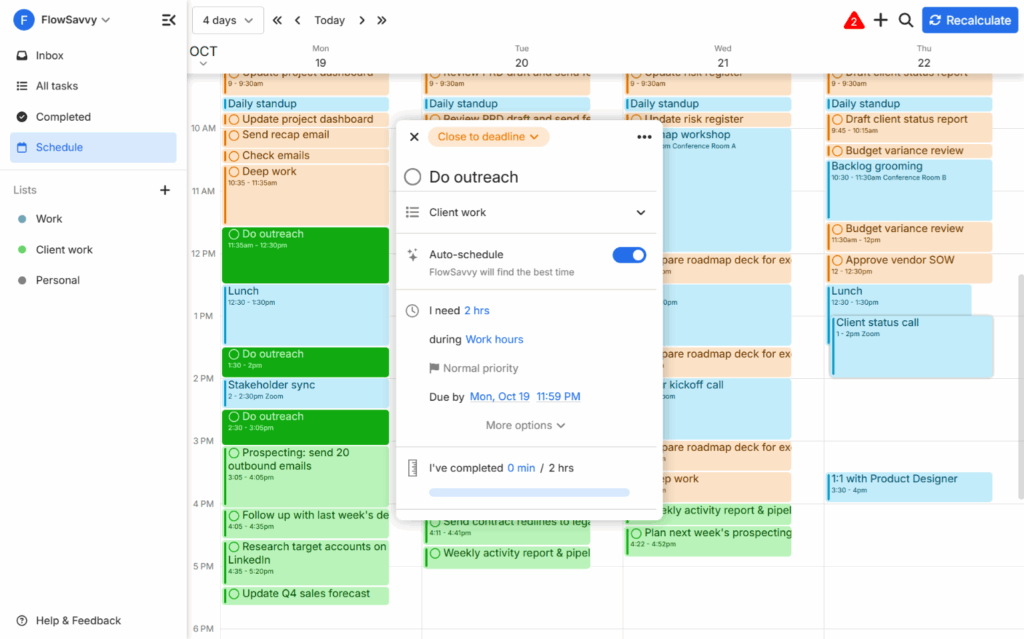
FlowSavvy automatically schedules tasks from your to-do list into your day for you. When you miss a task or your plans change, it automatically reschedules everything. The reason FlowSavvy works well as a daily planner is that it considers all the things you need to get done in the next few weeks, so it can find the optimal plan for each day to ensure you hit all your deadlines. You just open the app and look at what to do next.
The workflow for most other apps on this list is that you add a task to your to-do list, and then you pick a specific time to work on that task in your calendar. In FlowSavvy, you just add the task’s details like duration, priority, and due date, and FlowSavvy instantly shuffles your calendar around to make room for the new task at the best time.
Who is FlowSavvy best for?
FlowSavvy is best for individuals who want their day planned for them and re-planned automatically when things change. FlowSavvy is built for individuals, so it doesn’t have team features, making it less ideal for teams.
FlowSavvy is primarily an auto-scheduling app, and tasks can be manually dragged and dropped to tweak the calendar as much as you want, but if you prefer planning every block yourself, the other apps in this list might be a better fit for you.
Pros
- Builds your schedule from your to-do list automatically
- Automatically reschedules tasks when you miss one or plans change
- Fully featured mobile apps
- Low learning curve
Cons
- No native collaboration features (task assignees, shared projects, etc.)
- Can’t drag tasks from the to-do list into the calendar to manually plan them. Tasks can be dragged within the calendar though.
Pricing
Free plan available. Paid plans are $14/mo or $120/yr.
2. Motion: Best AI daily planner for teams
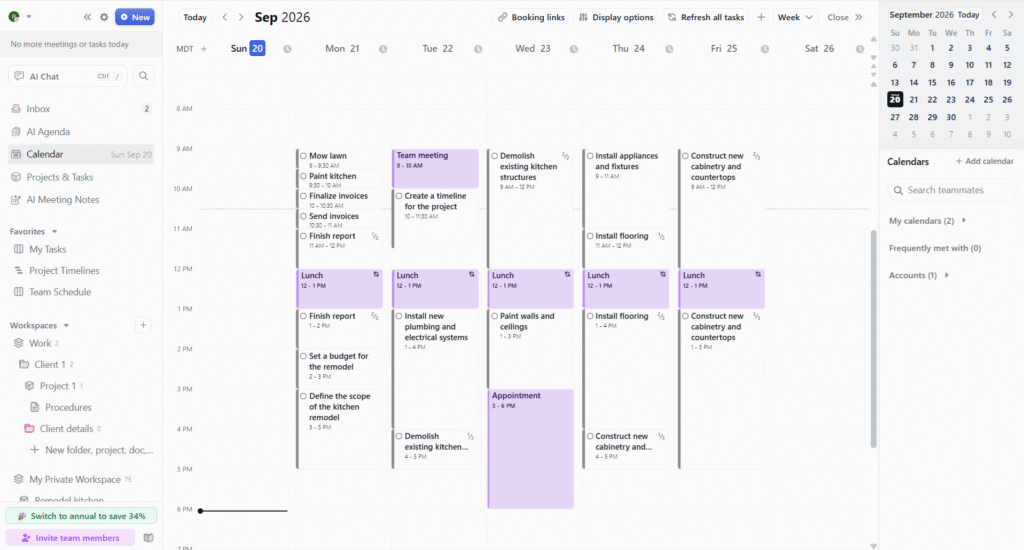
Motion is an AI productivity suite that offers auto-scheduling, project management, and notes. It can help you create detailed project plans with AI, and then schedule tasks directly into each team member’s calendar, so everyone always knows what to work on.
Motion works well as a daily planner for the same reason as FlowSavvy: it considers your entire week of priorities and then auto-schedules tasks into your calendar, rescheduling when plans change. I’ve included both in this daily planners list because Motion is the better pick for teams, whereas FlowSavvy is the better pick for individuals.
Who is Motion best for?
Motion is much more than a daily planner, so it works best for people who need a full productivity suite, including calendar, notes, booking links, AI meeting notetaker, and more. As a daily planner, Motion is best for people who want their day planned and re-planned for them automatically, and who also need to manage complex projects with their team. People who don’t work on a team and who just want an easy daily planner may prefer an auto-scheduler designed for individuals, like FlowSavvy.
💡Check out our FlowSavvy vs Motion guide for a full comparison to find the one that is best for your use case.
Pros
- Builds and reschedules your schedule automatically
- Advanced project management views like Gantt charts and Kanban boards
- AI project creation and reusable project templates
Cons
- High learning curve
- Expensive if you only want the daily planning features
- Limited mobile companion app
Pricing
No free plan. Paid plans start at $49/mo or $348/yr, with discounted rates for teams.
3. Morgen: Best for AI-assisted daily planning while staying in control
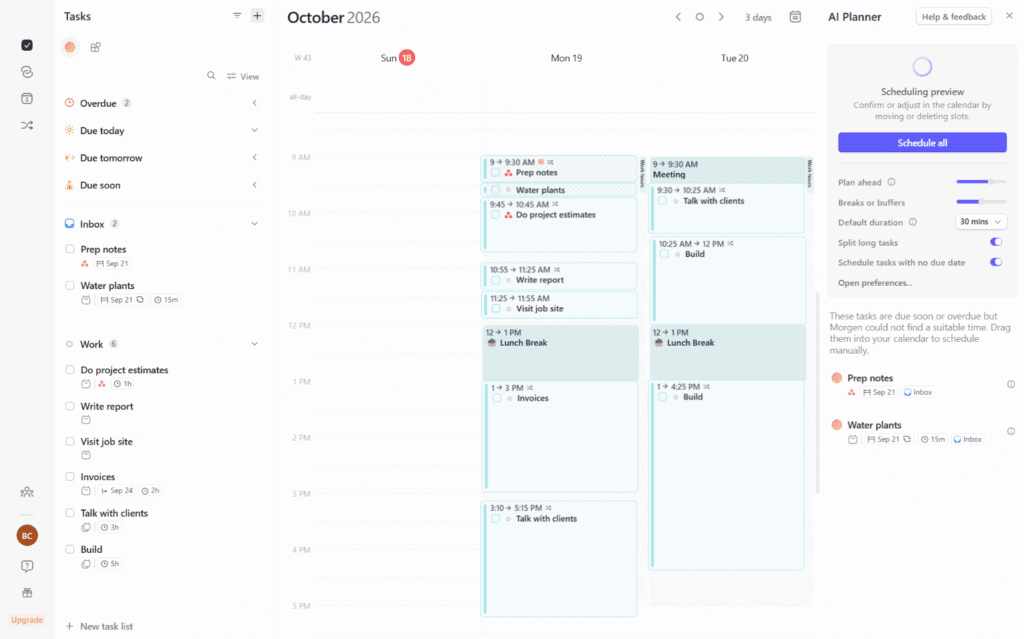
Morgen consolidates your tasks from multiple sources into a sidebar, and you plan them into your calendar via drag and drop. It also offers an AI planner feature that will plan out your tasks into your calendar when you click the “AI Planner” feature. Then, you can drag tasks around in the draft schedule before clicking “Schedule all” to actually put them on your calendar.
The plus side of this AI Planner is that tasks can spill over into other days, so your daily plan fits into the context of the larger week, but the downside is that it only schedules unscheduled tasks into the open time rather than reconsidering your entire schedule when a new task is added or priorities shift like FlowSavvy or Motion.
What I like about Morgen’s daily planning experience is that it’s instantly familiar. Some other apps like Structured have nonstandard UIs, but Morgen’s main view is just a standard calendar, with a task list on the left, so it doesn’t feel like there’s anything to learn about it.
Morgen supports creating both events and tasks on the calendar view, and it supports collaboration features like conferencing details on events and booking links for guests, making it a great daily planner for work.
Who is Morgen best for?
Morgen is best for people who want to plan their day manually with some AI help. Its AI planner assistant can time block your tasks and suggest changes when conflicts arise, and you can tweak the plan before it’s scheduled.
Pros
- Premium feel
- Easy drag and drop planning
- Can create multiple time blocks per task (make sure “View -> Show scheduled tasks” is turned on so you can drag a task into the calendar multiple times)
Cons
- Expensive compared to most productivity apps
- Requires connecting an external calendar
Pricing
No free plan. 14-day free trial, no credit card required. Paid plans are $30/mo or $180/yr, with discounts for teams.
4. Ellie: Best for intentional daily planning
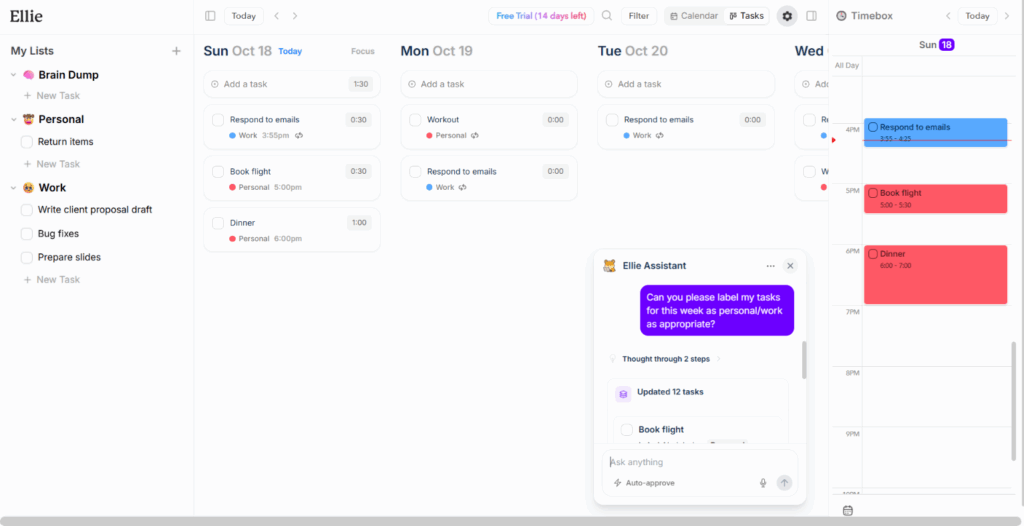
Ellie is a clean, affordable, modern app focused on drag & drop daily planning. You can organize tasks into lists in the backlog, then drag them onto specific days in your Kanban-style board, then drag them from there into specific times in the calendar view on the right sidebar. It also has a Daily Planning and Daily Shutdown view hidden inside the settings gear in the top right for people who want to be guided through their daily planning.
I love that the backlog, Kanban board, and 1-day calendar view are all visible in one view. This makes so much sense. It allows you to drag tasks between the backlog, board view, and calendar view. One tip for this view: In General settings, change the “Sidebar” setting to “All lists” so it shows all your lists like in the screenshot above. That allows you to drag and drop tasks between lists right on that sidebar.
Ellie is also one of two apps (the other being Amie) I know of that allows you to drag tasks from a to-do list directly into the calendar on mobile. Unfortunately its mobile app is only available on iOS, so there is no Android app.
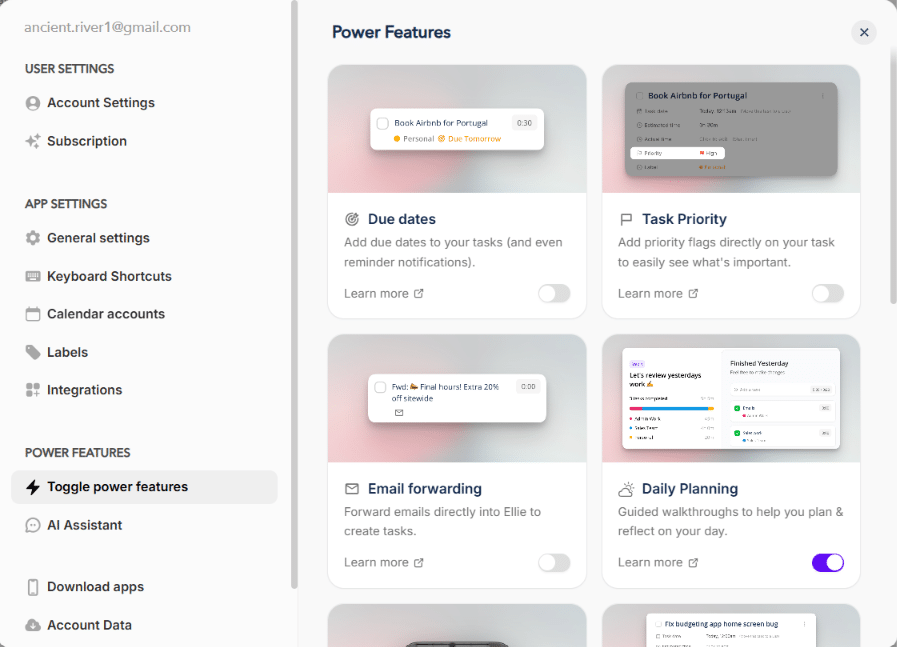
💡Tip: Make sure to check out the “Toggle power features” section in Ellie settings. I almost missed that Ellie has additional toggleable features like due dates, pomodoro timer, AI chat assistant, etc.
Who is Ellie best for?
Ellie is best for people who want to assign tasks to specific days and then plan each day one day at a time but who also value simplicity and clean, modern design. For the same planning style but more options in views, integrations, and basic auto-scheduling, Sunsama is the natural alternative.
Pros
- Drag and drop between backlog lists, day lists, and the calendar in one view
- Smooth, intuitive UI. Looks clean but packs a lot of functionality in.
- Smooth iOS app
Cons
- Only email/password login (no Google/Apple signin)
- Events can’t be added in Ellie (only tasks)
- No Android app
Pricing
Free plan available. Paid plans: $9.99/mo or $99.99/yr. A 14-day free trial of the Pro version is started immediately when you create your account (no credit card required).
5. TickTick: Best task manager + daily planner
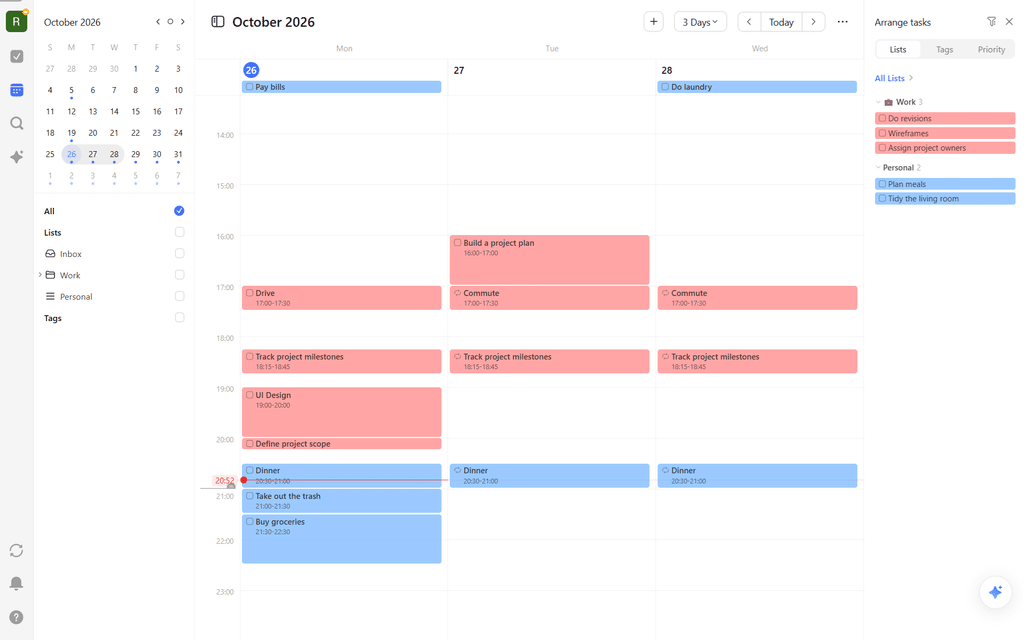
TickTick is a popular to-do list and notes app that also offers a calendar view that allows you to plan your tasks into your calendar. TickTick allows you to create different lists and then quickly create tasks via natural language parsing like “Answer emails tomorrow 9am-9:30am !high”.
TickTick’s calendar view allows you to drag tasks into the calendar. For tasks that already have a date assigned, they’ll show up in the header of the day they’re assigned, and you can drag them in. Tasks that don’t have a date assigned will show up in the sidebar, and you can then drag them into the calendar. To open this sidebar, click the triple dot icon in the top right corner, then select “Arrange tasks”.
Unfortunately, tasks in TickTick don’t support a duration when they’re not scheduled, and the only way to put a duration on them is to define a specific start and end time, or drag them into the calendar and then drag the start/end to adjust the duration. While this is still workable, it makes it less ideal for planning the day, because you have to think about the duration at the moment you plan the task rather than being able to define it when you capture the task. This also means the AI chat assistant doesn’t know the proper duration to put on the tasks when you ask it to plan your day.
Who is TickTick best for?
TickTick is best for people who want a simple, affordable daily planner. If you want a similar app but want nested lists and task durations without the task being scheduled, try Todoist, though TickTick wins my pick for the daily planning use case.
Pros
- Affordable
- Popular task manager plus calendar
- Eisenhower matrix, habit tracker, and pomodoro timer (enable these in “Settings -> Features”)
- Strong mobile apps
Cons
- The calendar view is only available on the paid plan
- Events are synced in as tasks, so there is no distinction between events and tasks in TickTick unless you apply a custom tag to imported events in the sync settings
- Outlook integration is read-only
- No way to change the color of individual tasks. Tasks use their list’s color
Pricing
Free plan available, though the calendar view requires a paid plan. 7-day free trial available through the mobile app on only the yearly plan. Paid plans are $4.99/mo or $49.99/yr.
6. Google Calendar: Best ultra-simple daily planning app
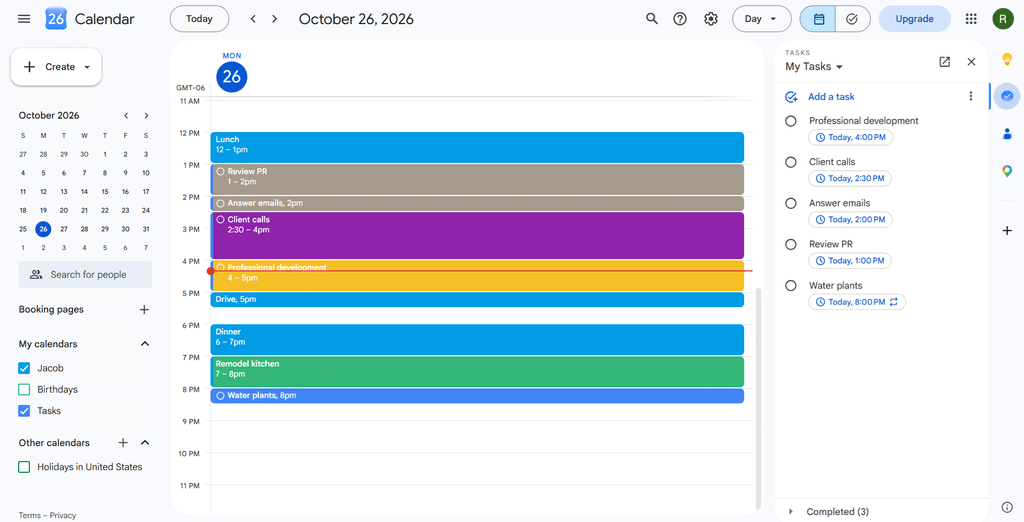
Google Calendar is a popular app for daily planning because it’s a simple, familiar calendar that works well. You can drag and drop to create color-coded events, set up repeating events, invite guests to your meetings, and more.
To take this one step further, you can open Google Tasks in the right sidebar and drag tasks directly into your calendar. Google Calendar does support adding duration to tasks once they’re in your calendar, but the task has to already be in your calendar rather than just in the tasks sidebar. Tasks also don’t support duration on repeating tasks, but that doesn’t matter as much for daily planning, so daily planning is actually one of the better use cases to use Google Calendar and Tasks together.
Who is Google Calendar best for?
Google Calendar is best for people who want simple, free daily planning. Google Calendar is an especially good option if you already use it at work, because your daily plan will be right alongside your meetings.
Pros
- Easy to use
- High quality web and mobile apps
- Native integration with Google Tasks
- Free
Cons
- Repeating tasks don’t support duration
- Doesn’t work as well with tasks from other to-do list apps besides Google Tasks
Pricing
Free.
7. Structured: Best simple daily planner for mobile
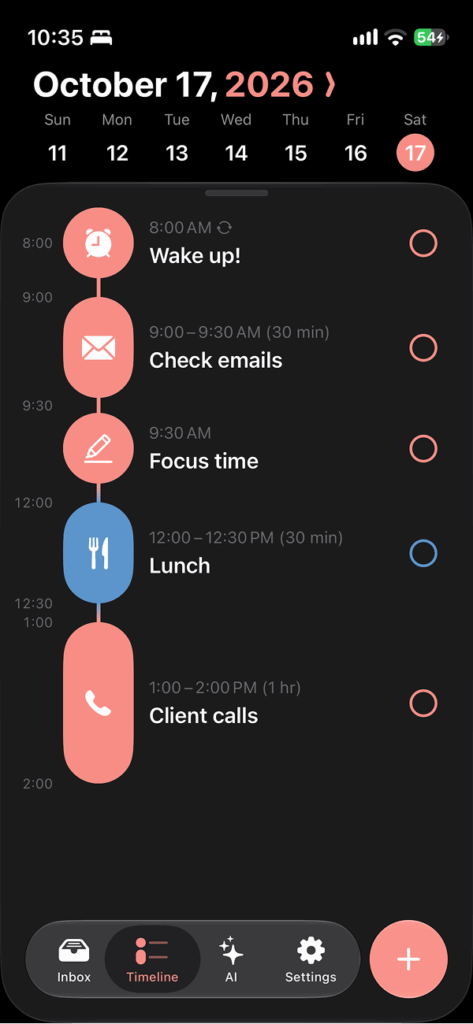
Structured is one of the most popular minimalistic, aesthetic daily planning apps available today. It uses an aesthetic timeline view rather than a calendar view, and you create tasks directly on the timeline rather than dragging them into the calendar from a task list.
Structured released an updated design for iOS 27 in September 2026, making it a strong pick for iOS users who prefer the most native experience possible.
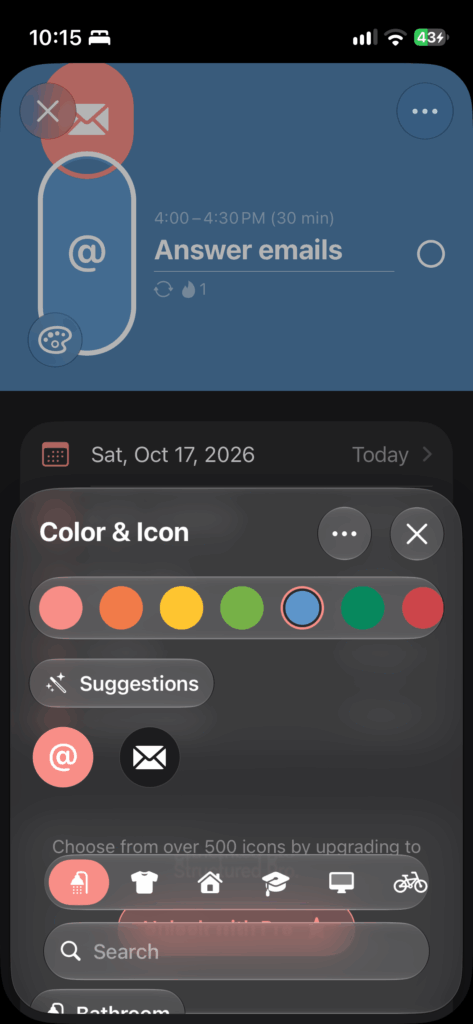
However, Structured is extremely simple and is not as ideal for task management. The only place to add tasks is the Inbox, so it works well as a daily planner for personal life, but its lack of lists and integrations make it difficult to use for more advanced use cases.
One interesting feature that’s not common in other daily planner apps is the “Energy Level” feature (must be enabled in settings). Each task can be assigned a level “Relaxing, Normal, Low Energy, Medium Energy, or High Energy”. When you schedule tasks into the day, it calculates your total energy expenditure so you can get a better idea of what you can handle and what you can’t.
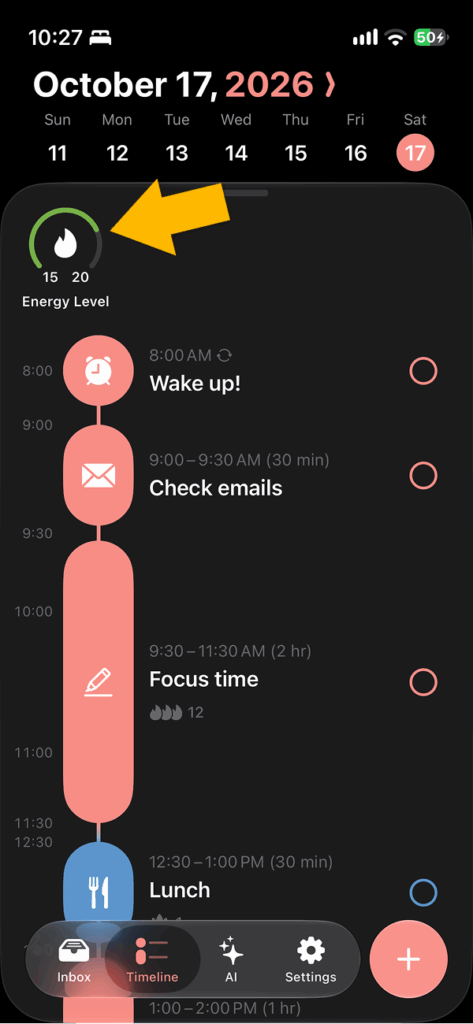
💡Tip: If scheduling based on your energy is appealing to you, and you want to base your schedule around your energy throughout your day, check out Lifestack.
Personally, the timeline is less intuitive for me to use than a regular calendar, because the scale of the day is not consistent, dragging tasks to a time that is past the last task of the day is not possible, and overlapping tasks are not as clearly represented as they are in a regular calendar. However, the timeline view definitely has a cuter look to it, so for people who prefer simple, aesthetic planning, this is a great option.
Who is Structured best for?
Structured is best for people who plan one day at a time from one inbox of tasks and who prefer an aesthetic, simple daily planner app. It is not a good fit for people who need to organize different areas of tasks, because it does not support multiple lists.
Pros
- Simple daily planner
- Strong support for the Apple ecosystem
- Color and icon customizations make the app aesthetic
- The timeline view may be more appealing and aesthetic to some people
Cons
- The timeline view may be less appealing for people who prefer a calendar view
- No categories or folders for task organization
- Web version is very limited at the moment
- Feels too simplistic for planning heavy workloads weeks at a time
Pricing
Free plan available. Paid plans are $6.99/mo or $29.99/yr.
8. ClickUp: Best project management app with daily planning
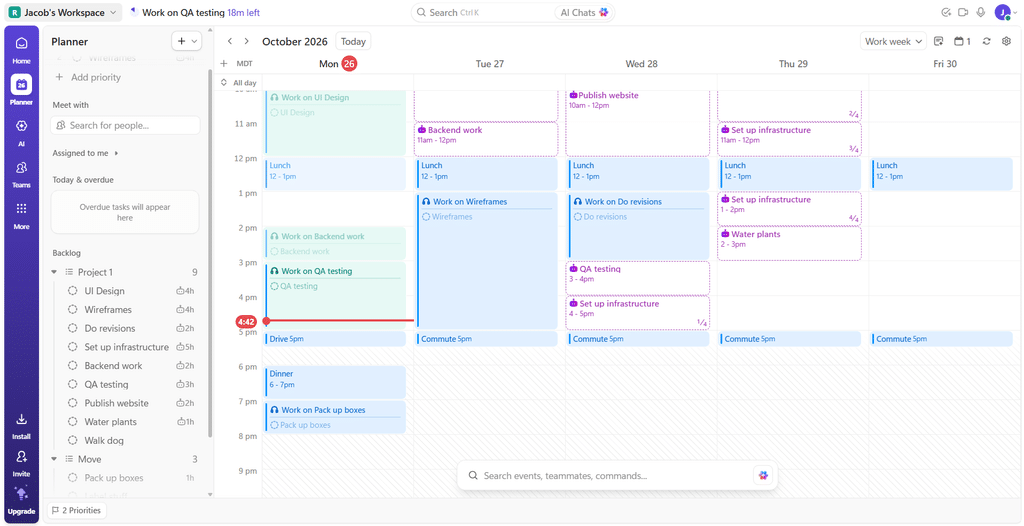
ClickUp is an all-in-one work platform with daily planning features built in. All of your projects, notes, and team communication live in one place, so everything you need for daily planning is already there. You can drag tasks from your backlog directly into the calendar, and tasks in ClickUp support duration, so when you drag them into the calendar, you can immediately see the outline of how much time they’ll take before you drop them into the calendar.
ClickUp also offers light auto-scheduling, which makes your daily planning easier, because you can simply click on the suggested task blocks and click “Confirm work session” to create that block on your calendar.
Who is ClickUp best for?
ClickUp is best for teams who need a powerful all-in-one work platform, where individual team members can plan their assigned tasks directly into their day. If you only want a daily planner, ClickUp might be overkill for your use case.
Pros
- Daily planning inside a top-tier project management tool, so all your work is connected
- Can drag and drop tasks from the backlog into the calendar
- Light auto-scheduling suggestions
- Enterprise-grade collaboration features
- The daily planning features are available on the free plan
Cons
- The full platform may be overwhelming if you only want a daily planner
Pricing
Free plan available. Paid plans start at $12/mo or $108/yr.
9. PlanWiz: Best digital daily planner with pre-built templates
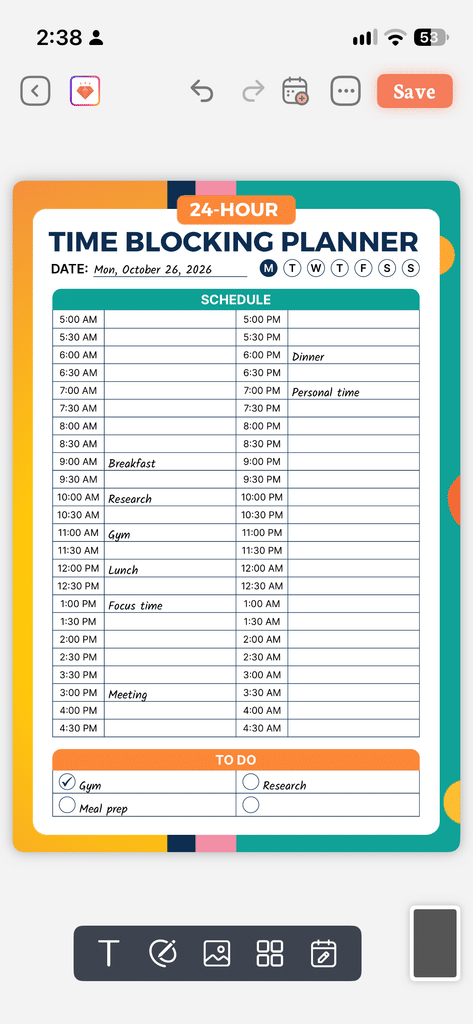
PlanWiz (named “Daily Planner, To-Do List” on the App Store and Play Store) is basically the digital version of a paper planner, superpowered by being connected directly to your calendar. You can pick from the extensive library of pre-built templates for any use case. The screenshot above shows just one template, but there are over 2000 templates you can choose from. The templates are already set up with input fields and working checkboxes, so you can plan out your day, and then export your time blocks from your planner into your calendar. Here’s what that calendar view looks like in PlanWiz:
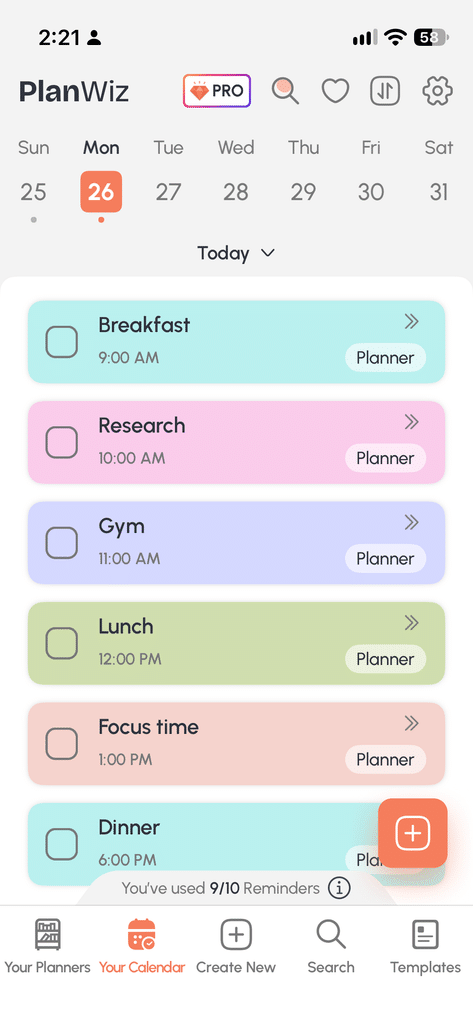
Events exported to the calendar default to having the “Carry Forward” setting turned on, meaning if you don’t complete them, they’ll roll over to tomorrow, which is a huge advantage of using this digital planner over a paper planner.
Who is PlanWiz best for?
PlanWiz is best for people who want the aesthetics and customizability of paper planners but who also don’t want to have to set up the planner themselves. PlanWiz comes with pre-built templates, so you can just find one you like and start planning.
If you’re looking for a task manager or drag & drop app, PlanWiz might not be a great fit, because it’s more like a paper daily planner. You just plan your day out one day at a time, and you can’t drag tasks around on the to-do list or drag them into the calendar.
Pros
- 2000+ pre-built templates for daily planning, to-do lists, etc.
- Export tasks from the planner to your calendar
- Similar to using a paper planner, for those who prefer that aesthetic
Cons
- Only available on iOS and Android. No web app.
- Not a task manager. More like using a paper planner for daily planning.
- Tasks can’t be dragged and dropped on the planner view or dragged to different times in the calendar.
Pricing
Free plan available. Paid plans: $3.99/week, $39.99/year, or $99.99 lifetime
Summary: Which daily planner is best for you?
If you want your day planned and re-planned for you automatically, FlowSavvy is the best fit for individuals and Motion is the better pick if you also manage projects with a team. If you’d rather plan manually, Morgen adds an AI planner you can tweak before it’s scheduled, Ellie offers a clean, guided drag-and-drop workflow, and TickTick is the best choice when you want a task manager with daily planning. ClickUp makes sense if your team already runs projects there.
For simpler needs, Google Calendar is a free and familiar option, especially if you already use it for work, and Structured is a simple, aesthetic planner that works best on mobile. PlanWiz is best for anyone who likes the layout of a paper planner but wants to use a digital planner.
If you’re not sure where to start, try the free plans of FlowSavvy, Structured, or Google Calendar and see which style of planning fits your day.
What about Sunsama?
Sunsama is an excellent daily planning app. I’d still recommend Sunsama, but I didn’t include it in the list because each of its strengths is covered by different winners.
Sunsama is commonly praised for its mindful approach to daily planning with guided rituals and board + calendar sidebar view. Ellie has almost identical daily rituals and the same board + calendar sidebar view, all at a lower cost ($9.99/mo vs Sunsama’s $22/mo), so I chose Ellie for that position in the list. Ellie lacks Sunsama’s Weekly planning ritual, but the daily rituals are the main draw.
Sunsama also features very good auto-scheduling that shows how tasks will fit into their assigned day. Morgen is a close Sunsama-style alternative, with a similar drag-and-drop approach to planning, and its auto-scheduling goes a step further: tasks can spill into earlier or later days rather than only the day they were assigned to, which makes for more realistic daily and weekly plans. For fully automatic scheduling, FlowSavvy and Motion are even stronger.
While individual strengths were covered by other apps, if you’re looking for one app that combines the mindful planning, board+calendar view, and auto-scheduling, plus a large number of integrations (something Ellie lacks), Sunsama will be the best fit for you.
What about Todoist?
Todoist is one of the best to-do list apps in the world. However, TickTick won the spot for “best task manager plus daily planner” in this list, because I found its calendar view to be slightly better equipped for daily planning:
- Todoist allows connecting only one calendar account total. TickTick allows connecting many.
- Events synced into Todoist are not editable, which means you’ll need to use two apps for your daily planning when events in other calendars are involved. Events synced into TickTick from Google Calendar are editable, though Outlook events are not.
- Future occurrences of repeating tasks cannot be edited in Todoist. They can be edited in TickTick.
- TickTick’s calendar view is more of a first-class citizen with its own view at the main level of the app, whereas the calendar in Todoist is a layout you can put any view in, which is a little confusing at times when you’re looking at the calendar view of a specific project and it doesn’t show other events or tasks.
Todoist is still one of my top recommended apps, so if you’re looking for an excellent task management app, or you want an alternative to TickTick for daily planning, try Todoist.
Other apps I tested
In total, I tested 25 apps. The nine in the list above were the best fit in my testing, but these 16 are also worth knowing about.
- Sunsama: Guided daily planning app with daily rituals and a board plus calendar view.
- Akiflow: Premium daily planner with built-in AI assistant; see our Akiflow alternatives guide.
- Amie: Calendar and to-do app with drag and drop, basic AI scheduling, and an AI chat assistant.
- Todoist: Task manager with nested projects, labels, and a calendar view.
- Tiimo: Visual daily planner with a focus mode.
- Sorted: Planner that puts calendar events and tasks on one timeline, with an auto schedule feature.
- Any.do: Calendar and to-do list app.
- Routine: Calendar and task planner.
- Lifestack: AI daily planner that plans your day around your energy levels.
- Saner.AI: Calendar and notes app with an AI chat assistant.
- Goodnotes: Handwriting-style digital planner.
- Notability: Note-taking app that can be used as a handwriting-style digital planner.
- Artful Agenda: Digital version of a physical daily planner with stylus handwriting and calendar sync.
- Notion: All-in-one workspace you can customize into your own planning system.
- Trello: Kanban-style task management app.
- Monday.com: Team project management platform.
Daily planner app FAQs
Which daily planners are best for time blocking?
For automatically time blocking your daily plan, FlowSavvy is best for individuals while Motion is best for teams. For manually time blocking your day, Morgen is the best premium time blocking daily planner, while Google Calendar is best for simple daily time blocking.
What is the best daily planner app for mobile?
- Best automatic daily planner on iOS and Android: FlowSavvy. Auto-schedules and dynamically reschedules your plan with all the same features as the web app.
- Smoothest daily planner on iOS: Ellie. Drag and drop tasks from the to-do list into the calendar in one view. Mobile app only available on iOS, not Android.
- All-in-one, affordable daily planner on iOS and Android: TickTick. To-do lists, calendar, pomodoro timer, Eisenhower matrix, AI assistant, voice input, etc., on both iOS and Android.
- Most aesthetic: Structured (iOS, Android) for its timeline view, or PlanWiz (iOS, Android) for its paper-planner-like templates and customizations.
What is the best free daily planner app?
FlowSavvy, Google Calendar, Structured, and ClickUp have the best free plans for daily planners.
- FlowSavvy: Best for automatic planning and rescheduling
- Google Calendar: Best for simplicity
- Structured: Best aesthetic
- ClickUp: Best for project management