An AI calendar can help you level up your productivity by doing the planning and rescheduling for you, so you can focus on execution. We tested 14 apps in-depth and narrowed it down to 7 apps that perform most reliably in 2026.
The best AI calendars in 2026
- FlowSavvy for auto-scheduling tasks for individuals
- Reclaim for defending focus time
- Motion for project management
- SkedPal for highly customizable auto-scheduling
- Morgen for AI-assisted manual planning
- Google Calendar with Claude for simple event management
- Akiflow for built-in AI chat with task management
How we evaluated AI calendar apps
The best AI calendars auto-schedule tasks from your to-do list into your calendar holistically and reliably. That means any tools we considered for this guide had to match the following criteria:
- Some form of task management: (e.g. a to-do list view)
- A calendar view
- Mass scheduling capabilities: The ability to mass schedule tasks into the calendar to create a holistic schedule, either via dedicated auto-scheduling engine or AI chat. AI daily planners (auto-scheduling scoped to individual days rather than multiple days being considered at once) were excluded since this article focuses on holistic AI calendars.
- Established: 1+ year, since we see so many launch and then stop a few months later.
- Reliable: Some apps we tested were too clunky/buggy, so we removed them. Every app listed here was reliable in our testing.
To test these tools, we created an account for each, customized the availability settings like working hours and preferences, connected at least one calendar app (e.g. Google Calendar) and one task management app (e.g. Todoist), then entered a full week’s worth of work to simulate a real work week. We then tested the app’s rescheduling capabilities by making changes like adding a new conflicting meeting or purposefully missing a task.
Disclaimer: One of the recommended products, FlowSavvy, is our product. We subjected it to the same evaluation criteria as the others and have included where it’s a good fit and where it’s not.
Auto-scheduling apps vs LLM-powered AI calendars
In the context of productivity apps, “AI calendar” usually means one of two things:
- A calendar app that automatically creates your schedule and automatically adapts when conflicts arise or you don’t complete a task.
- A calendar app with an LLM-powered chat component that lets you interact with your calendar in natural language.
This is usually a trade-off. Auto-schedulers with dedicated scheduling engines are extremely fast, predictable, and reliable, but lack the flexibility of natural language. LLM-powered calendars are flexible in that they can understand natural language, add events from pictures, answer questions about your calendar, provide suggestions, etc., but they struggle with the huge number of constraints involved in planning several weeks at once.
Some of the apps below are only dedicated auto-scheduling engines, while others are only LLM-powered calendars, while some are a combination of both. We’ve included both types of AI calendars in this guide so you can find exactly what you’re looking for, while understanding the tradeoffs and what to look for.
AI calendar apps comparison table
| App | Best for | Dedicated auto-scheduling engine | Auto-rescheduling | Natural language chat | Platforms | Price |
|---|---|---|---|---|---|---|
| FlowSavvy | Auto-scheduling for individuals | Yes | Yes | MCP | Web, iOS, Android | Free plan. $14/mo, $120/yr. |
| Reclaim | Defending focus time | Yes | Yes | Built-in and MCP | Web | Free plan. $12/mo, $120/yr. |
| Motion | Project management | Yes | Yes | Built-in (limited) and community-created unofficial MCP | Web, desktop, companion iOS/Android apps | $49/mo, $348/yr. |
| SkedPal | Complex auto-scheduling | Yes | Yes, but must click “Update schedule” | No | Web, companion iOS/Android apps | $14.95/mo, $119.40/yr. |
| Morgen | AI-assisted manual planning | Yes, with limitations | Yes, but it must be triggered manually and has limitations | Community-created unofficial MCP | Web, desktop, companion iOS/Android apps | $30/mo, $180/yr. |
| Google Calendar with Claude | Simple event management and time blocking | No | No, but can be requested via chat | Yes | Web, desktop, iOS, Android | Free plan. $20/mo, $204/yr. |
| Akiflow | Built-in AI chat with task management | No | No, but can be requested via chat | Built-in and MCP | Web, macOS, Windows, iOS, Android | $34/mo, $228/yr. |
1. FlowSavvy: Best AI calendar app for individuals
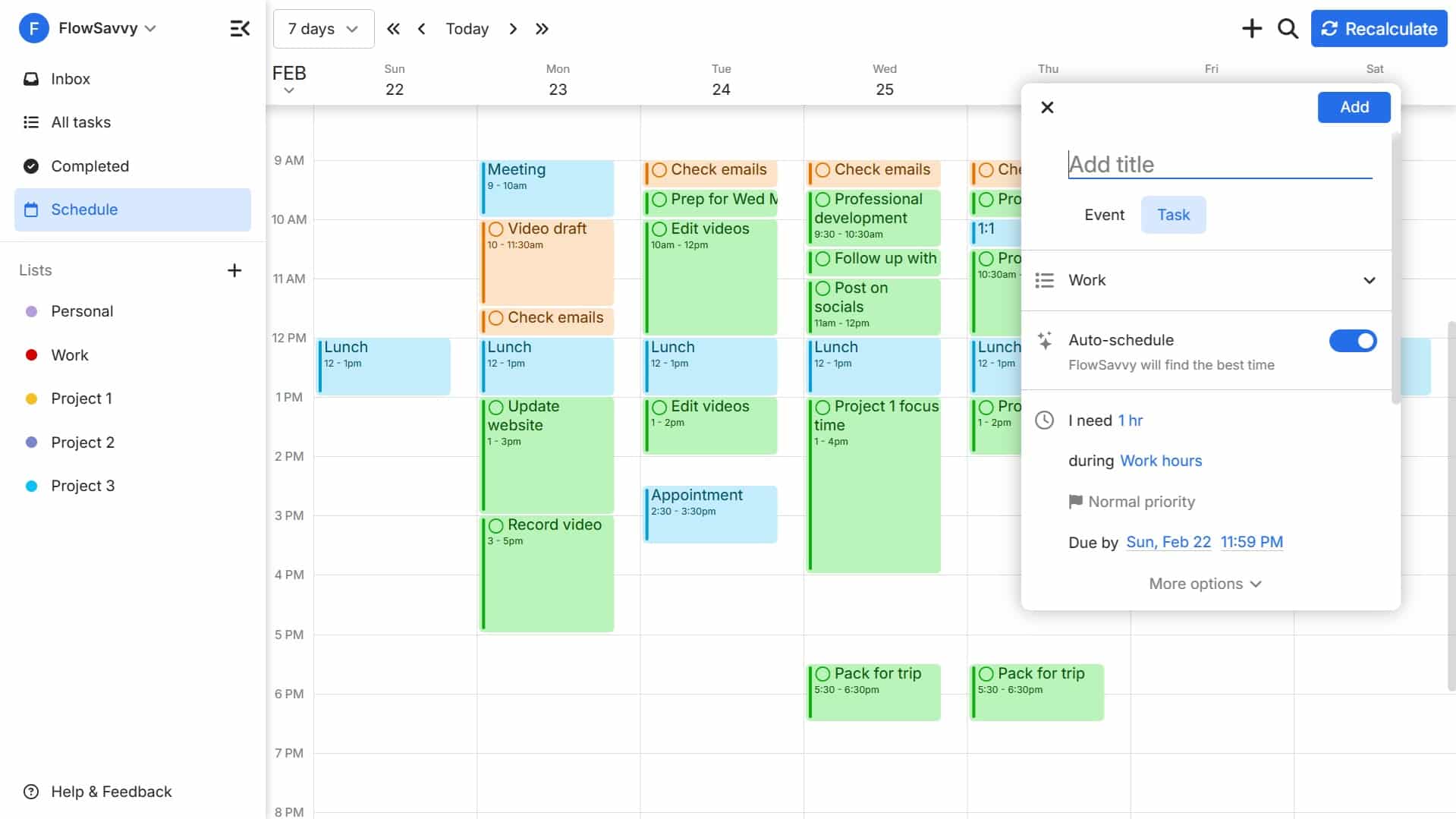
FlowSavvy is an AI calendar that focuses on auto-scheduling tasks from your to-do list into your calendar. Just enter your tasks, and FlowSavvy will build your optimized schedule. When plans change or you fall behind, FlowSavvy instantly rebuilds your new schedule so you can get back on track.
FlowSavvy is designed specifically for individual professionals rather than teams, so it has all the auto-scheduling features you need with none of the extra team feature bloat. The screenshot above is a good example of that. When you go to add a task, you just say how much time you’ll need for the task, which “hours” it should be done in, the priority, and when it’s due. FlowSavvy will then take over and do the actual scheduling, and then if a new meeting comes up or you get behind, FlowSavvy reschedules all your tasks instantly.
FlowSavvy does not offer a built-in chat component, but it does have an official MCP, so you can manage your calendar in natural language via the AI chat assistant you already use.
Who is FlowSavvy best for?
FlowSavvy is best for individual professionals who need robust auto-scheduling features at an affordable price without unnecessary complexity or team features. FlowSavvy is also the best option for people who need a strong auto-scheduling mobile app. For people looking for team features, Reclaim or Motion will be a better fit.
Pros
- Strong auto-scheduling that creates your schedule and rebalances when plans change.
- Easy to set up and use.
- All the same features on web, iOS, and Android.
- Robust free version and affordable paid plans.
Cons
- No team/enterprise features. Use integrations for collaboration features.
- The auto-scheduling is not as customizable as LLM-powered calendars.
- Does not automatically spread out large projects. Must use repeating tasks.
- No built-in chat component. Use the MCP for natural language support.
Pricing
- Free version: Yes
- Paid plan: $14/month, $120/year.
2. Reclaim: Best AI scheduler for defending focus time
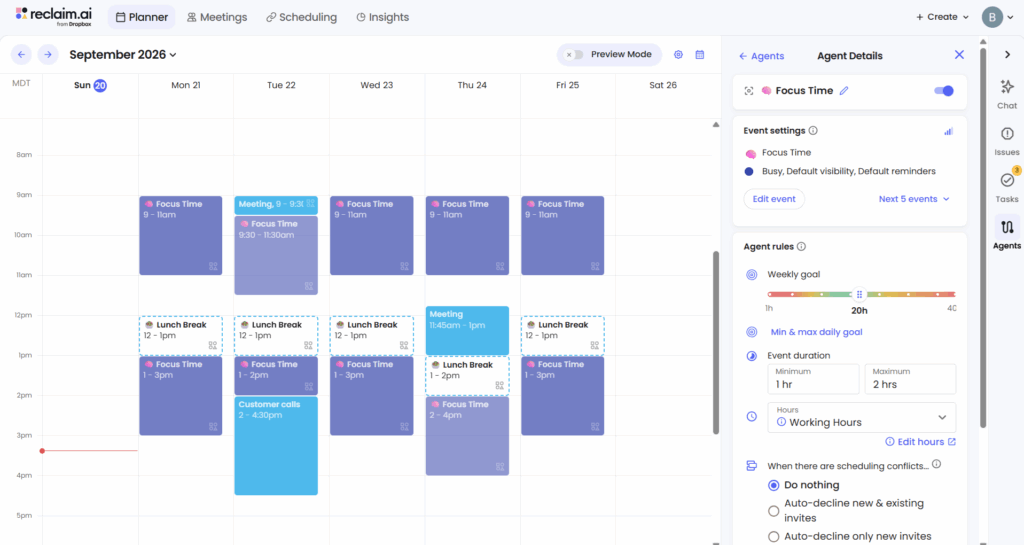
Reclaim 2.0 is an AI calendar designed to protect your focus time. You tell it how many hours of focus time you want each week, and it auto-schedules your meetings and habits (for example, lunch) to maximize your focus time.
Reclaim has been commonly recommended as an auto-scheduling app for several years, but Reclaim’s approach has changed with the recent launch of Reclaim 2.0, so I tested it out to see how things have changed. I still recommend it as a top AI calendar, but for a different reason than task auto-scheduling. Reclaim 2.0 no longer schedules individual tasks on your calendar, and instead, its main focus now is auto-scheduling meetings, habits, and large “focus time” events, while surfacing a list of relevant tasks at any given time that you can then choose from yourself. Here’s an example of what those suggestions look like in the right sidebar:
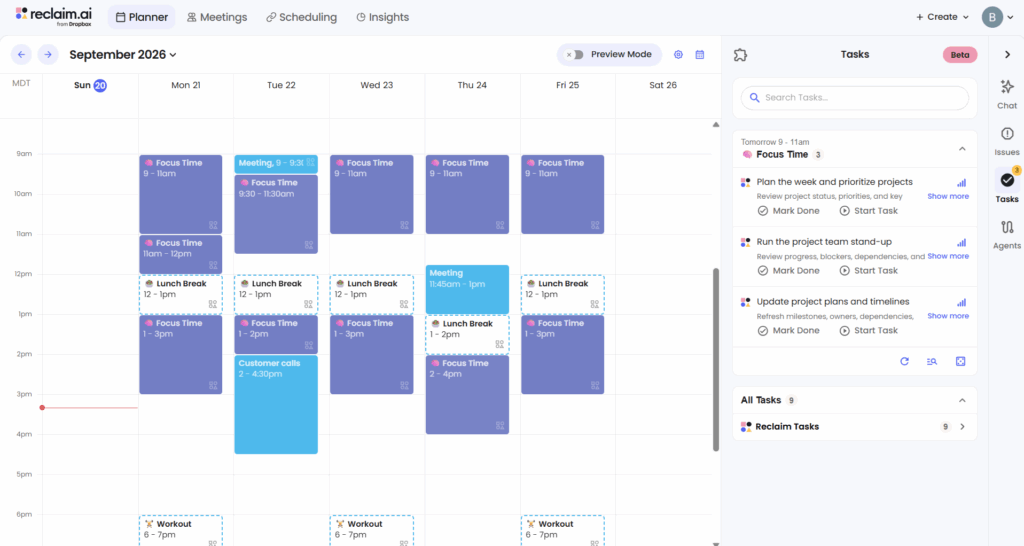
The strength of Reclaim 2.0 in my opinion is how easy it is to set up focus time. You just tell it how many hours you want, and it will automatically spread the hours out over the week, and protect them by turning them to “Busy” when there isn’t much wiggle room left. Tasks are also much simpler now, because they don’t require all the different parameters that Reclaim 1.0 needed in order to know when to auto-schedule them. Here’s what the new task view looks like now:
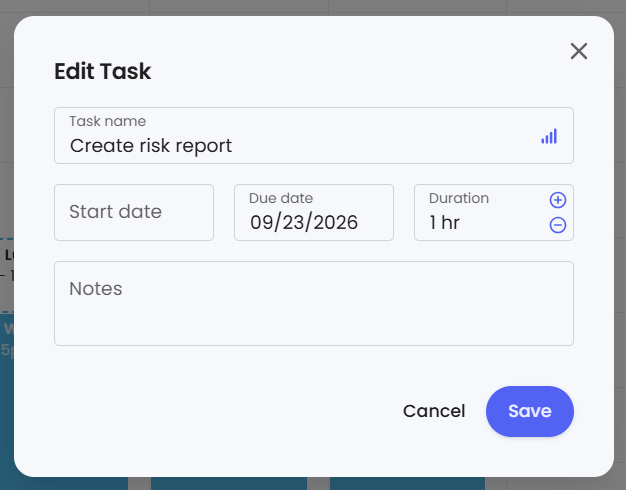
The one drawback to this simpler view is that I couldn’t find a way to classify a task as a “work” task or “personal” task, so the AI suggestions would sometimes suggest a personal task during my work hours.
Reclaim 2.0 also offers a chat assistant so you can make changes in your calendar in natural language. When you ask the assistant to make changes, it shows you the changes to your entire calendar in a preview mode, so you can accept the changes or discard them.
Who is Reclaim best for?
If you’re looking for an AI assistant to protect your time from interruptions at work and to find time to meet with others, Reclaim is the app for you. I haven’t come across any other app that comes close to Reclaim’s automatic meeting scheduling abilities, and its approach of blocking out focus time and suggesting tasks you could work on may feel less overwhelming than time blocking individual tasks.
If you are looking for an AI calendar app to help time block individual tasks, Reclaim 2.0 will not work for you. You can switch back to Reclaim 1.0 (Settings -> Account -> Manage my account) or use other apps on this list like FlowSavvy or Motion.
Pros
- Auto-schedules your meetings, habits, and focus time.
- Suggests a list of tasks to work on next, which may be less overwhelming than auto-scheduling every task into the calendar for some people.
- Detailed analytics provide insights into productivity patterns.
- Mirrors events from personal calendars to your work calendars and vice versa to prevent double bookings.
- Priority-aware booking links help clients/teammates meet with you without affecting your priorities.
Cons
- Does not schedule individual tasks.
- No native iOS/Android apps.
- No iCloud support.
- Limited task organization within Reclaim. Sync with task management tools for task organization.
- “Focus time” blocks can’t be moved manually. They’re fully managed by Reclaim.
Pricing
- Free version: Yes
- Paid plans: Multiple tiers starting at $12/month, $120/year.
3. Motion: Best AI calendar for project management
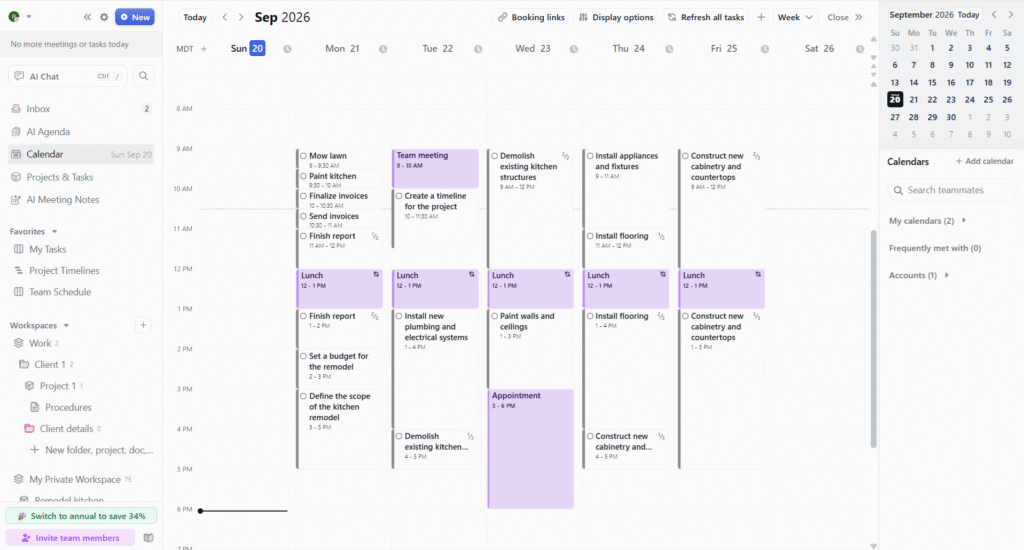
Motion is an AI productivity suite that includes AI Calendar, AI Project Management, AI Docs, AI Notetaker, and team collaboration features, making it one of the best AI schedulers for teams. The AI calendar feature schedules work into your calendar and readjusts when plans change.
The usual workflow in Motion is to create a project with the help of the AI project manager, then schedule your tasks using the AI calendar. Here’s what that looked like when I created the project 👇. I just told it to help me remodel my kitchen, and it broke it down into logical stages and tasks with duration estimates for each:
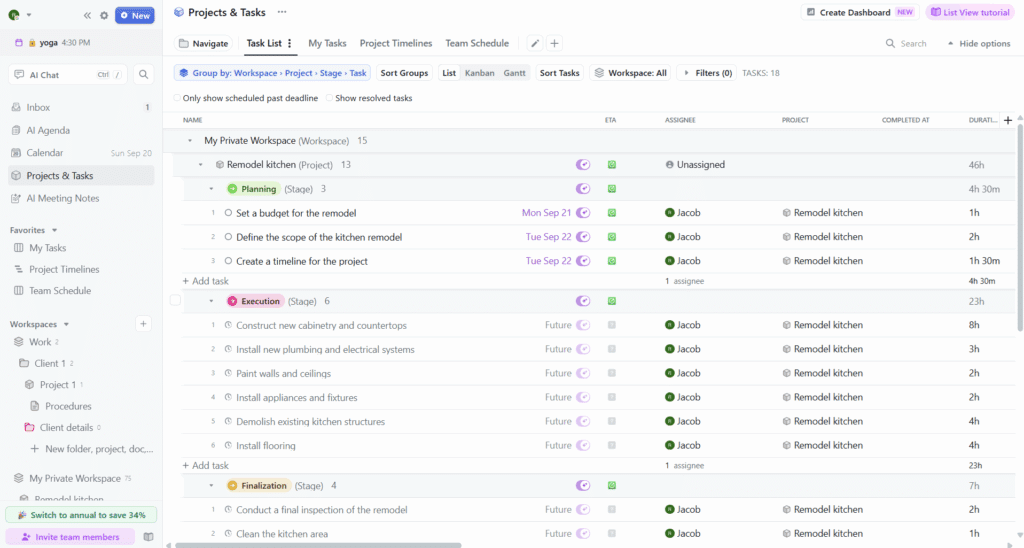
I like the table view for quick editing, but others might find the complex UI overwhelming, so this just depends on which you’re looking for.
After you’ve planned out the tasks that will go in a project, tasks assigned to you will be auto-scheduled into your calendar around your other events. Then, when you get behind or something comes up, Motion auto-reschedules your tasks. This is the stand-out feature of Motion and why we’ve included it in this AI calendars list.
Motion does include a chat component, but when I tested it, it was not able to create events or tasks at specific times. Instead, it seems geared for just creating and editing auto-scheduled tasks and documents, and surfacing information about the schedule and documents/notes. You can also try using a community-built MCP (third-party, use at your own risk).
Who is Motion best for?
Motion is ideal for teams who need to coordinate projects while auto-scheduling tasks into each team member’s calendar. Motion will help plan your projects, schedule them, and predict when they’ll be completed, making it a huge asset for teams.
However, it’s also the most expensive app on this list and may be more complicated than some people want. If you’re an individual looking for just the auto-scheduling, FlowSavvy will likely be a better fit for you. Check out our FlowSavvy vs Motion comparison for a deeper side-by-side look at these tools.
Pros
- Helps create projects and plan tasks into your team’s schedules.
- Advanced project management views like Gantt charts and Kanban boards.
- Coordinate task assignees, track team workload, and predict project completion dates.
- Includes other tools like AI Docs and AI Notetaker.
Cons
- Takes a long time to learn because of its complex views.
- Pricing is expensive for individual users.
- The mobile app is a limited companion app.
- Limited repeating task intervals (e.g. no option for “every 2 days”, “every 2 months”, “yearly”, etc.).
Pricing
- Free plan: No
- Paid plans: Multiple tiers starting at $49/month or $348/year. Discounts for teams.
4. SkedPal: Best AI scheduler for customizability
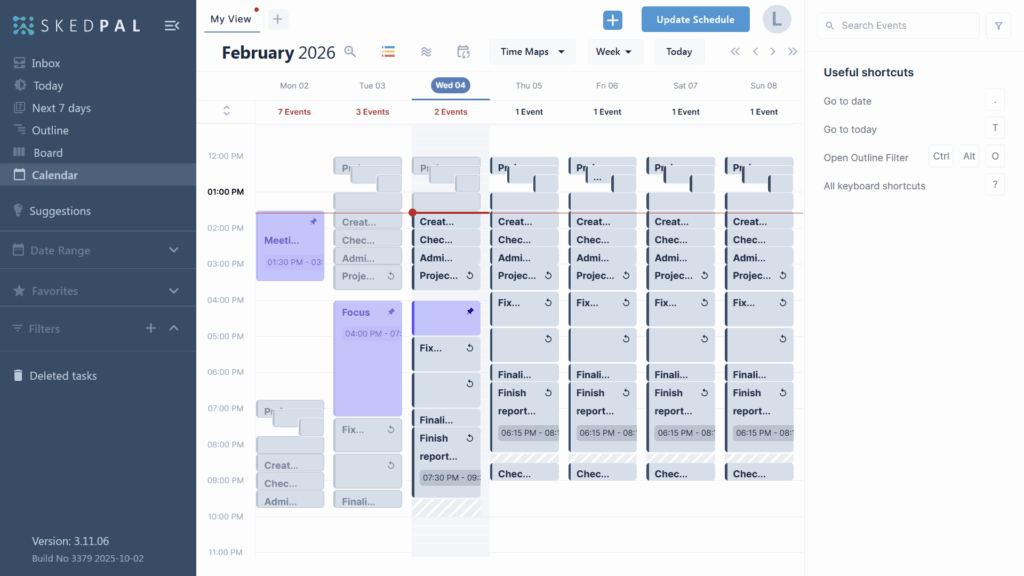
SkedPal is a highly customizable AI calendar app that creates your calendar for you. While it does have a steeper learning curve and setup time, once you take the time to set it up, you’ll have an AI calendar assistant that schedules exactly how you want.
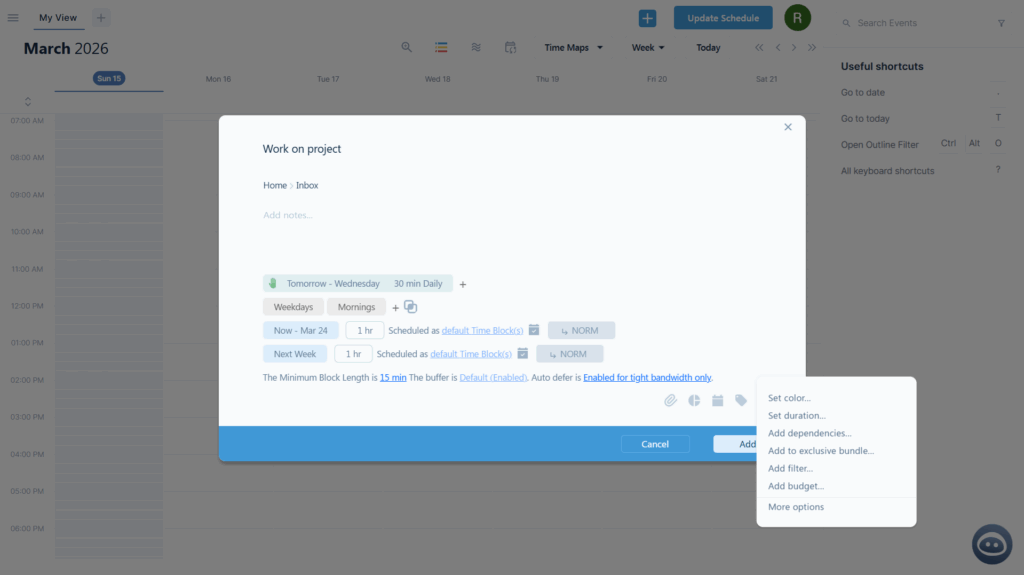
SkedPal has been around the longest of the apps on this list (founded in 2014), so it’s the most built-out auto-scheduler with just about every customization you could want. It offers extremely specific rules for how you’d like tasks to be scheduled, for example:
- Dependencies with wait time in between: “Put clothes in the washer, then wait 1 hour, then put clothes in the dryer”.
- Repeating tasks multiple times per day.
- Complex “time map” combinations. For example, “This task can be scheduled during the intersection of my ‘Personal hours’ and ‘Weekdays’”, or “This task can be scheduled during either ‘Work hours’ or ’emergency work hours’”.
Below is an example of what that customization looks like when you add a task. You can see this task will be scheduled in two different blocks, during weekday mornings, and there are additional options to add dependencies, add the task to an exclusive bundle, add filters, budgets, and more.
One of the biggest drawbacks I found in SkedPal is that it doesn’t automatically reschedule the same way as FlowSavvy, Reclaim, and Motion. With those apps, as soon as a new event comes up, they instantly reschedule your entire schedule. With SkedPal, you have to manually click “Update schedule”. There is an “Instant Schedule Update” feature, but it only auto-updates the current day, and it is only available on the most expensive plan.
SkedPal does not include a chat component or MCP, but it does have a Zapier integration, so you can use Zapier’s SkedPal MCP to trigger a limited set of actions in SkedPal.
Who is SkedPal best for?
SkedPal is ideal for users seeking a highly customizable and detailed auto-scheduler. SkedPal is usually the first option we recommend when people have niche use cases not supported by the other AI calendars.
SkedPal is designed for individuals rather than teams, making it one of the best options for individuals along with FlowSavvy. For a more in-depth look at which of these two to pick, check out our FlowSavvy vs SkedPal comparison.
If the auto-rescheduling feature is the main feature you care about, SkedPal may not be the best fit, since the auto-reschedule only updates the current day.
Pros
- Highly customizable scheduling plans for complex auto-scheduling.
- Allows an infinite hierarchy of subtasks.
- Users can categorize tasks and set limits on how much work from each category can be done each day/week.
Cons
- High learning curve.
- Limited companion mobile app.
- No collaboration features.
- Automatic rescheduling is limited to today only.
- No recent updates – development status unclear, though the product still works great. The version number (3.11.06) is the same as it was when we reviewed SkedPal in February 2026, and the iOS/Android apps were last updated November 2025, so it does not appear to be getting regular updates.
Pricing
- Free version: No
- Paid plans: Multiple tiers starting at $14.95/month or $119.40/year.
5. Morgen: Best AI planner for AI-assisted manual planning
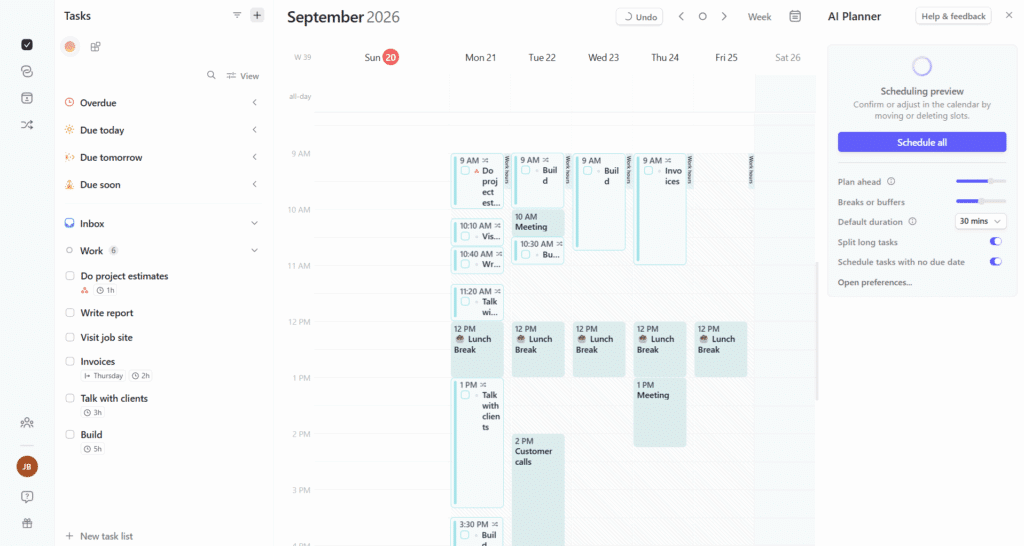
Morgen is an AI calendar that takes a different approach to automatic scheduling. Instead of instantly updating the schedule when you make changes (like adding a task, changing a priority, moving an event, etc.), you’ll need to use the AI planner feature to update your schedule.
I really liked the time blocking experience of Morgen where you can drag tasks from the left sidebar into the calendar, and the AI planner gave good recommendations for where to place tasks once I set up “frames” to guide it, like when my work hours and personal hours are.
The AI planner feature is excellent for planning the first version of the schedule and fixing one-off conflicts, but one downside I noticed after using it for a while is that it won’t reoptimize the schedule when you add new tasks. For example, I used the AI planner to auto-schedule a week of tasks, and then I added a new high priority task, and the AI planner only fit it into the leftover free time rather than shifting the other tasks around. For that kind of holistic rescheduling, the dedicated auto-schedulers like FlowSavvy, Motion, and SkedPal might be a better fit.
Morgen does not offer a natural language chat component or MCP, but you can try using a community-created MCP (third-party, use at your own risk) to manage your Morgen calendar in natural language.
So, Morgen has helpful automations, and it’s intentionally not as autonomous as some of the other options on this list. We wanted to include this option for users who may prefer a little more control over the scheduling. Morgen offers a great balance of sleek manual planning with strong AI suggestions when you want them.
Who is Morgen best for?
Morgen is best for people who like a lot of control in their planning but want some additional help from AI. While the AI scheduling isn’t as holistic or automatic as the other options in this list, it is a great option for people who enjoy manual time blocking and want help planning faster with AI suggestions.
💡Tip: If you like the more manual style of Morgen but want some other options, check out our guide on time blocking apps.
Pros
- AI suggestions help with planning tasks into your calendar.
- Sleek UI.
- Drag and drop tasks from the sidebar into the calendar.
- Easy to tweak the AI suggestions.
- Team collaboration features like event guests and conferencing details.
Cons
- Not as automatic as other AI calendars. Requires using the AI planner to update the calendar.
- Tasks planned in the calendar don’t move to make room when you add higher priority tasks, making the AI scheduling seem less holistic.
- Limited mobile companion app.
Pricing
- Free plan: No
- Paid plan: $30/month or $180/year.
6. Google Calendar with Claude: Best AI calendar for simple event management
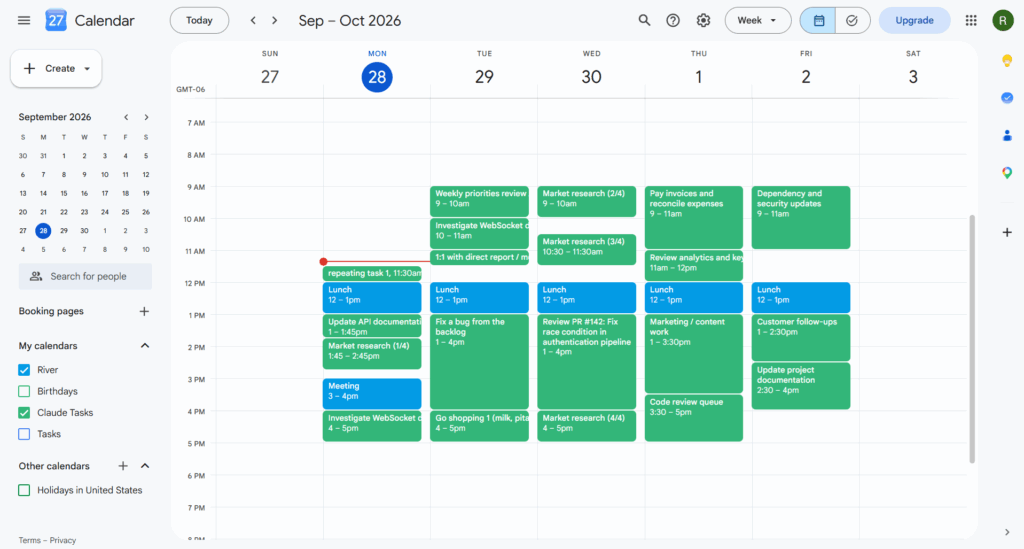
Google Calendar is a popular free calendar that can be connected to Claude to turn it into a simple AI calendar. If you just want a calendar you can talk to to add and manage events (rather than heavy task management / time blocking), this is a perfect option. You can upload itineraries, invitations, and syllabi, and your AI assistant can easily add the events to your calendar. You can ask it to move events, and analyze your upcoming week. You can also ask it to look at your tasks in your task management software and time block the tasks into your week:
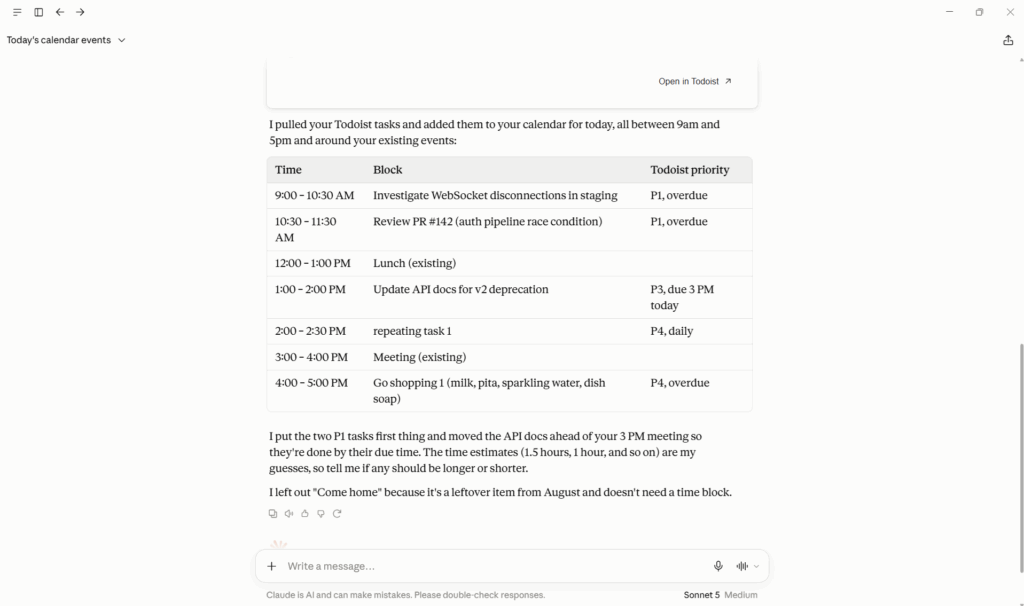
While many popular calendar apps allow AI agents to connect to them via MCP, I chose Google Calendar because of its simplicity, clean UI/UX, and familiarity to most people. If you already use another calendar like Microsoft Outlook, you may prefer to connect your agent to your existing calendar instead.
The main downside to this approach is that Google Calendar events aren’t connected to a task object in a task management software. Technically, Google Tasks can show up in the calendar, but duration cannot currently be configured in the Google Tasks API or MCP, meaning AI agents can’t set duration on Google Tasks to make them show up with a duration other than 30 minutes in the calendar. This is why AI agents need to create new events to represent the tasks in the calendar. This means you won’t be able to mark events “complete” like you can in other AI calendars. However, for event management and simple time blocking, Google Calendar with an AI assistant is a great option.
Should I use Claude, ChatGPT, or Gemini with Google Calendar?
I tested Gemini, ChatGPT, Claude, and Cursor, and I had the best experience with Claude (tested on Sonnet 5).
Claude has a huge selection of native connectors on the free plan, including Google Calendar and most task management apps, so I was able to easily connect Google Calendar and Todoist. I like that I can set it to auto-approve actions so I don’t have to confirm every time, and that Claude is able to use connectors in voice mode on the mobile phone, meaning I can talk to it like an assistant while I’m driving.
I did run into usage limits on the free plan after creating and rescheduling just 5 tasks a few times (about 10 minutes of testing). On the Pro plan, I created an entire week full of time blocks and made Claude reshuffle the entire week multiple times (much heavier usage than a typical planning session) and used 65% of my session limit, so Pro should be more than enough for regular usage.
If your tasks are in Google Tasks, you might prefer using Gemini, since Google Tasks does not offer an official MCP for other agents to connect to. However, I had several issues with Gemini’s requests to Google Tasks hanging (5 times over 2 different testing days) and not being able to access my connected apps randomly. I also did not like that it asks for confirmation before every action without a way to auto-allow. The issue may have been temporary, so if your tasks are in Google Tasks, it may be worth it to check if the experience has improved.
Who is Google Calendar with Claude best for?
Using Google Calendar with Claude is best for people that want an AI calendar mostly for event management or simple time blocking. It’s not as streamlined or reliable for complex time blocking and automatic rescheduling, but this option excels in flexibility.
Pros
- Can be used for free.
- Events are simple to work with.
- Extremely flexible since you interact with the calendar via an AI assistant chat.
Cons
- No built-in task management. Google Tasks API/MCP not sufficient for time blocking with Claude.
- Can hallucinate and make mistakes under complex scheduling loads.
- Slow for mass auto-scheduling.
Pricing
- Free plan: Google Calendar is free, and Claude offers a free plan.
- Paid plan: Claude has paid plans starting at $20/mo or $204/yr.
7. Akiflow: Best AI calendar assistant for built-in AI chat
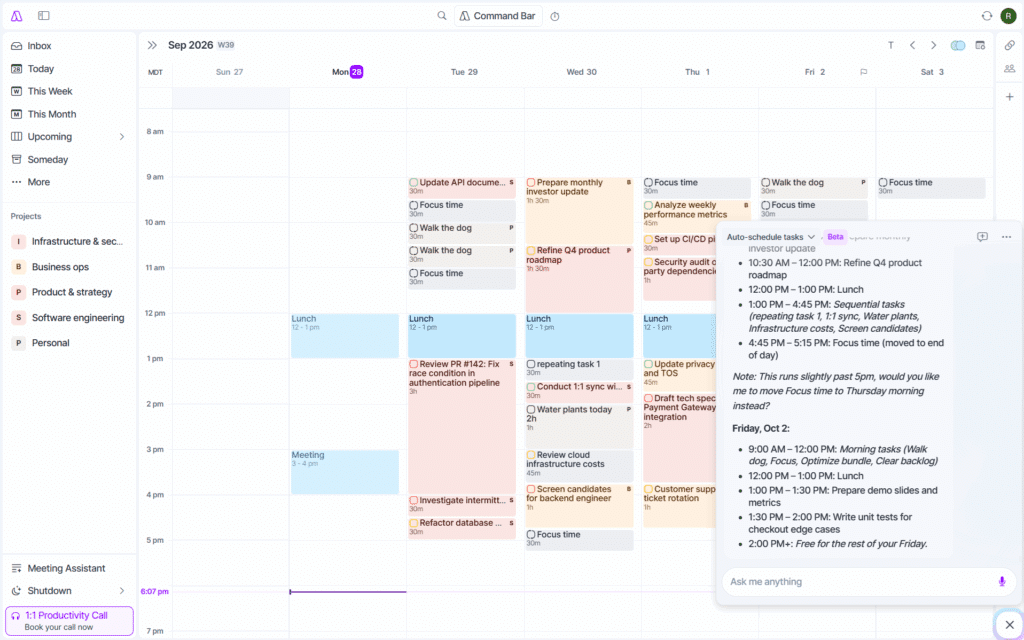
Akiflow is an excellent time blocking app with a built-in AI chat. While its main draw is its ability to integrate with multiple task management apps and then time block by dragging and dropping into the calendar, Akiflow’s AI chat allows you to manage your tasks and events via natural language.
This is very similar to the Google Calendar with Claude workflow, but Akiflow has the added advantage of having task management built-in to the app, so the scheduled time blocks are actually connected to your tasks and can be marked complete from the calendar.
I asked Aki to schedule all my tasks from Todoist into my calendar, and it took a few tries to get it to schedule how I wanted, but I was eventually able to get a reasonable schedule. Then, I told it “Something came up tomorrow. Please reschedule all my tasks tomorrow.” It did this by moving the tasks from Tuesday into other open spots on the calendar without moving other tasks. Then, I asked it to analyze my tasks and suggest categories so I could group the tasks into projects. Aki can’t create projects directly, so I created the projects myself, and then I asked Aki to move the relevant tasks into each project, which it did perfectly. This tight integration between the to-do list, calendar, and AI chat is a huge advantage over using a generic calendar like Google Calendar with an AI assistant.
Who is Akiflow best for?
If you’re looking for a dedicated time blocking app with a built-in AI chat for managing your events and tasks, Akiflow is the app for you.
For pure AI scheduling via an AI chat, I found Claude to be more reliable (more thorough reasoning) and flexible (allows uploads and voice conversation mode), while Akiflow was the obvious pick for better task management and speed.
Pros
- Can time block tasks manually or ask Aki to do it.
- Can consolidate tasks from multiple apps into one place that the AI can then schedule.
- AI chat is built-in, so it can be used to manage tasks and events in Akiflow.
- Aki makes changes faster than Google Calendar with Claude.
Cons
- Occasionally forgot constraints I had mentioned earlier in the same chat.
- Can’t upload images like Claude/ChatGPT.
- Suggested schedules were not as good as Claude’s, though Claude took significantly more time to think about the schedule.
Pricing
- Free plan: No
- Paid plan: $34/mo or $228/yr.
Which AI calendar is best for you?
For a quick recap, choose FlowSavvy for intuitive auto-scheduling for individuals, Reclaim for protecting focus time, Motion for project management, SkedPal for highly customizable auto-scheduling, Morgen for AI-assisted manual planning, Google Calendar with Claude for simple event management, and Akiflow for built-in AI chat with task management.
I recommend trying a few that speak to you, and give it some time to learn the platforms, since they’ll naturally take some time to learn. It took me about 30 minutes of playing around with each to learn how they were supposed to be used and really get the hang of it, so don’t give up early! Once you get your schedule set up and fully automated, you’ll be cruising through your work with your AI calendar handling the scheduling all in the background.
FAQs
What happened to Clockwise?
Clockwise shut down on March 27, 2026 following the company’s acquisition by Salesforce, so we removed it from this list. For a similar AI calendar, Reclaim is the closest direct replacement.
AI Calendar vs. AI Scheduling Assistant: What’s the Difference?
AI calendars are calendar apps that have AI integrated in some way, whether that is auto-scheduling and auto-rescheduling, or natural language chat components. AI calendars are a subset of AI scheduling assistants. AI scheduling assistants are the broader category of software that help with scheduling. This includes email CC assistants that coordinate meetings on your behalf, chat/voice assistants that you can talk to to manage your schedule, shift scheduling software, AI calendars, and more.
Is there a free AI calendar app?
Yes. FlowSavvy, Reclaim, and Google Calendar with Claude all offer free plans. FlowSavvy is better for pure auto-scheduling for individual professionals, while Reclaim is better for protecting focus time at work and auto-scheduling meetings for teams, and Google Calendar with Claude is best for simplicity and natural language flexibility.