Akiflow is a popular productivity tool built around the idea of bringing all your tasks into a “universal inbox” and then blocking time for them in your calendar. However, limitations like complexity, limited auto-scheduling, and budget push people to look for alternatives.
If you’re looking for an Akiflow alternative, the best choice for you will depend on what you like about Akiflow and what’s pushing you to look for alternatives.
⚡TL;DR: Best Akiflow alternatives
How I chose these alternatives
There are an enormous number of great task apps. To keep this guide focused on the best Akiflow alternatives, I’ve limited my recommendations to apps that stay true to these core aspects of Akiflow’s universal inbox → time blocking philosophy:
- A task list and calendar in one
- Designed for both desktop and mobile use
- Strong bonus: auto-scheduling
This means this guide does not include products that aren’t focused on the task list + calendar combination that Akiflow is built around, or apps that lack the strong desktop and mobile experience needed for quickly capturing and organizing tasks throughout the day.
Quick decision table:
| Alternative | Best for | Key features | Price |
|---|---|---|---|
| FlowSavvy | Built-in AI auto-scheduling | – AI auto-scheduling is core to the product – Rebuilds your entire schedule after any change – Streamlined and intuitive UI | Free; $14/mo or $120/yr |
| Motion | Managing complex teams and projects | – AI task scheduling across team members – Built-in project management – AI tool suite | Multiple tiers starting at $49/mo or $348/yr. Discounts for teams |
| TickTick | Simple and affordable task management | – Simple yet feature rich task manager + calendar – Eisenhower matrix, habit tracker, pomodoro timer | Free; $4/mo or $36/yr |
| Morgen | AI-assisted planning with human approval | – Side-by-side to-do list and calendar – AI suggestions that you can approve or reject – Use “frames” to guide the AI scheduling | $30/mo or $180/yr. Discounts for teams |
| Sunsama | Intentional daily planning | – Dedicated daily and weekly planning flows – Customizable “Home” view – AI assistant and basic auto-scheduling | $22/mo or $204/yr |
Best Akiflow alternatives (based on why you’re switching)
Instead of ranking these tools from “best to worst,” it’s more useful to choose based on why you’re leaving Akiflow. The sections below are organized by common reasons people switch, so you can jump directly to the one that best matches your situation.
1. If you want more auto-scheduling
FlowSavvy: Best for built-in, no-friction auto-scheduling
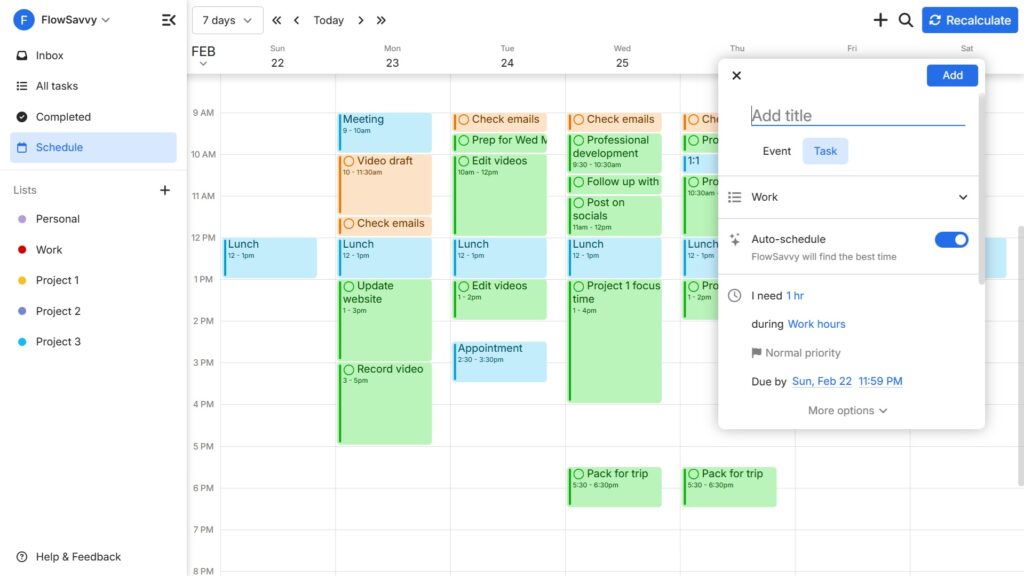
FlowSavvy is an AI scheduling tool built around automatic time blocking: you add your tasks with durations, deadlines, and when you’re willing to work, and the app schedules those tasks onto your calendar as concrete blocks. When things come up or you add new tasks, the system continually rebuilds your entire schedule, ensuring your schedule is always up-to-date and optimized.
Compared with Akiflow’s manual planning flow with an AI assistant as an added layer on top, FlowSavvy puts always-on auto-scheduling at the center. The default workflow is closer to “the calendar automatically updates based on the task list” than “I place every block by hand unless I ask for help.” It feels narrower as an all-purpose productivity hub than Akiflow, but more specialized for turning a backlog into a realistic week without constant manual dragging.
Key Features
- Advanced auto-scheduling based on priorities, deadlines, availability, and more
- Rebuilds your entire schedule after any change
- Flexible repeating tasks
- Streamlined and intuitive interface
💡Pro tip: Instead of pinning tasks to specific times, use levers such as priority, due date, and scheduling hours to get the schedule you want while keeping things flexible. You’ll thank yourself later when you can reschedule everything in 1 click instead of dragging each task to a new time.
Pricing
- Free plan available
- $14/mo or $120/yr
2. If Akiflow is not “all-in-one” enough
Motion: Best for managing complex teams and projects
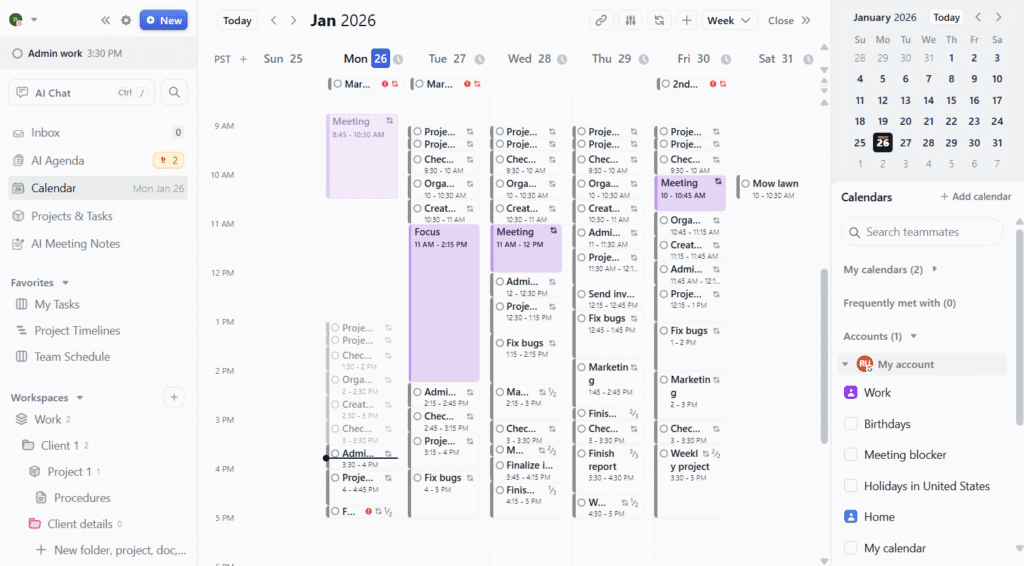
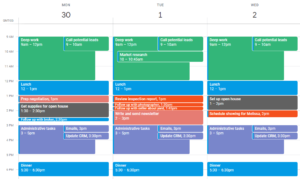
Motion is an all-in-one AI work platform that mixes auto-scheduling with advanced project management and team tools. Along with auto-scheduling, Motion includes a suite of AI tools such as AI Chat, AI Docs, and AI Meeting Notes.
When Akiflow starts to feel like a personal planner stretched to coordinate projects between teammates, Motion is a good next step for your team. With Motion, you take on higher cost and onboarding effort in exchange for more comprehensive team management and scheduling features. Solo users who don’t need that layer may find Motion heavier than necessary and may want to look at the other alternatives in this list.
💡Worth knowing: Motion can auto-schedule dependent tasks across team members and facilitate scheduling meetings with people. However, it does not automatically reschedule multi-person meetings when conflicts arise — something many online reviews and AI-generated summaries incorrectly claim it can do. If that functionality is important to you, Reclaim might be a better fit.
Key Features
- Project and team management
- Shared tasks and collaboration features
- Automatic task scheduling
- AI tool suite
💡Pro tip: Motion has a ton of features and can be overwhelming for beginners. Take advantage of the built-in AI chat to learn about Motion’s capabilities, set up your first tasks and projects, and talk through your work in a familiar chat-based format.
Pricing
- No free plan
- Multiple tiers starting at $49/mo or $348/yr
3. If Akiflow feels too complex or heavy
TickTick: Best for simple and affordable task management
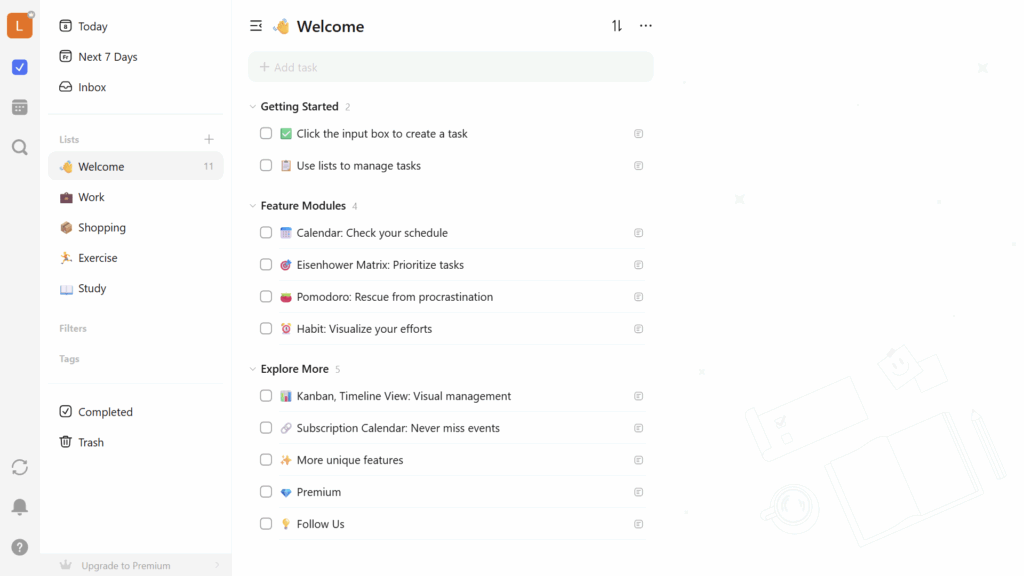
TickTick is a traditional task manager with a built-in calendar view, offering an excellent balance of simplicity and useful features. It offers a wide range of productivity features such as Eisenhower matrix, habit tracker, pomodoro timer, and plenty of integrations that enable an Akiflow-like universal inbox.
TickTick is the best choice when you want a simpler, more affordable way to organize your tasks than Akiflow. One notable drawback with TickTick is that it doesn’t have any kind of AI assistant like Akiflow’s Aki or the built-in auto-scheduling that you get from FlowSavvy or Motion. Users looking for automation will miss that, but this can actually be a plus if you’re craving a lighter setup at a much lower cost.
Key Features
- Classic task manager + calendar view
- Many integrations mimic Akiflow’s “universal inbox”
- Eisenhower matrix, habit tracker, pomodoro timer
💡Pro tip: Go to “Features” and “Smart List” in settings and turn on only the features and lists you want to see in the app to keep things focused. You can always add more later as you get used to the basics.
Pricing
- Free plan available, though the calendar view is only available on the paid plan
- $4/mo or $36/yr
4. If you want a balance of AI suggestions and manual planning
Morgen: Best for AI-assisted planning with human approval
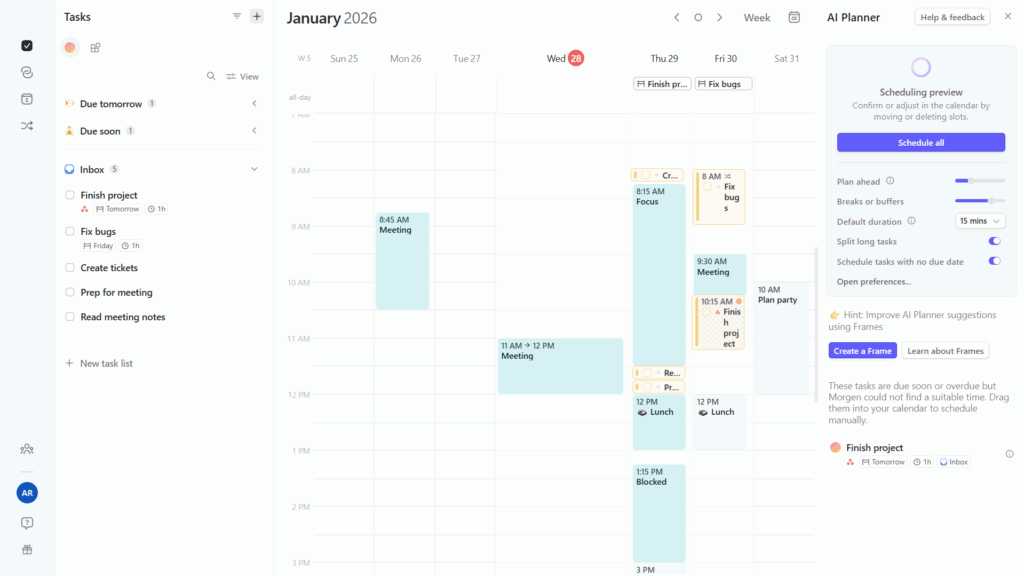
Morgen is a calendar-based planner that uses AI to suggest how your tasks should be scheduled, while keeping you in control by letting you review and approve those suggestions before they’re applied. If you want more AI scheduling than Akiflow provides, but not as much as dedicated auto-schedulers like FlowSavvy and Motion, Morgen might be a good middle ground for you.
Among the alternatives in this guide, Morgen will feel the most familiar in terms of layout: tasks on one side, calendar on the other, with the ability to drag tasks from the list onto the calendar. Where Morgen diverges from Akiflow is in its approach to AI scheduling. Instead of prompting an AI assistant, you just open Morgen’s AI planner and it instantly suggests times for all your unscheduled tasks. You can approve all of the suggestions at once or drag tasks around to tweak the schedule before approving. When conflicts arise, Morgen notifies you and gives you the option to instantly replan the conflicting tasks with the AI planner.
Key Features
- Side-by-side to-do list and calendar like Akiflow
- AI suggestions that you can approve or reject
- Use “frames” to guide the AI scheduling
- Polished, modern UI
💡Pro tip: If tasks are scheduled out of priority order, you can do a “full reschedule” by shift + dragging or ctrl + clicking to multi-select tasks on the schedule view, delete them (this just unschedules them), then activate the AI Planner to reschedule all of them in the correct order.
Pricing
- No free plan
- $30/mo or $180/yr
5. If you want more structured daily planning
Sunsama: Best for intentional daily planning
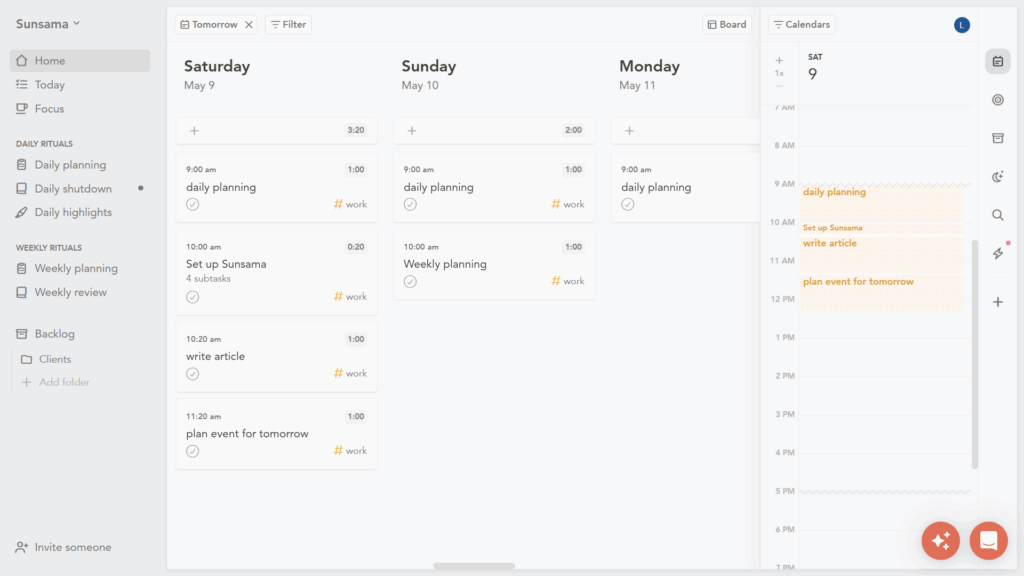
Sunsama is a structured daily planner that helps you build a realistic plan for your day by guiding you through a daily planning workflow. You consolidate tasks from the many integrations, then decide what you want to do today vs. push to other days, then plan a time for each task.
Compared to Akiflow, Sunsama takes a noticably more intentional approach to planning. While the home view is very customizable, the default view is a board where tasks are organized by day, and then a single-day calendar view on the right, encouraging you to choose what you want to do each day and then focus on the current day. Sunsama also offers a chat-based assistant like Akiflow’s Aki that can help move and edit tasks.
One other feature I found interesting is Sunsama’s “task projections” feature that automatically time blocks tasks on the day that they’re planned for. The blocks are easy to tweak and the projections provide a helpful jumpstart to planning your day.
Key Features
- Daily and weekly planning workflows
- Customizable “Home” view
- Basic auto-scheduling
- AI assistant similar to Aki
💡Pro tip: Sunsama has dedicated daily planning and weekly planning flows that are a core part of its “intentional planning” philosophy. Create repeating tasks for daily planning and weekly planning to take advantage of these workflows.
Pricing
- No free plan
- $22/mo or $204/yr
Final thoughts: What is the best Akiflow alternative?
If you’re switching from Akiflow, the right choice depends on how you want your planning workflow to change: more automation, more simplicity, or more structure.
- Choose FlowSavvy if you want full, built-in auto-scheduling without extra complexity
- Choose Motion if you need an all-in-one layer for projects, teammates, and scheduling
- Choose TickTick if Akiflow feels too complex or expensive
- Choose Morgen if you want AI to suggest your schedule, but manually approve or reject it
- Choose Sunsama if you want a more structured daily planning workflow
FAQs
Is there a free alternative to Akiflow?
Yes, several alternatives offer free plans:
- FlowSavvy has a free tier that satisfies most time blocking needs
- TickTick has a generous free version for simple task management, but the calendar view is a paid feature
- Todoist is another excellent task manager with a free plan, but its calendar view isn’t as useful as Akiflow’s
- Notion has a good free plan for notes and tasks, but it isn’t as calendar-first as Akiflow
However, most advanced scheduling features are typically behind paid plans.
Does Akiflow support automatic scheduling?
Akiflow’s AI assistant, Aki, is great for handling simple requests like “plan a daily run at 5pm” or “move all my tasks to tomorrow”, but in practice, it’s more like an assistant you prompt rather than an engine that continuously re‑solves your entire week the way dedicated auto‑schedulers are designed to. It’s not as hands-off for complex, always‑on scheduling as tools where auto‑scheduling is core to the product.
If you want true automatic scheduling, try FlowSavvy, Motion, or Reclaim.
What’s a simpler alternative to Akiflow?
If Akiflow feels too complex, there are several simpler alternatives:
- FlowSavvy: an auto-scheduler focused on ease of use and minimal setup
- TickTick: a classic task manager with calendar, habits, and timers bundled in
- Todoist: works well as a universal inbox but with a simpler calendar component than Akiflow
- Sunsama: structured daily planning when you’re tired of managing a sprawling universal inbox
Is there a cheaper alternative to Akiflow?
Yes, several alternatives are more affordable:
- TickTick: one of the cheapest full-featured task managers
- FlowSavvy: a lower-cost route into heavier auto-scheduling
- Sunsama: a structured daily planner that walks you through planning each day
These tools cover many of the same core needs (tasks + calendar) at a lower price point.