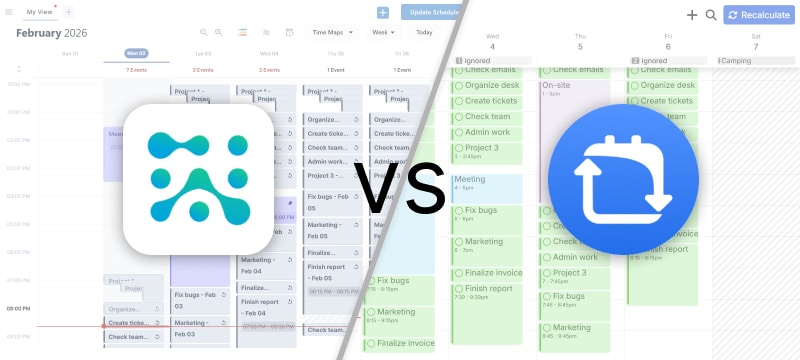
FlowSavvy and SkedPal are two of the most powerful auto-schedulers for individuals in today’s market, but they focus on different priorities and work better for different types of people. In this guide, we’ll take a deep dive into both tools and help you find the tool that will work best for your use case.
Key Takeaways
- Both tools excel in AI Auto-Scheduling, but optimize for different planning styles
- SkedPal is designed for users who want deep control over how work is scheduled, while FlowSavvy prioritizes ease-of-use and quick setup
- FlowSavvy is more affordable and has a free plan
- FlowSavvy’s web, iOS, and Android apps have full feature parity, while SkedPal’s mobile apps are limited companion apps
Let’s dive deeper into how these two apps compare and what makes FlowSavvy the best SkedPal alternative in 2026.
Evaluation Criteria: How We Reviewed These Tools
To compare these tools fairly, we analyzed them against the core elements that define a strong auto-scheduling app:
- Auto-Scheduling: How reliably each tool generates schedules and adapts to changes.
- Customizability: How much the system can be customized to individual preferences.
- Learning Curve: How quickly new users can get set up and start seeing value.
- Integrations: Ability to connect with other services.
- Project and Task Management: How well the platforms handle organizing lots of projects and tasks.
- Pricing: Overall cost, and value for the features provided.
- Platforms: Availability and quality of mobile, desktop, and web apps.
We rated each of these categories 1-5 and created this quick comparison table below, and you can find in-depth explanations for each rating below the comparison table.
Quick Comparison Table
| Criteria | SkedPal | FlowSavvy |
|---|---|---|
| Auto-Scheduling | 4/5 Powerful auto-scheduling, but front-loads work and doesn’t auto-update | 5/5 Powerful auto-scheduling with workload balancing and fast, automatic recalculation |
| Customizability | 5/5 Strong customizability enables fine-tuned auto-scheduling | 4/5 Supports the most important auto-scheduling features and options |
| Learning Curve | 3/5 Steep learning curve due to many concepts and options | 5/5 Easy to start using |
| Integrations | 4/5 Asana, Zapier, create tasks via email, and calendar sync (events read-only) | 3/5 Calendar sync (events editable) but no task integrations |
| Project/Task Management | 4/5 Infinite hierarchy of subtasks provides some project management | 3/5 Best for basic organization |
| Pricing | 3/5 Expensive for individual auto-scheduling, no free plan | 5/5 Most affordable robust auto-scheduler |
| Platforms | 3/5 Mobile apps are only companion apps with limited functionality | 5/5 Fully featured Web, iOS, and Android apps |
Now for an in-depth comparison of each criteria 👇
Auto-Scheduling Features & Performance
Because auto-scheduling is the defining feature of both of these apps, that’s what we dedicated most of our efforts to testing and comparing. Both SkedPal and FlowSavvy are incredibly powerful and either would work well for most users. However, several meaningful differences in execution give FlowSavvy the advantage in this category.
Let’s take a look at some of the areas where the two apps differ most noticeably.
Workload Distribution
Both SkedPal and FlowSavvy support the core inputs needed for automated scheduling including deadlines, priorities, availability windows, durations, and dependencies. One key difference is how each tool distributes work across the available time.
SkedPal generally prioritizes filling the earliest open time blocks. If you prefer to front-load your work and get everything done ASAP, this may work for you, but if you have a large amount of work due in several weeks, it may not make sense to schedule it up front like this.
FlowSavvy can schedule tasks up front like this as well, but by default, FlowSavvy spreads work more evenly across the available window before a deadline. This balanced workload distribution option results in a steadier day-to-day workload, which is more realistic and sustainable long term in most cases.

Automatic Rescheduling
SkedPal requires you to click the “Update Schedule” button whenever you want the schedule to update. So every time you add a task or make a change, you have to hit that button in order for the schedule to update. SkedPal does have an “Instant Schedule Update” feature that automatically updates your schedule after you make changes, but it only updates the current day, kicks in after a 10 second delay, and is only available on the Pro plan.
In FlowSavvy, recalculations are triggered whenever the user makes a change. The entire schedule is recalculated instantly every time you make a change, and this feature is available even on the free plan. Automatic recalculation can be turned off in FlowSavvy though if you do want to defer recalculation until you click the “Recalculate” button.
If you want your schedule to automatically update when you make changes, FlowSavvy will be the better choice.
Recalculation Performance
We evaluated how quickly each app updates schedules by testing them across a range of realistic planning scenarios, from relatively light workloads to more demanding, high-volume schedules. All tests were run on the same device and network to keep conditions consistent. In our results, FlowSavvy typically recalculated in roughly 1–3 seconds, while SkedPal generally fell in the 2–6 second range depending on schedule complexity.
In this test, SkedPal recalculates a medium workload in 2.6 seconds, and FlowSavvy recalculates the same workload in 1.566 seconds. This represents a very regular change you might make many times a day, but bigger changes like auto-scheduling 10+ repeating tasks for several weeks at once will take closer to the upper end of the time ranges mentioned earlier.
Recalculation speed will naturally vary based on the complexity of the user’s to-do list and schedule, but both tools perform well enough to handle complex planning without interrupting your flow. However, if you make frequent adjustments throughout the day and want the fastest recalculation possible, FlowSavvy will be the better choice.
Overdue Task Handling
When tasks can’t be scheduled before their deadlines, SkedPal and FlowSavvy both clearly indicate the issue and show the tasks in a centralized view that allows the user to choose how to handle tasks in this state.
In SkedPal, tasks that can’t be scheduled before their deadlines just don’t get scheduled at all, whereas FlowSavvy still schedules them after their deadlines by default (this can be changed per task) and clearly colors them red, allowing you to see that the tasks are scheduled after their deadlines while still including them in the schedule.
Neither approach is necessarily better in all cases, so you’ll just have to decide what makes more sense for your workflow. The most important thing is that the system makes it clear when a task couldn’t be scheduled by its deadline, which both apps do well.
That’s all for the Auto-Scheduling criteria. Let’s move on to the other criteria.
Customizability
SkedPal is jam-packed with features and customizations, making it ideal for advanced workflows and fine-grained control of the auto-scheduling. For example, when auto-scheduling a task, here are some of the more advanced options you can configure:
- Advanced dependencies: Most auto-schedulers let you specify that one task must be scheduled after another, but in SkedPal, you can also require one task to be scheduled right after or right before another task, or you can add a specific gap between two dependent tasks.
- Repeat rules: Beyond standard repeat rules like daily, weekly, etc., SkedPal also allows tasks to repeat multiple times per day or a set number of days after completion.
- Time map combinations: Tasks can be auto-scheduled in multiple time maps or only in the overlap of multiple time maps.
- Bundles: Instead of scheduling each task as a separate time block, you can allow tasks to be bundled together into a single block, or mark a task as an “exclusive bundle” so only its subtasks are grouped together.
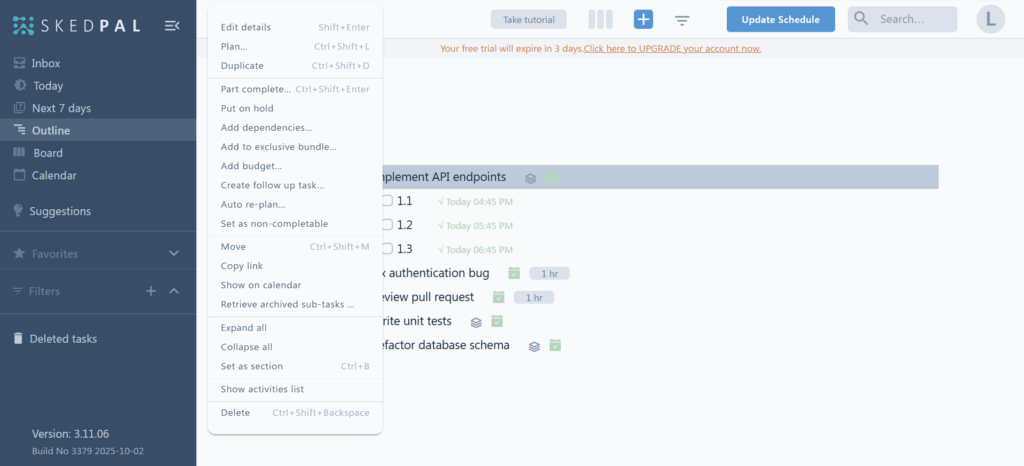
After creating a task, there are many possible actions you can take on the task, including “edit details”, “plan”, “duplicate”, and many more.
Another helpful feature in SkedPal is its highly customizable “Filters”, which allow you to filter tasks by keyword, zone, time map, tag, and many more properties and then save the filter so it’s easily accessible.
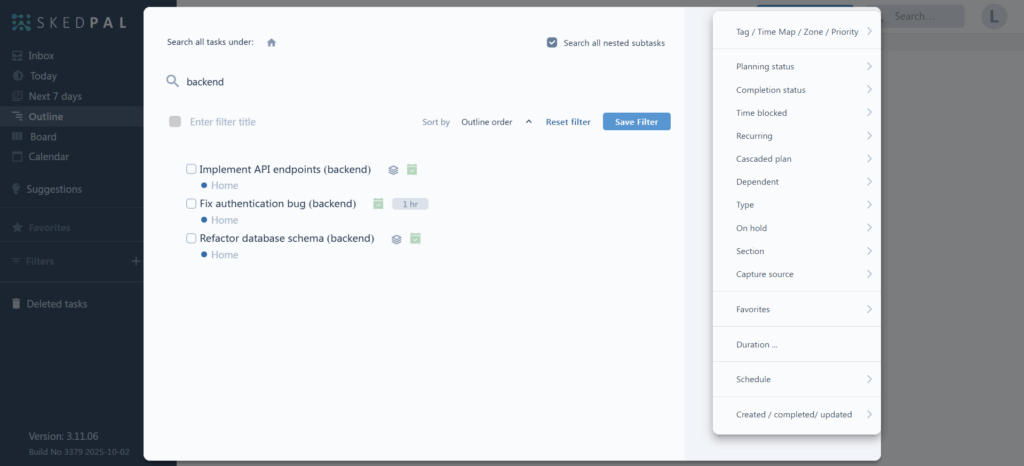
While FlowSavvy doesn’t include near as many features and options as SkedPal, it does include all the essential auto-scheduling customizations such as duration, priority, scheduling hours (called time maps in SkedPal), due date, and many more. In addition, FlowSavvy includes robust options for managing calendars, lists, and general preferences.
If you want as much fine-grained control and customizability as possible, use Skedpal, and if you prefer an intuitive app with the essential customizations, use FlowSavvy.
Learning Curve
Because SkedPal includes so many features and customizations, many users find it overwhelming and overkill. Because of the dense configurations and many concepts to learn (Areas, Time Maps, Zones, Budgets, Exclusive bundles, etc.), the platform takes a long time to learn.
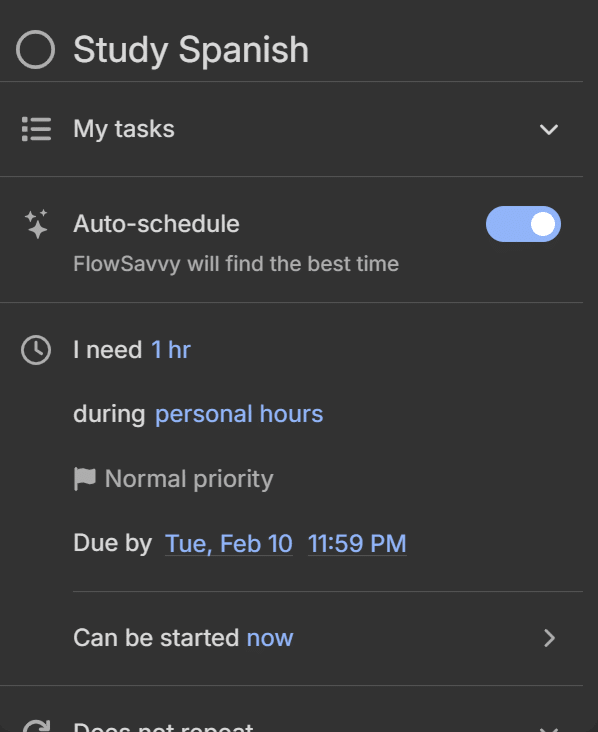
FlowSavvy is designed to be as easy to pick up and start using as a regular calendar. Users appreciate that the UI is simple and intuitive despite its powerful auto-scheduling. Every function has been tested with users to smooth out friction/confusion points.
Here’s what FlowSavvy’s task view looks like, focusing only on the most essential properties:
However, for people that want deep customization and more fine-grained control, the learning curve may be worth it.
Integrations
SkedPal syncs with Asana and Zapier, allowing the user to import tasks and set up automations with other services that integrate with Zapier. Each user is also assigned a unique email address, allowing tasks to be created simply by emailing them to SkedPal. SkedPal syncs with Google, Outlook, and iCloud calendars, but events from these calendars are read only in SkedPal, so you have to go to the other calendar apps if you want to make any changes to events.
FlowSavvy does not include any task integrations at the moment, but it does support 2-way syncing with Google, Outlook, and iCloud, enabling you to manage your events directly in FlowSavvy and keep your tasks synced to those services.
If task integrations are essential to your workflow, SkedPal might be a better fit for you.
Project/Task Management
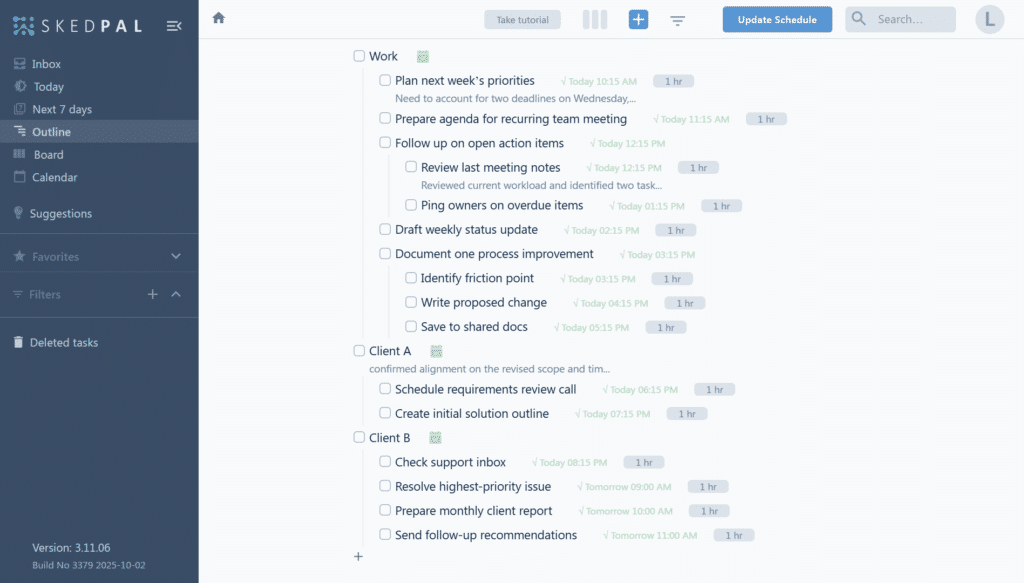
SkedPal uses infinite hierarchy and subtasks to organize tasks into projects, making it suitable for deep organization and note taking. Here’s an example of SkedPal’s “Outline” view:
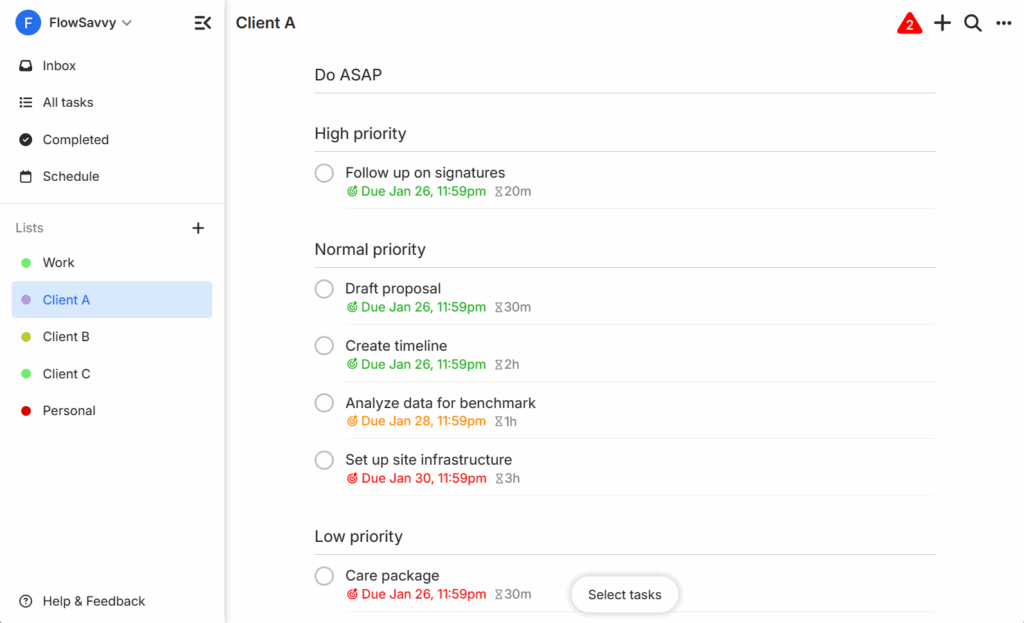
For organizing your tasks in FlowSavvy, FlowSavvy supports adding them to lists. The screenshot below shows the task lists in the left sidebar and the contents of one of the lists in the main view. FlowSavvy is designed to be clean and easy to use without unnecessary complexity.
For subtasks, FlowSavvy supports writing out basic subtasks inside the notes section using the checklist feature.
If you want to organize your tasks in a deep hierarchy, SkedPal might be a better fit for you, and if you’re looking for a simple, easy way to organize your tasks without sacrificing powerful auto-scheduling, FlowSavvy might be a better fit for you.
Pricing
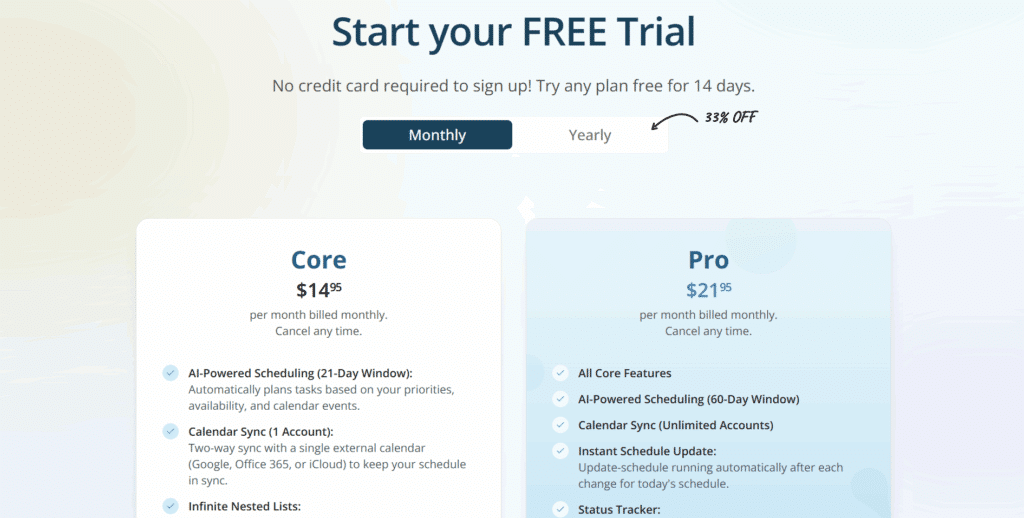
SkedPal and FlowSavvy differ significantly in the plans they offer. SkedPal’s “Core” plan is $14.95/mo or $119/yr. The “Pro” plan, which includes all features, is $21.95/mo or $179/yr. They offer a 14 day free trial, but they do not have any free plan. See SkedPal pricing.
FlowSavvy Pricing
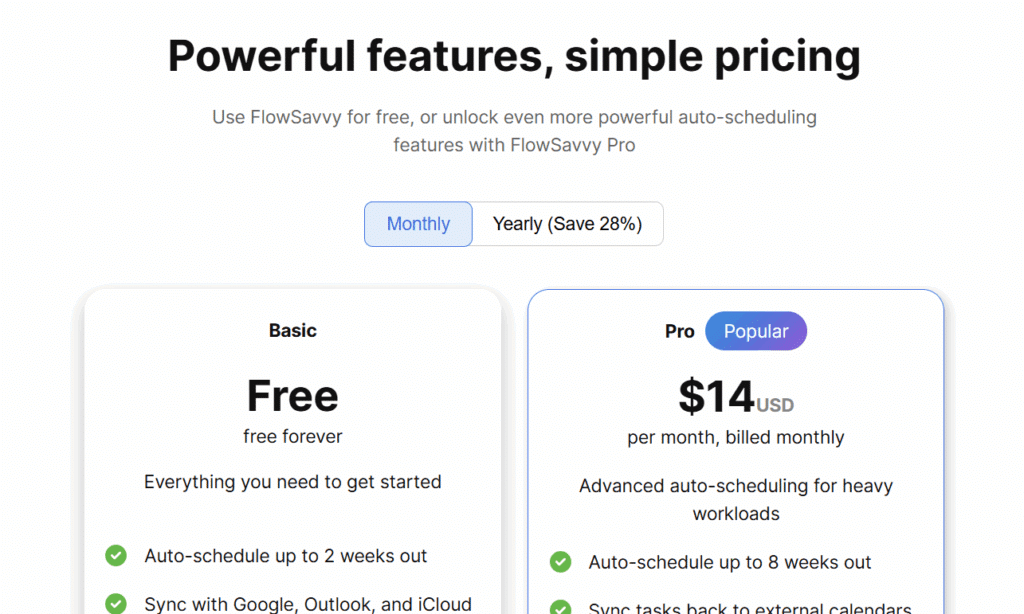
FlowSavvy is available for $14/mo or $120/yr. FlowSavvy also has a robust free version. See FlowSavvy pricing.
Users who move from SkedPal to FlowSavvy often mention how streamlined FlowSavvy feels in comparison while still delivering powerful auto-scheduling, all at a significantly lower price point.
Platforms Supported
Cross-platform support is another meaningful difference between the two tools, particularly for users who rely on their phones throughout the day.
FlowSavvy’s mobile apps include the full functionality of the web version, so you can create, edit, and manage tasks and settings without switching devices. In addition to full feature parity, the mobile apps support push notifications, home screen widgets, and in-app subscriptions directly through the app stores. FlowSavvy’s interface is also consistent across web, iOS, and Android, so there’s no separate workflow to learn.
SkedPal’s mobile app, by contrast, is primarily a companion to the desktop version. While it does include most of the essential features such as creating and editing tasks and updating your schedule, it doesn’t include all the same features as the desktop version, and it uses a completely different interface than the web app, meaning you have to learn both interfaces.
If you expect your auto-scheduler to work seamlessly across devices with no tradeoffs in functionality, FlowSavvy provides the more complete cross-platform experience.
Who Is SkedPal Best For?
SkedPal is best for people that want deep customization of auto-scheduling and are ok with taking a longer time to learn the app. If you want to fine tune your settings and auto-scheduling parameters to make the app auto-schedule tasks exactly how you want and you have the budget for it, SkedPal might be the better fit for you.
Who Is FlowSavvy Best For?
FlowSavvy is best for professionals or individuals looking for a robust, easy-to-use, and affordable AI Auto-Scheduler. If you’re tired of manually dragging time blocks around in your calendar and want a powerful auto-scheduler that’s optimized for ease-of-use, FlowSavvy might be the better fit for you.
Summary
SkedPal and FlowSavvy both offer powerful auto-scheduling, but they serve different priorities. SkedPal is better suited for users who want deep customization and granular control of the auto-scheduling logic, while FlowSavvy emphasizes easier setup and reliable, streamlined auto-scheduling at a lower cost.