The best SkedPal alternatives for auto-scheduling tasks in 2026 are FlowSavvy, Motion, ClickUp, Reclaim, Morgen, and Akiflow.
SkedPal is one of the most customizable AI calendar apps available, but its learning curve, limited mobile apps, and less fully automatic rescheduling make people look for alternatives. This guide will help you find the right SkedPal alternative depending on your use case.
⚡TL;DR: Best SkedPal Alternatives
- FlowSavvy: Best SkedPal alternative for individuals
- Motion: Best SkedPal alternative for teams
- ClickUp: Closest to SkedPal’s Outline view with nested subtasks
- Reclaim: Best for auto-scheduling meetings and protecting focus time
- Morgen: Best for AI scheduling suggestions you approve or reject
- Akiflow: Best for chat-based scheduling
If you’re looking for alternatives that have SkedPal’s style of auto-scheduling tasks, FlowSavvy and Motion are the closest matches.
How we evaluated SkedPal alternatives
We tested each app and ranked them by how closely they match SkedPal’s core features. We then ranked the apps by their average score across categories.
SkedPal features we looked for
- Automatically schedule tasks from the to-do list into the calendar (including how closely the auto-scheduling features match SkedPal’s)
- Automatically reschedule when things don’t go according to plan
- Task and project organization
- Mobile apps
Disclaimer: One of the products below, FlowSavvy, is our product. We used the same criteria to evaluate it as other alternatives and have described when it’s a good fit and when it’s not.
Quick decision table
| Best for | Key features | Auto-scheduling | Auto-REscheduling | Task organization | Mobile apps | Price | |
|---|---|---|---|---|---|---|---|
| FlowSavvy | Closest SkedPal alternative for individuals | – Auto-scheduling for tasks – Fully featured mobile apps – Intuitive UI (no team feature bloat) – Repeating tasks and dependencies | 5/5 | 5/5 | 4/5 | 5/5 | Free; $14/mo or $120/yr |
| Motion | Auto-scheduling tasks for teams | – Auto-scheduling for tasks – Project management views – Team collaboration features | 5/5 | 5/5 | 4/5 | 3/5 | Multiple tiers starting at $49/mo or $348/yr |
| ClickUp | Nested subtasks like SkedPal’s Outline view | – 7 levels of subtasks on the list view – Light auto-scheduling for tasks – Full work platform with team collaboration | 3/5 | 3/5 | 5/5 | 3/5 Beautiful, modern app, but the planner view has limitations | Free; Paid plans from $12/mo or $108/yr |
| Reclaim | Auto-scheduling meetings and protecting focus time | – AI scheduling for meetings and habits – Priority-aware booking links – Mirror events between calendars | 5/5 Excellent auto-scheduling, but it’s for meetings and habits rather than individual tasks like SkedPal | 5/5 | 3/5 | 2/5 | Free; Multiple tiers starting at $12/mo or $120/yr |
| Morgen | AI scheduling suggestions you can accept or reject | – Drag and drop tasks from the to-do list to plan manually – AI planner for auto scheduling | 3/5 | 3/5 | 4/5 | 4/5 | $30/mo or $180/yr, with discounts for teams |
| Akiflow | Chat-based scheduling assistant | – Drag and drop tasks from the to-do list to plan manually – “Aki” assistant can help you plan | 2/5 | 2/5 | 4/5 | 4/5 | $34/mo or $228/yr |
1. FlowSavvy: Closest SkedPal alternative for individuals
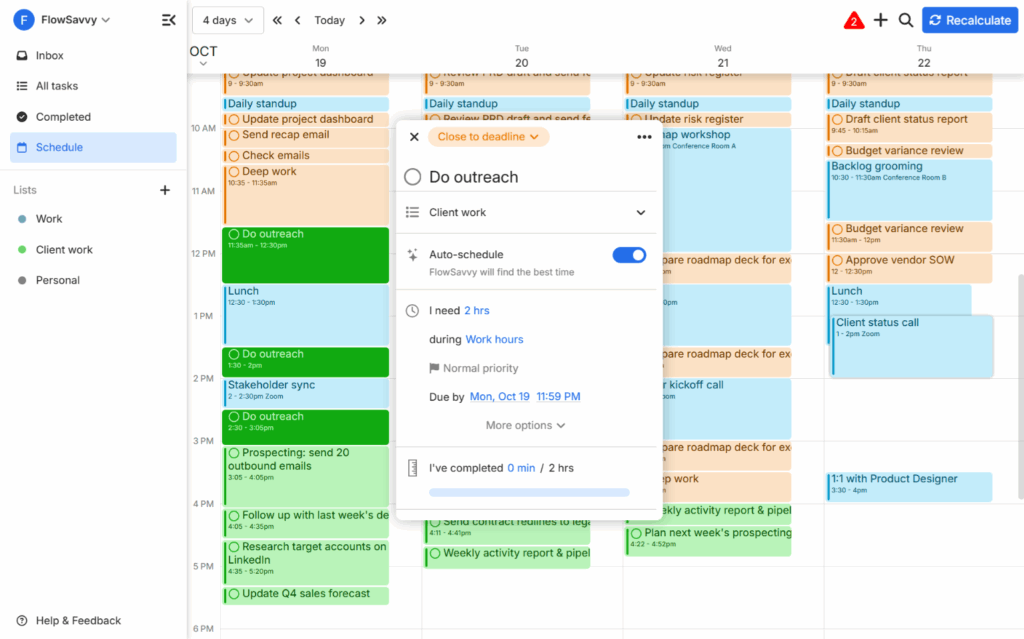
FlowSavvy is the closest SkedPal alternative in terms of auto-scheduling functionality. Like SkedPal, it plans tasks from your to-do list into your calendar around your existing events using priorities, deadlines, dependencies, scheduling hours, and more. The main difference is that FlowSavvy is designed to be easy to pick up, whereas SkedPal’s many concepts (Areas, Time Maps, Zones, Budgets, Exclusive bundles, etc.) allow for more complex scheduling but take a long time to learn.
FlowSavvy recalculates your entire schedule automatically whenever you make a change, even on the free plan. In SkedPal, you have to click “Update Schedule” to update the full schedule, and the automatic “Instant Schedule Update” Pro feature only updates the current day. For people who prefer SkedPal’s “Update schedule” button instead of fully automatic scheduling like FlowSavvy and Motion, FlowSavvy has an option in settings to make it only update when you press the “Recalculate” button to make it behave exactly like SkedPal (96% of active users keep auto-recalculate turned on in FlowSavvy, though).
What you give up with FlowSavvy is some of SkedPal’s fine-grained control. FlowSavvy includes the essential auto-scheduling customizations, but it doesn’t have options like SkedPal’s bundles or infinite nested subtasks.
Pros
- AI scheduling creates your calendar and reschedules as needed
- Low learning curve
- Automatic recalculation on free and paid plans
- Full mobile apps (not just companion apps)
- Task dependencies
- Robust repeating flexible tasks
Cons
- Fewer scheduling customizations than SkedPal
- No team features (built for the individual experience)
- No subtasks (only as a basic checklist in tasks’ notes)
Pricing
- Free plan: Yes
- Paid plans: $14/mo or $120/yr
💡Check out our FlowSavvy vs SkedPal comparison for an in-depth comparison.
2. Motion: Best SkedPal alternative for teams
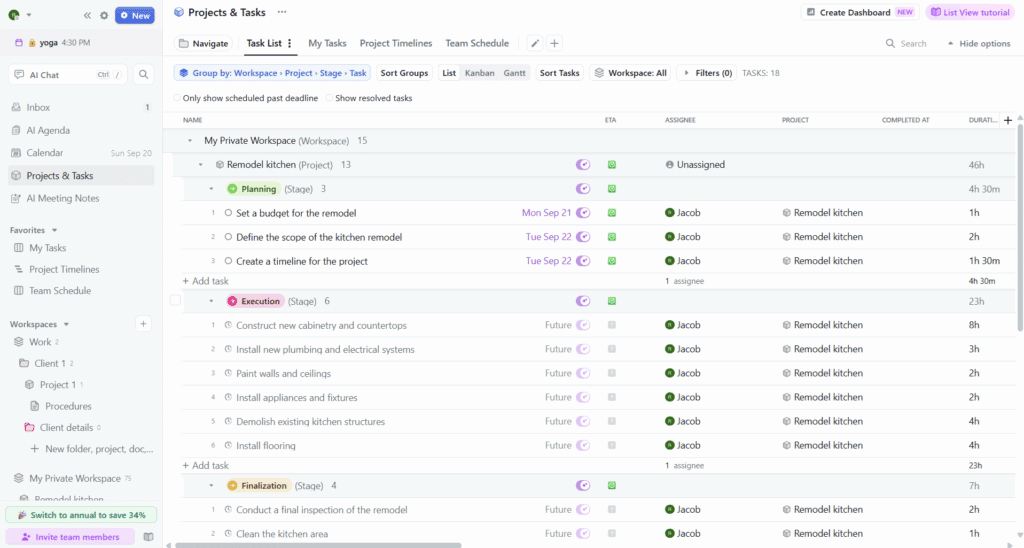
Motion is an auto-scheduling AI calendar with project management built in. It operates very similarly to SkedPal in that it auto-schedules tasks into the calendar around your existing events. Motion is a fully automatic scheduler like FlowSavvy, so it will automatically reschedule when you make changes or new meetings get scheduled, rather than having to click “Update schedule” like SkedPal.
While SkedPal is designed for individuals with complex scheduling needs, Motion adds several features aimed at teams, like AI project management, AI Docs, an AI meeting notetaker, and collaboration. You can coordinate task assignees, track team workload, and predict project completion dates. If you’re looking for a full productivity suite that includes SkedPal-like task auto-scheduling, Motion is the strongest option.
The tradeoff is that Motion is expensive for individual users and may feel overwhelming for people who only want the auto-scheduling without all the other team features.
Pros
- Helps create projects and plan tasks into your team’s schedules
- Auto-reschedules tasks when conflicts come up
- Advanced project management views like Gantt charts and Kanban boards
- Supports task dependencies
- Repeating flexible tasks
Cons
- Pricing is expensive for individual users
- The mobile app is a limited companion app
- Limited repeating task intervals (e.g. no option for “every 2 days” or “yearly”)
- No subtasks (only as a basic checklist in tasks’ notes)
Pricing
- Free plan: No
- Paid plans: Individual plans start at $49/mo or $348/yr, with discounts for teams
3. ClickUp: Closest alternative to SkedPal’s Outline view
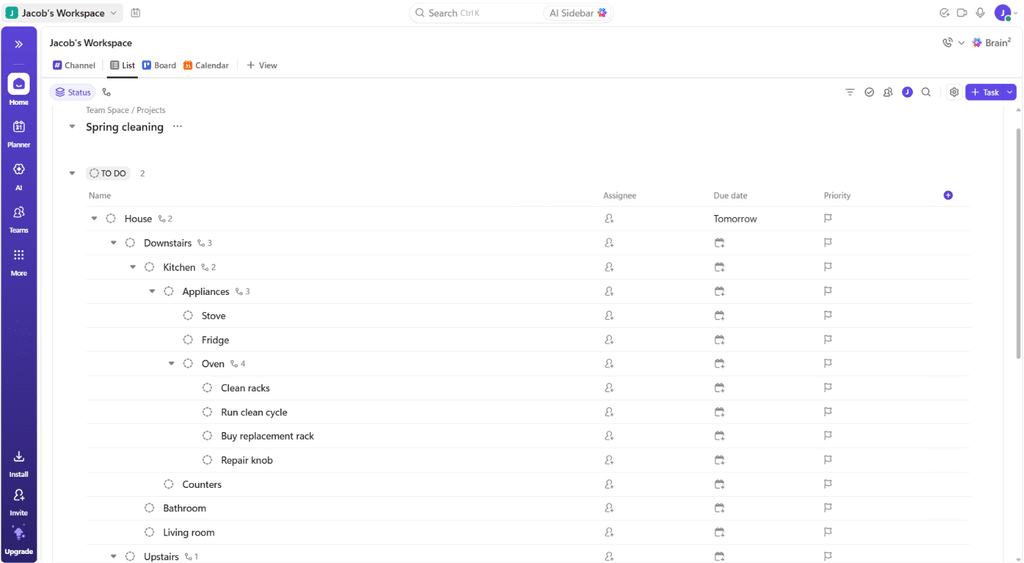
ClickUp is an all-in-one work platform with light auto-scheduling. It’s on this list because it’s the closest alternative to SkedPal’s “Outline” view that also has auto-scheduling. SkedPal’s Outline view supports infinitely nested subtasks, whereas the other auto-schedulers like FlowSavvy and Motion don’t support subtasks at all, so we wanted to include an alternative for people who need nested subtasks alongside their auto-scheduling. The closest we found is ClickUp, because its list view (shown in the screenshot above) supports 7 levels of subtasks, and you can change a task’s level with tab and shift+tab, just like in SkedPal’s Outline view.
ClickUp allows you to auto-schedule tasks into the calendar by enabling auto-schedule on each task. However, ClickUp’s auto-scheduling is basic compared to the other auto-schedulers. It supports only one set of scheduling hours, and it ignores start dates, due dates, and dependencies (priorities do affect scheduling, though).
ClickUp has the best native task management out of the auto-schedulers by far, so it’s best for people who want advanced task management capabilities, combined with some auto-scheduling.
Pros
- Lists support 7 levels of subtasks in a view similar to SkedPal’s Outline view
- Light auto-scheduling
- All-in-one work platform with enterprise-grade collaboration
- Great free functionality
- Extremely modern design on all platforms
Cons
- Auto-scheduling is basic compared to other apps
- Auto-scheduling has to be turned on for each task in the planner view
- Auto-scheduled tasks don’t show up in Google or Outlook until you click “Confirm work session,” but then they won’t be auto-scheduled anymore
- The planner view on the mobile app is read-only and does not show auto-scheduled tasks
Pricing
- Free plan: Yes
- Paid plans: From $12/mo or $108/yr
4. Reclaim: Best for auto-scheduling meetings and protecting focus time
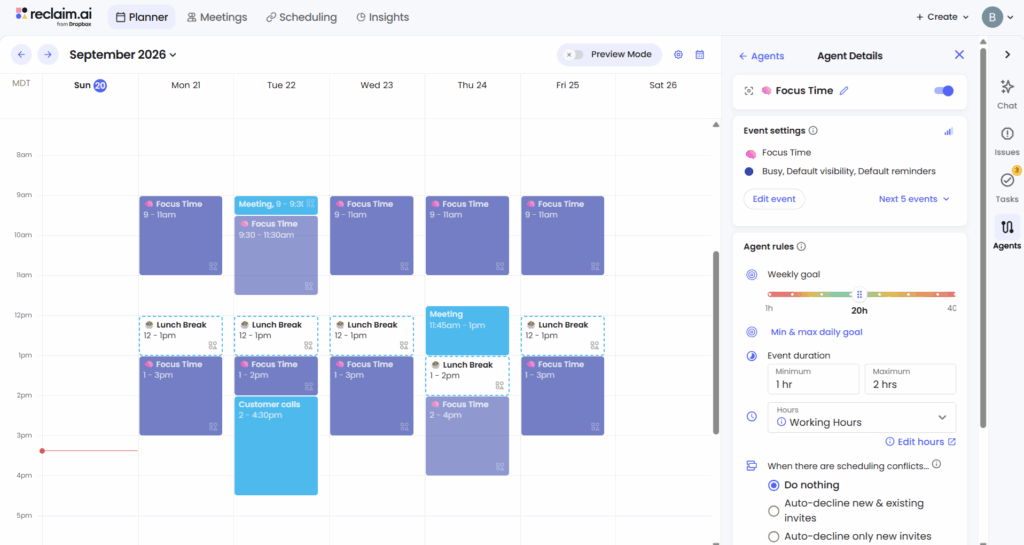
Reclaim is another popular AI calendar app that protects your focus time via auto-scheduling and automations. Reclaim takes a slightly different approach to automatic scheduling than SkedPal. Instead of scheduling every task into your calendar, you tell it how many hours of focus time you want each week, and it auto-schedules your meetings, recurring habits, and focus time around your other events, and then gives you a list of suggested tasks you could work on at the current moment.
If you’re looking for a SkedPal alternative that auto-schedules meetings and recurring habits rather than individual tasks, Reclaim is the best app we know of for this. What you’d be giving up is the automatic scheduling of individual tasks, and native task management. Reclaim doesn’t have a way to organize tasks natively like SkedPal’s tags and filters, so you’ll need to connect it to your task management app to organize tasks there.
💡Note: The screenshot, facts, and testing results in this section are referencing the new Reclaim 2.0. Sources that talk about Reclaim auto-scheduling individual tasks are referring to the legacy Reclaim 1.0 version.
Pros
- Auto-schedules meetings, habits, and focus time
- Priority-aware scheduling links
- Can mirror events between personal and work calendars
- Preview mode allows you to make changes via the built-in AI chat or external AI assistants before they’re actually added to your calendar
Cons
- Reclaim 2.0 does not schedule individual tasks like SkedPal
- No native mobile app (only available on mobile as a PWA)
- No iCloud support
- Limited native task organization
Pricing
- Free plan: Yes
- Paid plans: Multiple tiers starting at $12/mo or $120/yr
💡Check out our Reclaim alternatives guide for more apps like Reclaim
5. Morgen: Best for AI scheduling suggestions you approve or reject
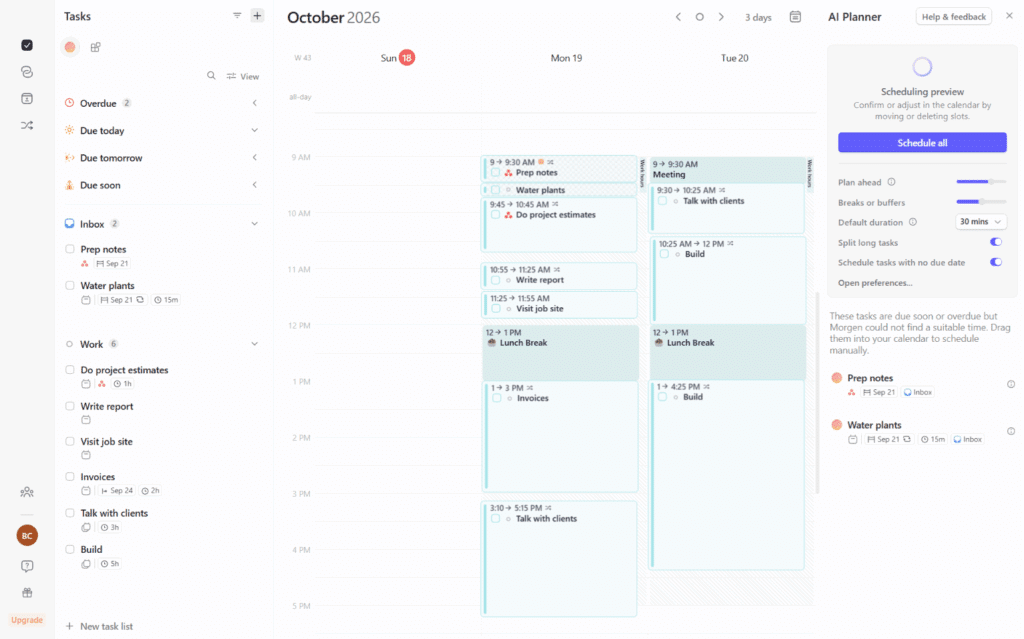
Morgen is a time blocking app that aggregates all your tasks from different sources and then allows you to drag them into the calendar or use the AI planner feature to plan them for you. When you use the AI planner, it gives suggestions for the time block placements, and you can choose to accept them or not, meaning tasks will never move without your explicit consent.
People looking for a replacement for SkedPal’s auto-scheduling will find Morgen to be a very different kind of workflow. It’s intentionally not a fully automatic scheduler, so instead of instantly updating the schedule when you add new tasks, you need to use the AI planner to schedule the tasks into your calendar. Similarly, when you make changes like adding a new meeting or rescheduling missed tasks, Morgen will point out the conflicts and ask if you want the tasks to be rescheduled.
Morgen’s “frames” allow you to define times on the calendar that guide the AI planner to know where to schedule your tasks. This feature is what made us rank Morgen’s scheduling abilities over other alternatives that are more like regular calendars with an AI chat.
If you’re looking for a SkedPal alternative that allows you to still plan your week with AI but accept or reject the suggestions before anything is planned, Morgen is a great app for you. For people looking for SkedPal-like auto-scheduling and automatic rescheduling though, FlowSavvy, Motion, and Reclaim will be a closer fit.
Pros
- Smooth drag & drop time blocking experience
- Large number of integrations
- AI suggestions help with planning tasks into your calendar and are easy to tweak
- You’re in full control of when tasks move
Cons
- The AI planner is not as holistic as SkedPal’s (new tasks get scheduled into open space rather than regenerating the entire schedule)
- Limited companion mobile app
- More expensive than most auto-schedulers
- Requires connecting an external calendar
Pricing
- Free plan: No
- Paid plans: $30/mo or $180/yr, with discounts for teams
6. Akiflow: Best chat-based scheduling assistant
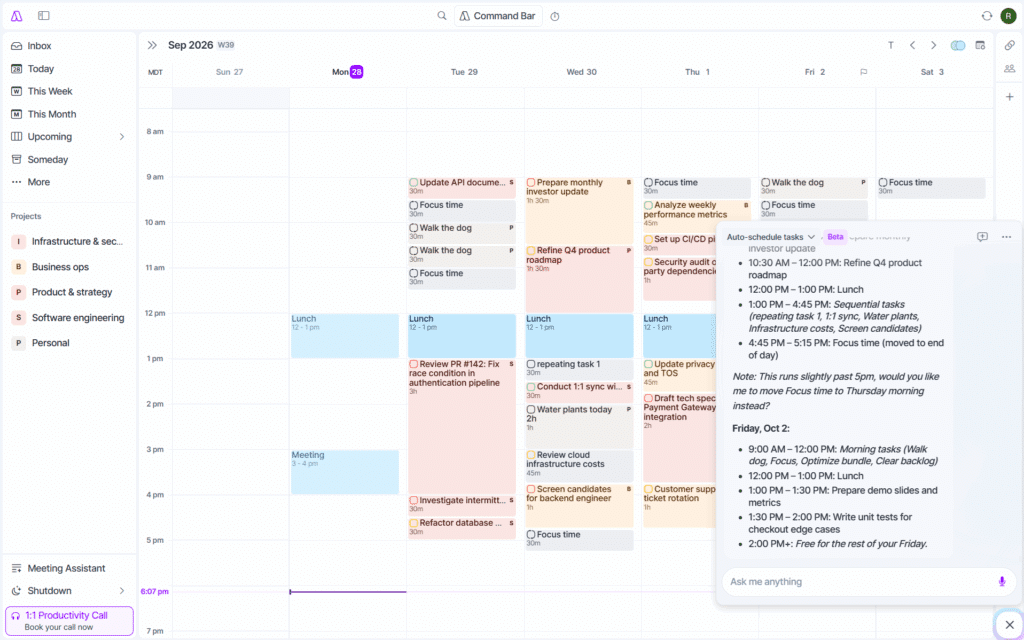
Akiflow is another time blocking app similar to Morgen, but its AI scheduler comes in the form of a chat-based, LLM-powered assistant called Aki. Aki is one of the best chat-based scheduling assistants we’ve seen in practice. The chat UI is clean and intuitive, and it allows you to take actions in your calendar via natural language.
Akiflow also has task management built in, so if you liked the idea of Reclaim’s AI chat assistant but wanted more native task management, Akiflow is a good combination of both. However, because the assistant is LLM-powered, it can struggle with large numbers of constraints, as we’ve talked about in our AI calendar apps guide.
So, as a great time blocking app with both an excellent manual planning experience and a chat assistant, Akiflow is a great SkedPal replacement. The AI can handle simple scheduling needs like “reschedule my tasks from today to next week” but is less ideal for fully automatic scheduling like SkedPal, FlowSavvy, and Motion.
Pros
- Chat-based scheduling assistant understands natural language
- Sleek design
- Great as a time blocking calendar app in general
- Large number of integrations
Cons
- Not a true auto-scheduler, so you must engage the assistant whenever you want it to make changes
- Limited companion mobile app
- More expensive than other similar planner apps
- Requires connecting to an external calendar
Pricing
- Free plan: No
- Paid plans: $34/mo or $228/yr
Final thoughts: What is the best SkedPal alternative?
The best alternative depends on your needs. For an easier auto-scheduler for individuals, use FlowSavvy. For auto-scheduling with team features, use Motion. If you want an alternative to SkedPal’s Outline view with light auto-scheduling, use ClickUp. If you want help scheduling meetings and protecting focus time, use Reclaim. If you’d rather stay in control and only use AI for suggestions, choose Morgen or Akiflow.
FAQs
Is there a free alternative to SkedPal?
Yes. FlowSavvy, ClickUp, and Reclaim both offer free plans. FlowSavvy is the closest free option to SkedPal’s auto-scheduling, since Reclaim 2.0 no longer auto-schedules individual tasks, and ClickUp’s auto-scheduling does not consider start dates, due dates, dependencies, and does not support different scheduling hours for different types of tasks.
Which apps are similar to SkedPal?
FlowSavvy and Motion are the most similar apps to SkedPal, since they both auto-schedule tasks into your calendar and reschedule when plans change. ClickUp is the closest to SkedPal’s Outline view, but its auto-scheduling is very basic.
How much does SkedPal cost?
SkedPal’s Core plan is $14.95/mo or $119/yr, and its Pro plan is $21.95/mo or $179/yr. It does not have a free plan, but it offers a 14-day free trial.
Is SkedPal or Motion better?
SkedPal and Motion are better for different things. SkedPal is better for individuals who want advanced auto-scheduling customizations, while Motion is better for teams who need project management alongside their task auto-scheduling.
Do any SkedPal alternatives have a mobile app?
Yes. FlowSavvy, Motion, ClickUp, Morgen, and Akiflow have mobile apps. Reclaim is available on mobile as a PWA. FlowSavvy is the only one that has full feature parity with its web version, and ClickUp’s planner view is read-only on mobile and does not show auto-scheduled tasks.