If you’re reading this, you likely have tons of tasks from several different areas of life (work, personal, home, etc.), and making sure nothing falls through the cracks is a real challenge. An Auto-Scheduler that plans your week for you can help tremendously.
In this article, we’ll share why FlowSavvy is the best auto-scheduling app for busy people like you and how it can help.
⚡TL;DR
- FlowSavvy is an auto-scheduling app that creates and updates your schedule automatically
- FlowSavvy reduces stress caused by managing huge workloads
- FlowSavvy is best for busy solo professionals (not teams)
What is Auto-Scheduling?
Auto-scheduling most commonly refers to software that automatically schedules tasks from your to-do list into your calendar.
The best auto-schedulers take that a step further by automatically rescheduling tasks when plans change or you get behind.
You may see other sources labeling other types of software as auto-scheduling, like meeting schedulers, employee shift scheduling software, or workflow automation software. These are usually not what people mean when they say just “auto-scheduling” and will not be covered in this article.
Why Busy People Need an Auto-Scheduler
People that have a lot of responsibilities and tasks from multiple different areas of life are typically under a lot of stress. They’re surrounded by deadlines and conflicting priorities, and letting any tasks fall through the cracks can have real consequences.
To make sure everything gets done, these people will typically turn to time blocking, which is the practice of blocking off time in your calendar for every task.
This lets you ensure every task has a place and can be done before their respective deadlines.
However, maintaining a time-blocked schedule like this is incredibly difficult, since unplanned things come up, meetings run longer than expected, tasks take longer than planned, etc. It becomes a burden to keep rearranging your calendar every time it gets derailed. This is why most people give up on time blocking.
Auto-scheduling apps fix this problem by instantly rescheduling your tasks so you can get all the benefits of time blocking without constantly having to drag and drop your tasks around. They’re a critical part of the systems busy people use to manage their workload without stress.
Why FlowSavvy is the Best Auto-Scheduling App For Busy People
FlowSavvy has several features designed specifically for people that have heavy workloads and need a tool that reduces that, not adds to it. Here’s an overview of each of those features and how they’ll help you.
FlowSavvy Creates Your Schedule For You
Managing a busy schedule often involves constant juggling and reorganization of tasks. FlowSavvy simplifies this process with its effortless auto-scheduling feature. When you think of something you need to do, you simply input it into FlowSavvy, and the app immediately finds time for it in your calendar.
Here’s an example where I add a task to follow up with clients. I know this will take about 2 hours and that I need to do it sometime before next week, but I don’t want to have to think about where I should put it in my calendar. FlowSavvy does the actual scheduling part for me.
If something urgent comes up, I can just add it in FlowSavvy, mark it as high priority, and FlowSavvy will move other low priority tasks to make room for the high priority task.
This holistic, dynamic auto-scheduling allows you to focus on the actual work instead of planning. This feature is particularly beneficial for those with constantly changing priorities and deadlines, providing a seamless way to keep your schedule up-to-date and manageable.
No More Drag & Drop Rescheduling When You Get Behind
One of the biggest challenges with creating a plan is getting back on track when you weren’t able to follow the plan perfectly. You have to sit there and drag every time block on your calendar around, finding a new time for everything.
FlowSavvy addresses this issue with its quick recalculation feature. If you miss a task or get behind, you can simply click “Recalculate,” and the app will instantly rebuild your schedule, finding a new time for any tasks you weren’t able to complete.
Here’s an example where I missed some tasks yesterday, so I just click recalculate and they’re put back into my schedule for the rest of the week.
This allows you get a fresh start as many times a day as you need, without having to manually move time blocks around to update your schedule.
Always Know When You’re Overcommitted Or Not
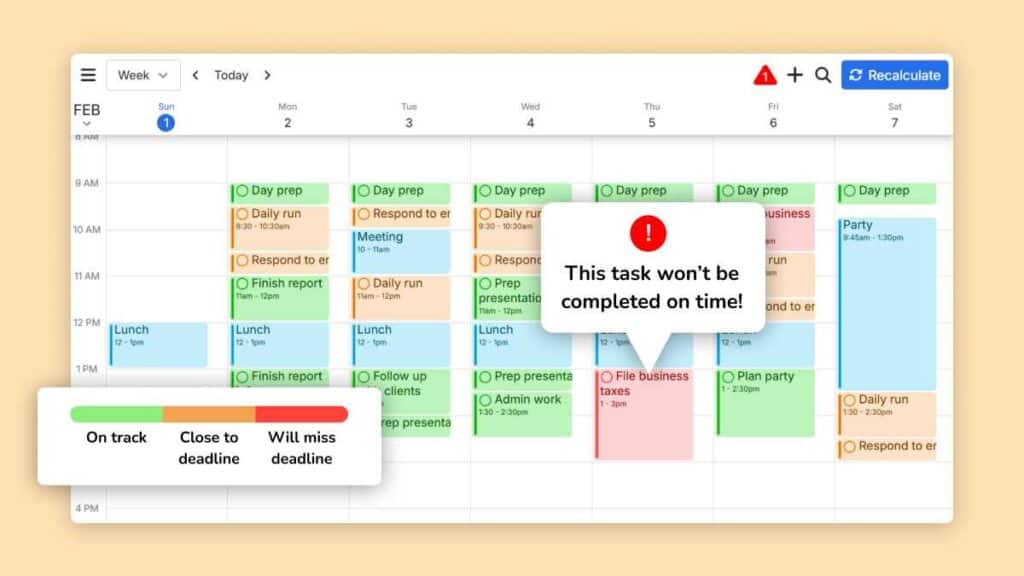
FlowSavvy color-codes tasks based on their proximity to their deadlines, providing a clear visual representation of how the week will play out. This feature helps you quickly assess your schedule and identify potential conflicts or overcommitments.
The color-coding system helps busy individuals understand their overall capacity and avoid overloading their schedules. When you see a lot of red or orange on your calendar, it’s a clear indicator that you need to reassess and possibly cut back on commitments.
Low Learning Curve Means You Start Benefiting Immediately
Busy people don’t have time to learn a complicated planner. FlowSavvy helps you jump right into the power of auto-scheduling without the steep learning curve typical of other auto-schedulers.
We’ve spent hundreds of hours interviewing people, watching them set up the app for the first time, and testing features, all to create interfaces that feel natural the first time you use them.
Your Repeating Tasks Get Auto-Scheduled Too
Building habits and routines is crucial for achieving long-term goals, but finding consistent time for these activities can be challenging, especially when you have so many priorities pulling you in different directions.
FlowSavvy ensures those repeating tasks are consistently integrated into your schedule amongst your other priorities, helping you develop and maintain productive habits. Whether it’s daily exercise, weekly meetings, or monthly reports, FlowSavvy finds the optimal time slots for your repeating tasks.
Your Work-Life Boundaries Are Automatically Protected
Different aspects of life often require tasks to be completed during specific hours. FlowSavvy supports multiple “Scheduling Hours” profiles, such as work hours, personal hours, and more.
For example, here are what my Work hours look like 👇. I don’t want any tasks scheduled on Sunday, and then Mon-Fri are all 9am-5pm.
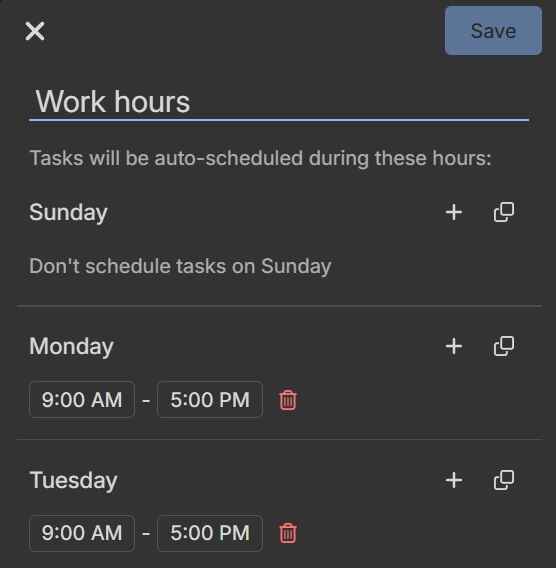
By setting distinct scheduling profiles, you can protect your work-life boundaries, ensuring that work tasks are confined to designated hours and personal time is safeguarded. This helps prevent burnout, reduces stress, and ensures you have dedicated time to relax and recharge, ultimately leading to a healthier and more balanced lifestyle.
Dump Tasks Into The Inbox. Process Them Later
Tasks and ideas pop into your head unexpectedly, and it’s essential to capture them quickly when you have a lot of things going on so you don’t forget. However, sometimes you just want to capture the idea and come back later to process it.
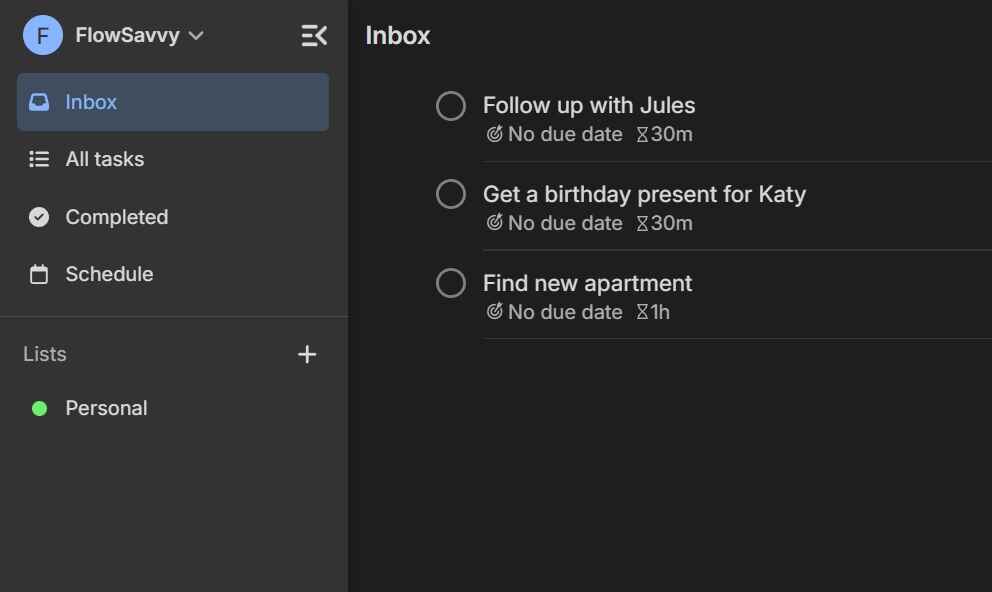
FlowSavvy’s quick-capture inbox provides a convenient way to jot down tasks on the fly. When you have more time, you can add necessary details like due date and duration, and FlowSavvy will seamlessly auto-schedule the task into your calendar.
Who FlowSavvy is Best for (and who it’s not)
FlowSavvy is built for busy solo professionals, not teams. If you’re looking for an auto-scheduler that isn’t bloated with team features, FlowSavvy is the right auto-scheduler for you.
FlowSavvy does integrate with Google Calendar, Outlook, and iCloud, so you can still collaborate with your teammates there. However, if you need other team collaboration features like task assignees, shared projects, and central billing, check out our AI Scheduling Assistants guide, which includes some great options for teams!
FAQs About FlowSavvy and Auto-Scheduling
Will FlowSavvy just make me more busy with another tool to manage?
No. Traditional to-do list apps and calendars can give a false sense of productivity since you can spend all day organizing tasks, but with FlowSavvy, as soon as you put in your first task, it gets assigned a time in your calendar. FlowSavvy is designed to get things off your to-do list, not just store a backlog of tasks that keeps piling up.
How does FlowSavvy know which tasks can be moved and which can’t?
Tasks have an “Auto-Schedule” toggle so you can decide whether tasks should be auto-scheduled or not. FlowSavvy will also never move your events.
Is FlowSavvy free?
FlowSavvy has a free version with basic auto-scheduling features, and you can upgrade to Pro to unlock more powerful auto-scheduling features. Check out our pricing page for more info.
Does FlowSavvy have integrations?
Yes, FlowSavvy features a 2-way sync with Google Calendar, Outlook Calendar, and iCloud Calendar. It also integrates with the task apps Todoist, Apple Reminders, Microsoft To Do, and Google Tasks, and connects to thousands of other apps through Zapier.
How can I know it will work for me?
FlowSavvy has already helped thousands of people automate their scheduling. If you’ve tried time blocking but are tired of moving things around manually, FlowSavvy will feel like a breath of fresh air.
Is Auto-Scheduling really better than scheduling it myself?
If you have a busy schedule with lots of tasks to manage every day, yes, auto-scheduling will bring life-changing time savings and stress relief. If you have a light schedule with just 1 or 2 tasks every day, manual time blocking in the calendar app you’re already familiar with might be the better choice for you.
Check out our comparison of Automatic Scheduling vs Manual Planning for a more in-depth comparison.
How is FlowSavvy different than other auto-schedulers?
FlowSavvy’s key differentiators are the following:
- Built for individuals: FlowSavvy is built for individuals whereas most other auto-schedulers are bloated with team features.
- Easy to use: Auto-scheduling apps are notorious for being complex. FlowSavvy is designed to be intuitive like a regular calendar.
- Fully featured mobile apps: FlowSavvy is the only auto-scheduler on the market today with full feature parity across its web, iOS, and Android apps. Other auto-schedulers offer limited companion apps for iOS and Android.
Final Thoughts
Busy people use FlowSavvy to automatically schedule their tasks so they can work with less stress, knowing nothing will fall through the cracks. If you have a lot of tasks to manage in multiple areas of life, give FlowSavvy a try today!